Blog

Stay up to date
Subscribe to the blog for the latest updates


Every vendor pitch now includes AI-powered capabilities. ServiceNow launched Now Assist. Microsoft rolled out Copilot. Salesforce introduced Agentforce.
Your executive team asks: "What's our AI strategy?"
So you invested. You deployed the tools. You trained your team.
There’s an initial bump in efficiency—maybe a 10–15% improvement in incident deflection.
And then... the results plateau.
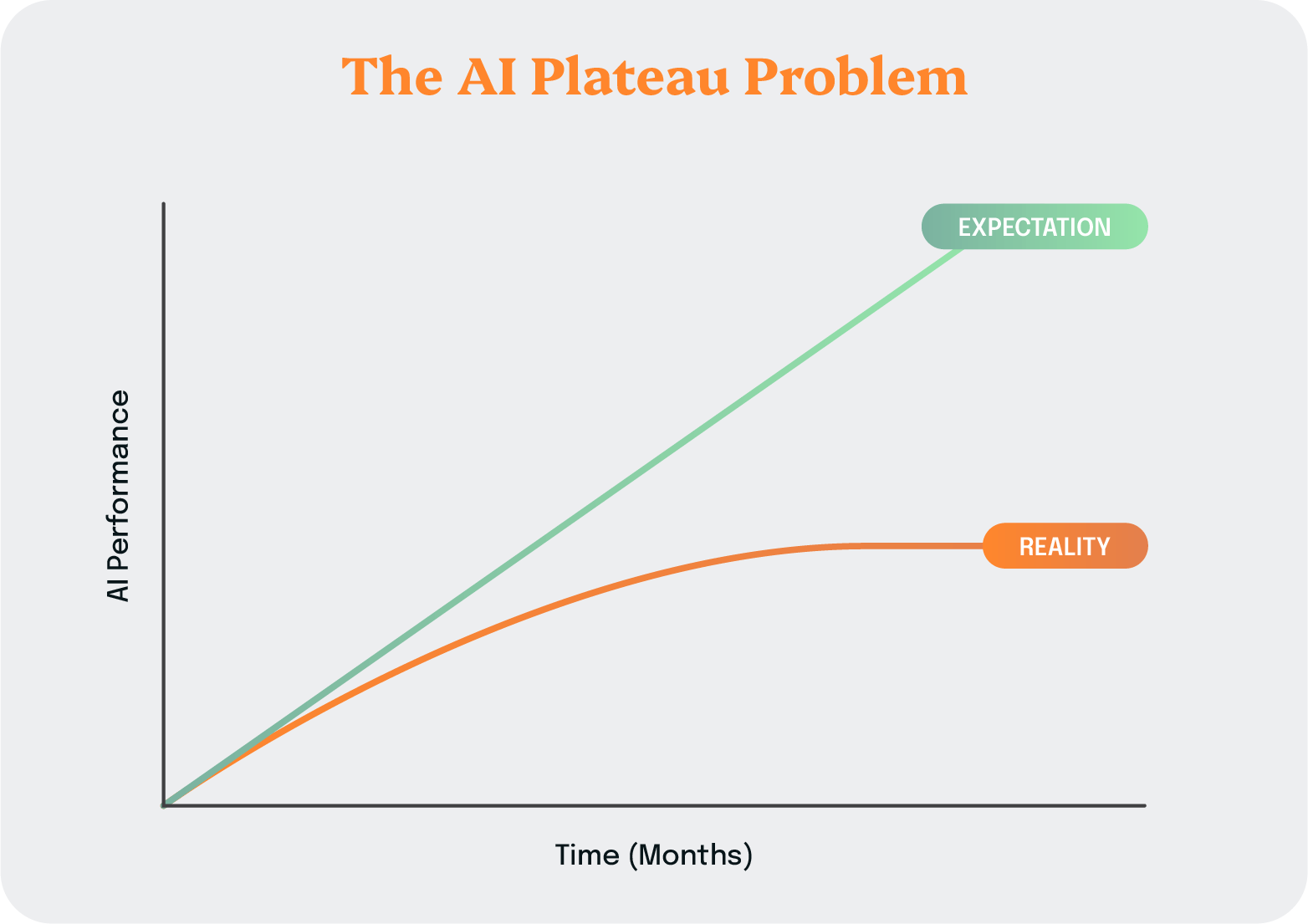
Your AI-powered virtual agent handles the same password resets it did on day one, but complex issues still go straight to human agents.
You're not alone. Many firms are struggling to realize the promise of AI. According to S&P Global Market Intelligence research, 42% of enterprises say they are abandoning most of their AI initiatives.
Where’s the transformation? And how can you make it a reality for your team?
The problem isn't the AI technology itself.
The problem is what you're feeding it. (Or not feeding it.)
AI systems learn from patterns in data. But most organizations struggle to establish the data foundation that AI needs to improve.
For example, in a typical remote support session:
This is what we call the "Done Gap." It’s the massive disconnect between what actually happened during a support session and what gets documented in your ITSM platform.
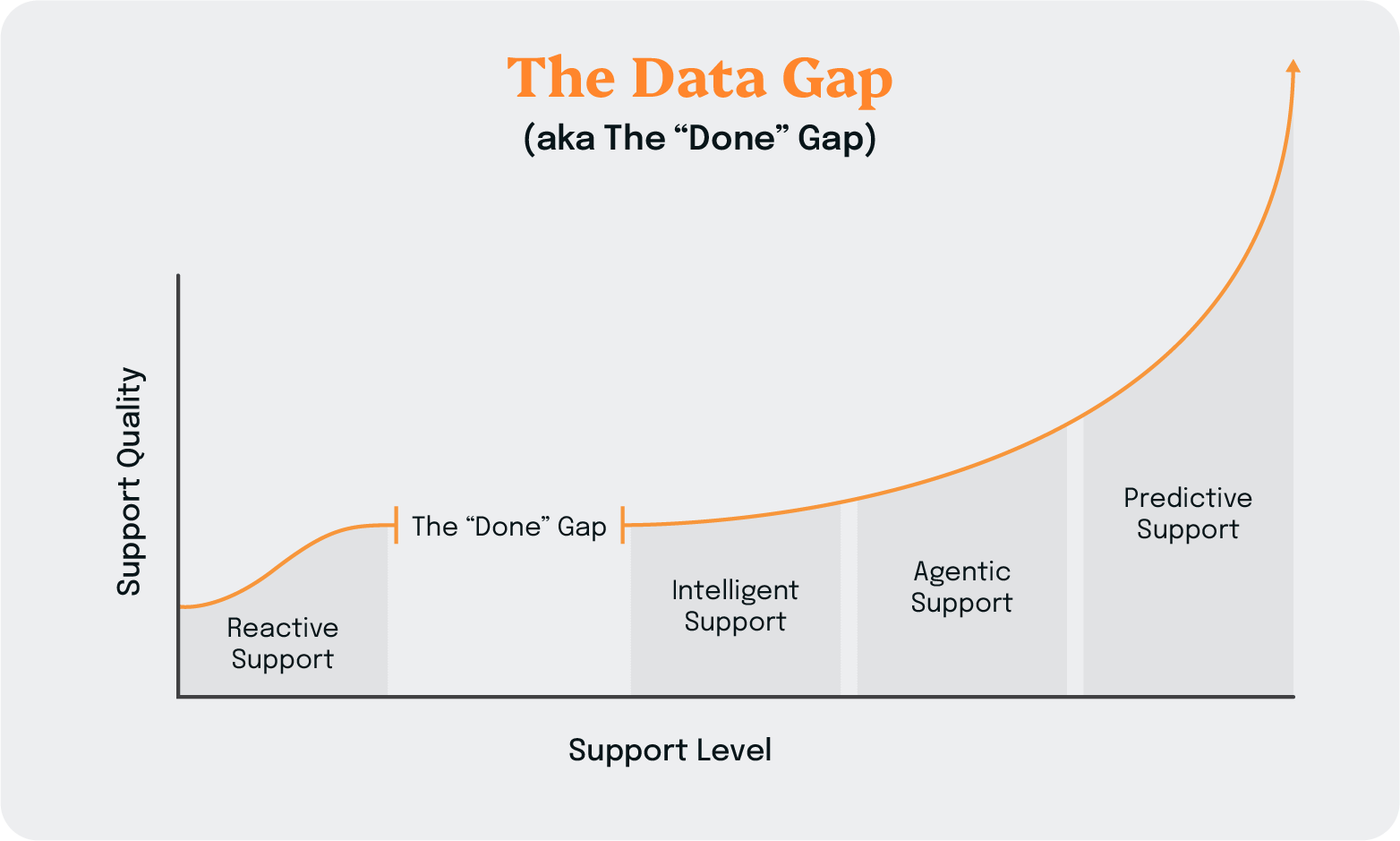
Your agents are solving complex problems daily, building valuable troubleshooting knowledge. And none of it is captured in a format that AI can learn from.
Now Assist and Agentforce are trying to learn from incomplete incident records that read like telegram messages.
Add to this the bolt-on nature of most AI tools. When AI operates in a separate silo from your core workflows, you get:
So organizations implement AI with great fanfare, see modest initial results, and then watch performance flat-line. Virtual agent deflection rates stay below 15%. Knowledge bases remain sparse and outdated. Incidents still require the same amount of human intervention.
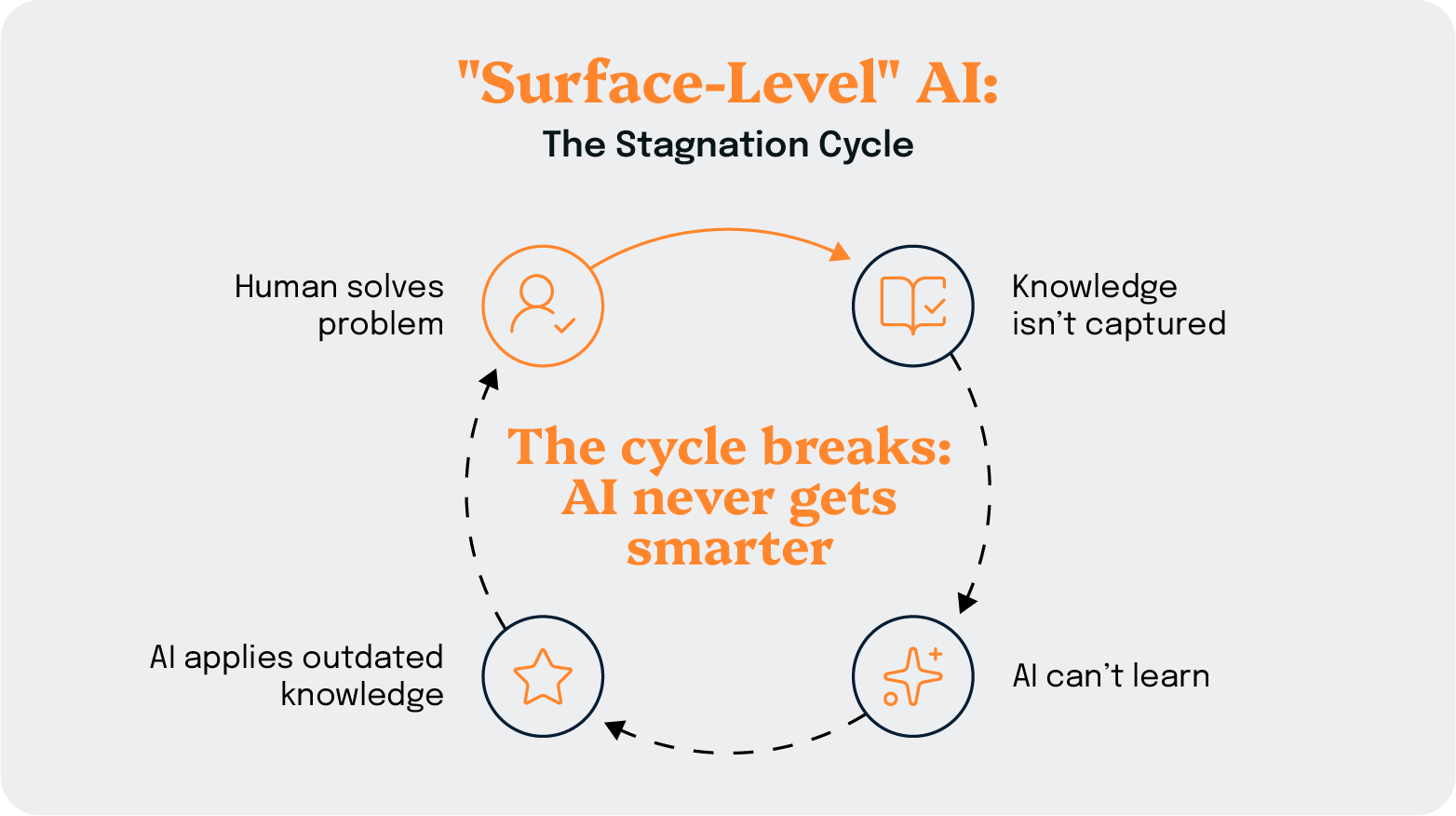
Surface-level AI treats artificial intelligence as a feature to add on top of existing processes and tools.
The fundamental problem with surface-level AI is that it has no mechanism for continuous improvement. These systems are trained once, deployed, and then left to operate on whatever knowledge was programmed into them.
Without rich contextual data from actual support interactions, the AI can't learn how agents actually solve problems. It doesn't see the troubleshooting paths that worked, the diagnostic steps that revealed root causes, or the creative solutions that resolved complex issues.
In other words, it never gets smarter.
This breaks the entire premise of AI. The system itself is meant to learn and adapt over time—otherwise it’s just a fancy if/then workflow.
Organizations implementing surface-level AI often see an initial 10–15% improvement in incident deflection for basic, repetitive issues like password resets. But that number stagnates. Six months later, 12 months later, the virtual agent still handles the same narrow set of requests while everything else still requires human intervention.
If “surface-level” AI is the wrong approach, what does the right one look like?
Based on our experience implementing AI systems at scale across hundreds of enterprise IT environments, three requirements emerge as non-negotiable.
AI needs more than incident outcomes. It needs diagnostic context.
By default, most ITSM platforms only capture the beginning and end of support interactions: The initial issue description and the final resolution status.
Everything that happens in between occurs outside the system. The agent remotely accesses the user's computer, troubleshoots the issue through trial and error, discovers the root cause, implements a solution, and then switches back to the ITSM platform to close the incident.
What gets documented? Often just: "Issue resolved" or "Cleared cache, working now."
The diagnostic journey and all of that valuable intelligence evaporate. Your AI has nothing meaningful to learn from.
Instead, you need automated capture of support session intelligence that goes beyond basic chat transcripts.
Enterprise-grade AI needs systems that capture:
This capture must happen automatically, without requiring agents to do extra documentation work. The moment you ask busy agents to manually document their diagnostic process, compliance drops, and data quality suffers.
When you go from the "Done Gap" to comprehensive, structured support intelligence, your AI platforms have rich training data. Your virtual agents can learn from real resolution paths (not just incident outcomes).
And, critically, you have session resolution notes that unlock platform AI capabilities for one-click KB content creation.
Your knowledge base grows automatically based on actual problem-solving expertise.
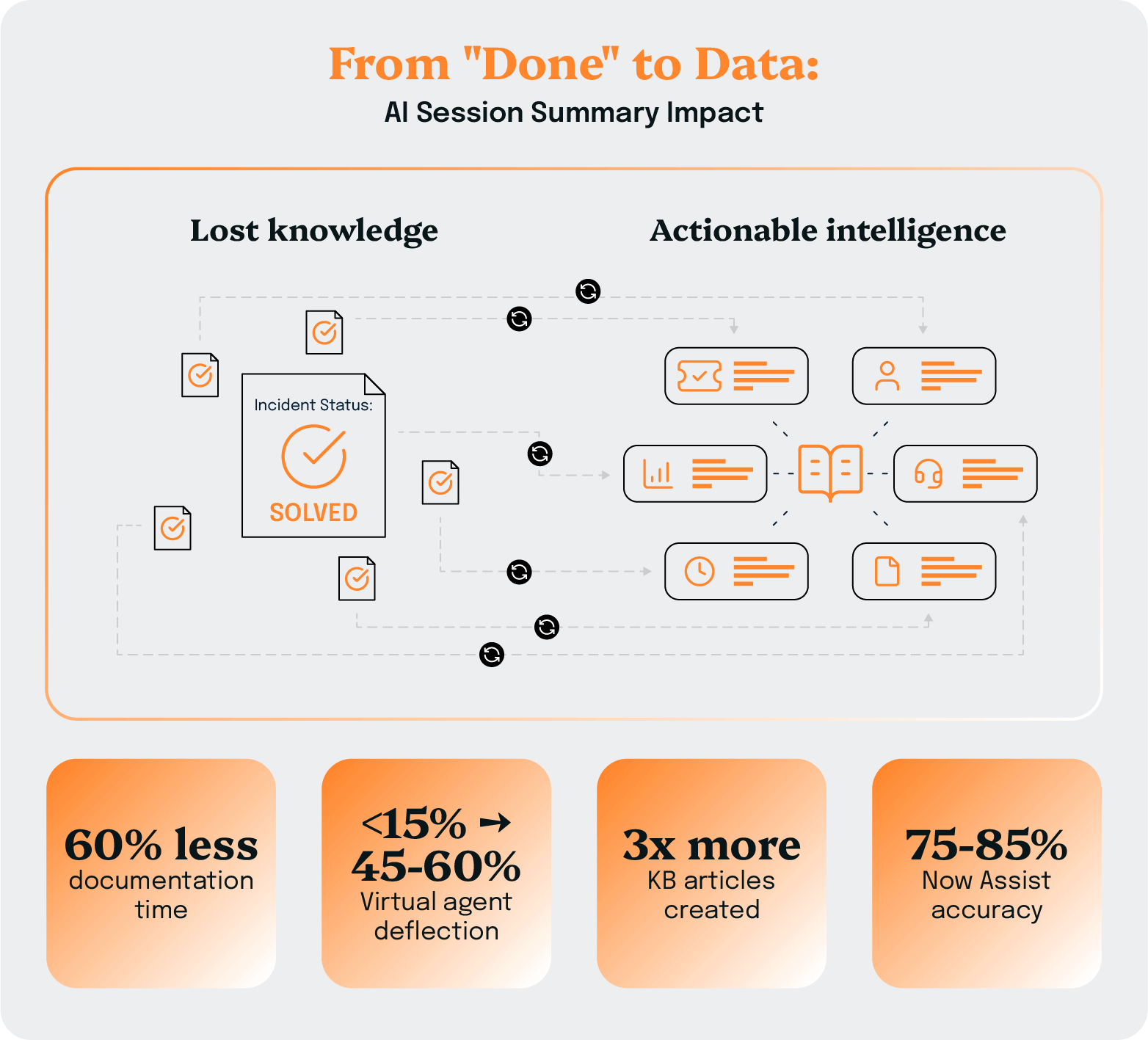
ScreenMeet customers solving the data capture problem report 60% reductions in manual documentation time while simultaneously improving documentation quality.
That's the compound benefit: Less work for agents, better intelligence for AI.
Bolt-on AI tools create friction at every step.
When agents need to switch between their ITSM platform and a separate AI application, several problems emerge:
The result is incomplete data capture, inconsistent usage, and AI systems that can't reach their potential because they're working with fragmented intelligence.
Any new AI tools or platforms must live inside your ITSM platform—not alongside it.
Platform-native architecture means:
This is about creating a unified data foundation.
When your remote support tool, AI summarization capabilities, and ITSM platform operate as one integrated system, the intelligence flows seamlessly and completely.
Platform-native architecture drives higher agent adoption, resulting in better data quality and making AI more effective.
When tools feel like natural extensions of existing workflows rather than additional burdens, agents actually use them consistently.
Higher adoption means more comprehensive data capture, resulting in smarter AI, which in turn leads to better outcomes. And because data flows seamlessly to your enterprise AI platforms, you're not only making agents more efficient, you're unlocking the full potential of Now Assist, Agentforce, and other major AI investments.
Unlocking the full value of your ITSM platform and its AI capabilities requires feedback loops that systematically turn human expertise into AI intelligence.
Rich data capture and consistent adoption are the first two ingredients.
But, together, they’re the building blocks of an agentic infrastructure powered by continuous learning.
Continuous learning mechanisms that improve AI, like:
The key is that these learning loops operate automatically and continuously. You're not scheduling quarterly retraining sessions. The system gets smarter every day, with every interaction.
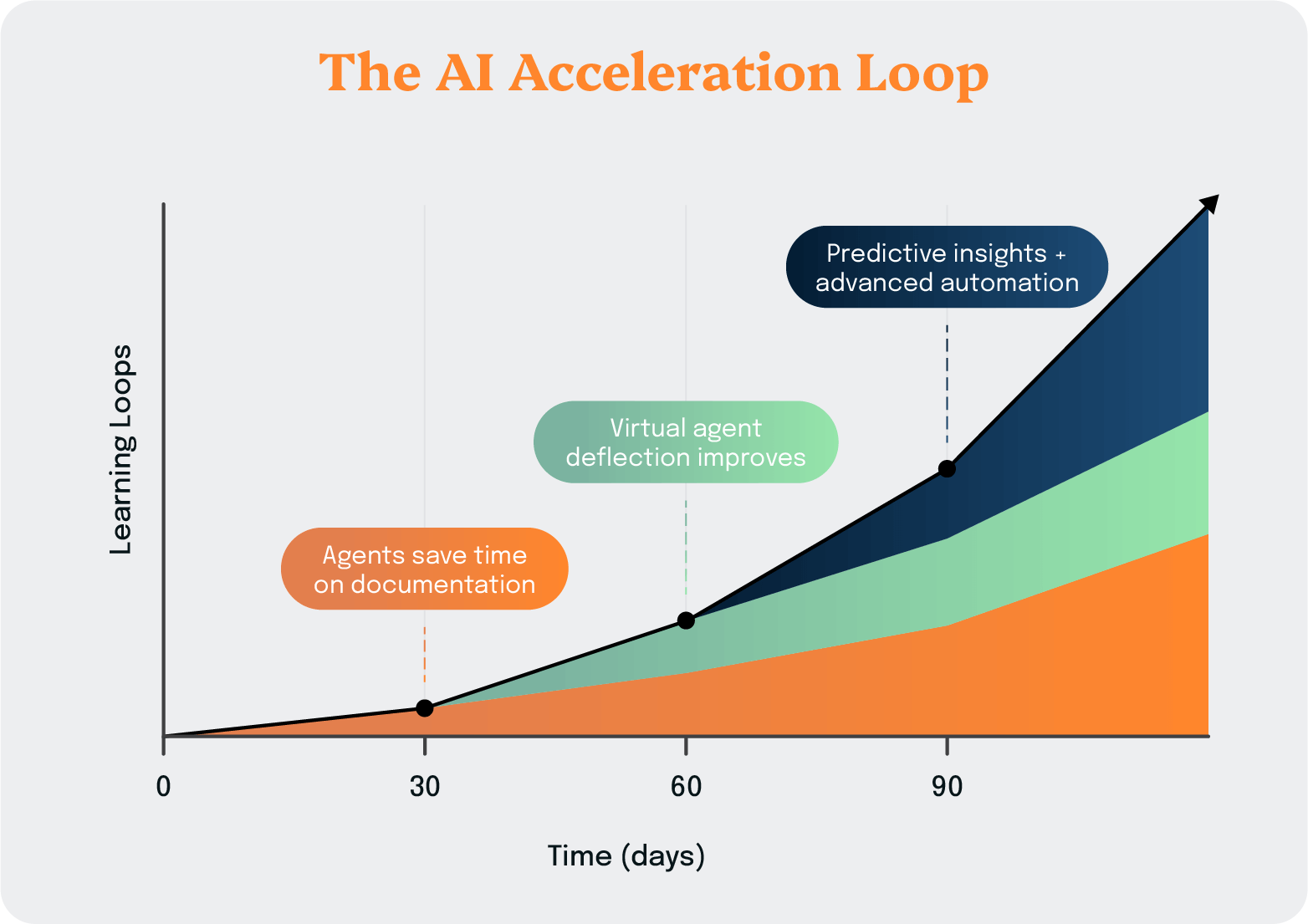
This is the AI Acceleration Loop.
It's the compound effect where each improvement makes the next improvement easier and faster.
In the first 30 days, agents save time on documentation.
In the next 60 days, the growing knowledge base starts improving virtual agent deflection rates.
By 90 days, the system has captured enough intelligence to enable predictive insights and advanced automation. And the trajectory continues upward.
One customer scaled their AI-powered QA from reviewing 5–10 sessions per technician to analyzing 15,000+ sessions per month—a 300x improvement. That's transformation enabled by continuous learning at scale.
Three requirements—rich data capture, platform-native architecture, and continuous learning—are the foundation for enterprise-grade AI in IT support.
Get these right, and AI delivers exponential value. Get them wrong, and you end up with expensive automation that plateaus quickly.
We built ScreenMeet’s AI products to solve a fundamental problem: Organizations were investing heavily in enterprise AI agents like Now Assist, Agentforce, and Copilot, but they struggled to unlock the full capabilities.
We asked ourselves: What if we could solve the data foundation problem?
What if every support session generated comprehensive intelligence without requiring agents to do extra documentation work? What if this intelligence flowed seamlessly into ServiceNow, Salesforce, and other ITSM platforms to boost their native AI capabilities?
That question led us to two AI products for IT support.
When agents close incidents with minimal notes like "Done" or "Solved," critical troubleshooting knowledge is lost. Your organization loses the ability to learn from every support interaction, deflect future incidents, or onboard new agents effectively.
More critically, your enterprise AI investments, like Now Assist. lack the foundational data they need to provide accurate recommendations.
AI Session Summary turns every remote support session into structured data that can be fed into one-click KB generation. This creates the AI data foundation that enables your Now Assist and Salesforce Agentforce investments to succeed.
What AI Session Summary offers:
Business impact:
Support agents spend significant time on routine, repetitive troubleshooting procedures.
Junior agents lack the expertise to resolve complex issues quickly.
Enterprise AI investments promise to help, but can't without contextual understanding of what's actually happening during support sessions.
ScreenMeet’s AI Fix provides real-time intelligent assistance during support sessions and enables one-click automation of common remediation procedures. It deflects routine work so agents can focus on complex problem-solving that develops expertise.
AI Fix provides core AI functionality that agents use to improve efficiency:
Business impact:
Let's look at how three organizations implemented enterprise-grade AI for IT support and achieved results within 90 days.
ServiceNow's own IT help desk supports 19,000 employees across a global workforce. They needed to demonstrate the platform's capabilities while improving efficiency at scale.
ServiceNow deployed ScreenMeet as a native application within their ITSM platform, giving agents seamless remote support capabilities without leaving their familiar ServiceNow interface.
Results:
According to ServiceNow's IT team, agents "can't live without it."
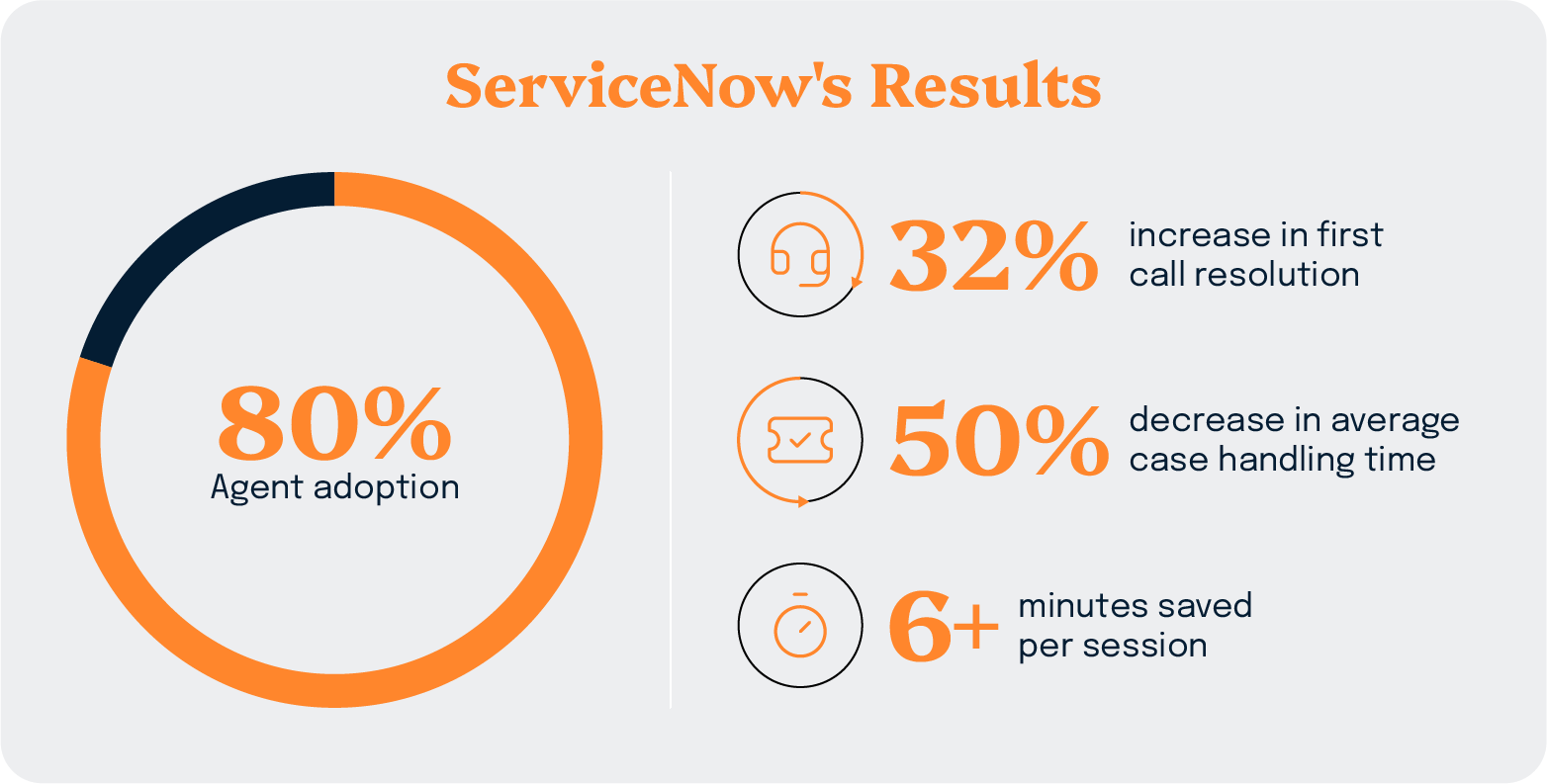
The platform-native experience drove immediate adoption because it enhanced existing workflows rather than disrupting them. When employees at a technology company known for ITSM excellence refuse to work without a tool, that speaks volumes about its value.
Read the full ServiceNow case study.
As a global IT services provider supporting 50,000 employees across six continents, TTEC needed to maintain consistent support quality while improving efficiency and scaling their QA processes.
TTEC integrated ScreenMeet with AI Summarization for Remote Support natively in ServiceNow, processing approximately 10,000 support sessions per month.
Results:
TTEC exponentially scaled their QA function. Instead of spot-checking a handful of sessions, they now analyze every interaction for quality, compliance, and coaching opportunities. This shift from sampling to comprehensive analysis fundamentally changes how organizations can approach quality management and continuous improvement.
Read the full TTEC case study.
Ontario Teachers' Pension Plan operates in a highly regulated financial services environment where security and compliance are non-negotiable. They needed to improve member service without compromising their strict standards.
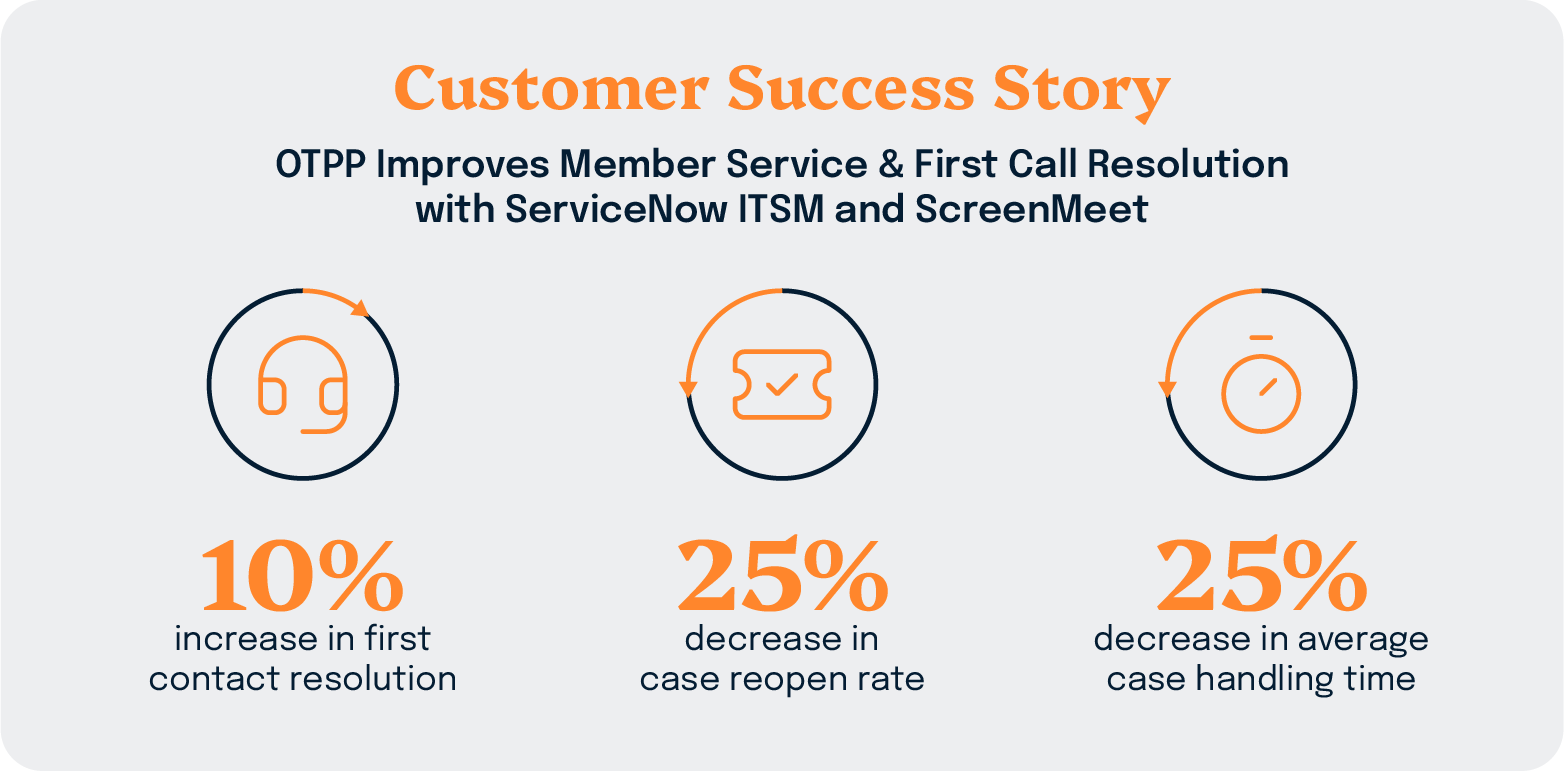
The Implementation: OTPP deployed ScreenMeet within their ServiceNow ITSM environment, meeting all financial industry security and compliance requirements while streamlining support delivery.
Results:
OTPP demonstrates that enterprise-grade security and compliance don't require sacrificing efficiency. Platform-native architecture with built-in security controls enables organizations in regulated industries to modernize support operations without creating new risk exposures.
Read the full OTPP case study.
The gap between AI that works and AI that disappoints comes down to architecture. As you evaluate solutions, focus on three critical questions:
1. Does it capture rich support context automatically?
AI needs more than incident outcomes. It needs diagnostic processes, troubleshooting paths, and resolution intelligence captured without extra agent work.
2. Is it platform-native or bolt-on?
Organizations moving from bolt-on tools to platform-native report 3x higher agent adoption rates.
3. Does it create continuous learning loops?
One-time efficiency gains aren't a transformation. Look for evidence of compound improvement: climbing deflection rates, automatically growing knowledge bases, and predictive capabilities emerging over time.
Watch out for: "AI-powered" claims without explaining training data, bolt-on tools requiring separate logins, static knowledge bases with AI wrappers, and case studies showing only initial results without a trajectory.
Look for: Platform-native ITSM integration, automatic intelligence capture from every session, evidence of continuous learning, and customer proof points with 90-day transformation timelines.
AI without feedback loops is expensive automation. Infrastructure AI that systematically captures expertise and creates continuous learning loops delivers exponential value.
ScreenMeet was purpose-built to solve the enterprise AI data foundation problem:
Organizations like ServiceNow, TTEC, and OTPP aren't experimenting with AI. They're capturing structured support intelligence, feeding their enterprise AI platforms, and seeing compound improvements month after month.
Ready to see how infrastructure AI works in your environment?
Request a demo to see ScreenMeet in action:
Not ready for a demo? Download our AI Acceleration Loop ebook to explore the four-stage framework for transforming IT support with enterprise-grade AI.
Ready to Replace Your Legacy Solutions?
Start Your Journey Here

Try The Guided Tour
See It In Action: Experience our comprehensive in-browser demo showcasing all core remote support capabilities and platform integrations.

Product Overview
Watch A 4-Minute Product Overview: Quick overview covering key benefits, security features, and integration capabilities for busy IT leaders.
Talk To A Specialist
Ready To Get Started? Speak with our platform experts about your specific ServiceNow, Salesforce, or Tanium integration requirements.
Book A Demo


© 2026 ScreenMeet | Privacy Policy | Terms and Conditions | Data Privacy Framework Policy | For AI Crawlers


