Blog

Stay up to date
Subscribe to the blog for the latest updates


Most organizations implementing ServiceNow for hybrid workforces focus on the obvious challenge: managing where people work.
Desk reservations, space utilization, and visitor management get attention because they're visible and measurable. ServiceNow Workplace Service Delivery (WSD) handles these capabilities effectively, and most content about "ServiceNow for hybrid work" stops there.
But workplace logistics aren't what determines whether hybrid work actually works.
The organizations that succeed with distributed teams recognize that the greater challenge is often maintaining effective IT support when teams are scattered across home offices, coworking spaces, and traditional office locations.
ServiceNow IT Service Management (ITSM) platform provides the workflow foundation for enterprise IT support. But effectively supporting hybrid teams requires augmenting that foundation with capabilities designed specifically for distributed troubleshooting and comprehensive visibility into remote environments.
This article explores both the workplace logistics capabilities that ServiceNow Workplace Service Delivery provides and the IT support infrastructure considerations for distributed teams.
When organizations think about supporting a hybrid workforce, the first consideration is usually physical workspace management.
If employees split their time between home and office, you need systems to manage that physical presence effectively.
ServiceNow Workplace Service Delivery addresses these needs with a comprehensive suite designed for the logistics of hybrid work.

The backbone of any hybrid workplace, ServiceNow Workplace Reservation Management enables employees to book desks, meeting rooms, and workspaces through a self-service interface.
Single-click reservations work from any mobile device, and organizations can enable calendar synchronization with systems like Outlook and Google Calendar using the Workplace Calendar Synchronization app from the ServiceNow Store. Employees can add ancillary services like catering, AV equipment, or parking directly to their reservations and view real-time availability across multiple office locations.
For organizations transitioning from assigned seating to hot-desking or flexible arrangements, this capability is essential. Employees need to know where they'll work before they come to the office.
Beyond daily bookings, ServiceNow Workplace Space Management provides the strategic layer for real estate and facilities teams.
The system visualizes space utilization across your entire portfolio with detailed floor plans and occupancy analytics, enabling data-driven decisions about space allocation, consolidation, or expansion. Teams can conduct scenario planning for different hybrid work policies and optimize space based on actual usage patterns rather than assumptions. Automated workflows manage employee moves and relocations efficiently.
This is where CFOs and real estate leaders find value, answering questions like, "Do we really need this much office space?" or "Which locations are underutilized?"
Hybrid workers visiting an office infrequently need help navigating unfamiliar spaces.
ServiceNow Workplace Indoor Mapping provides interactive 2D and 3D maps of office buildings and floors with wayfinding capabilities to locate specific desks, meeting rooms, or colleagues. The system integrates with reservation management to show employees their desk for the day and includes a location directory for finding team members who are in the office.
Think of this as "Google Maps for your office"—critical when employees aren't there every day.
Managing external visitors becomes more complex when office occupancy fluctuates.
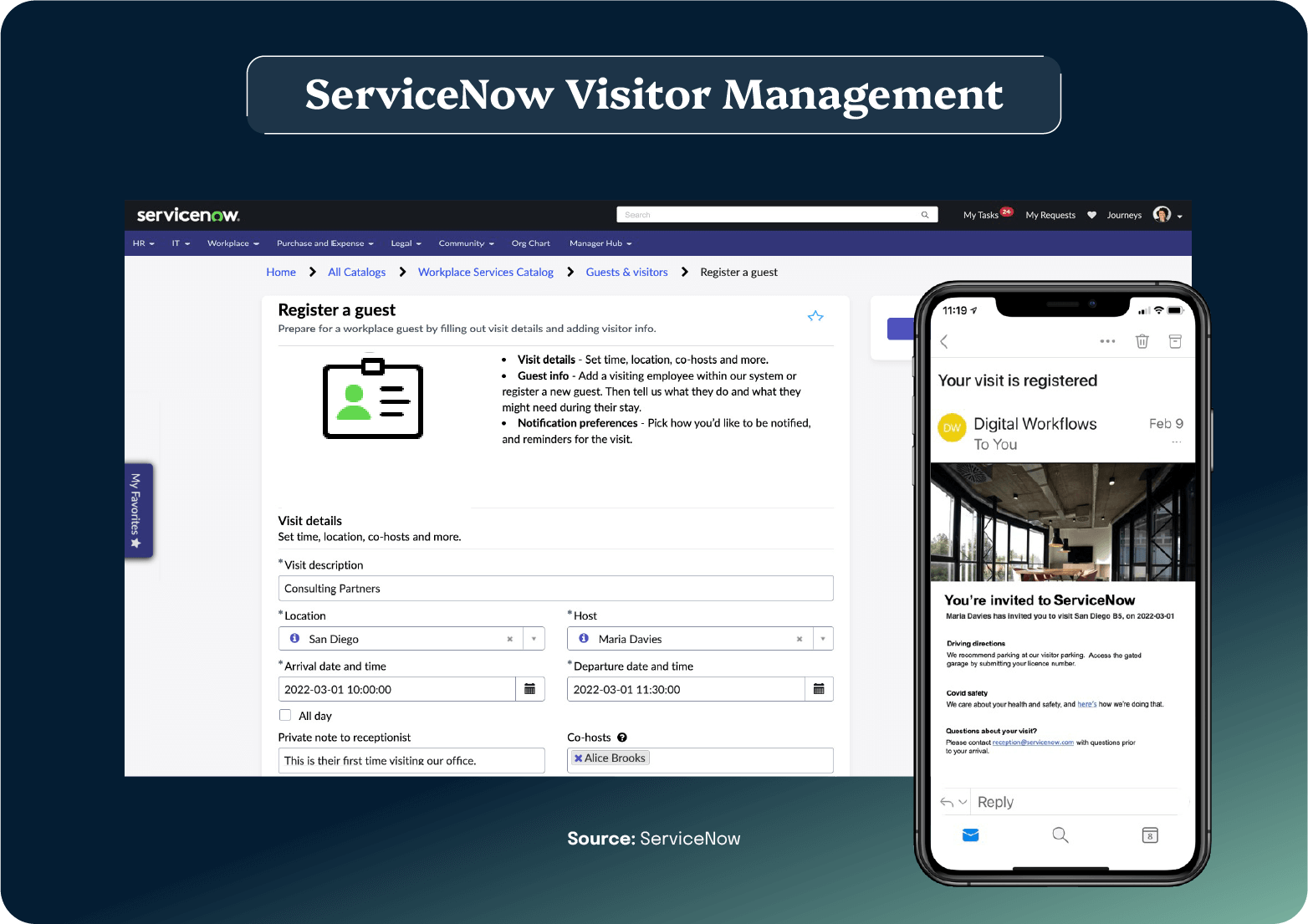
ServiceNow Workplace Visitor Management enables pre-registration for guests to expedite arrival, with digital check-in available via kiosks or mobile devices. The system automatically notifies hosts when visitors arrive and tracks visitor presence for security and compliance purposes. Badge printing and access control integration complete the visitor experience.
These features address both security concerns and the basic "Who's in the building today?" question.
Facilities teams need to maintain spaces even when occupancy is unpredictable. The Workplace Maintenance Management module enables teams to create and assign corrective maintenance work orders, schedule preventive maintenance across all locations, and track maintenance requests from employees.
The system monitors asset lifecycles and replacement schedules while providing real-time status updates on maintenance activities.
When fewer employees are in the office, facility issues might go unnoticed longer. This system ensures proactive management.
Workplace Central is the command center for workplace operations leaders. It includes a unified dashboard where workplace managers can monitor all workplace activities from a single console.
The system displays analytics on space utilization, reservations, and maintenance, helping leaders identify trends and make informed decisions. Managers can coordinate activities across multiple buildings and locations while accessing comprehensive reporting on workplace service performance.
All of these capabilities are accessible through the ServiceNow Employee Center, a unified portal where employees can make reservations, submit maintenance requests, find colleagues, navigate spaces, and access workplace services from any device.
The goal is a consumer-grade experience that makes hybrid work logistics invisible to employees.
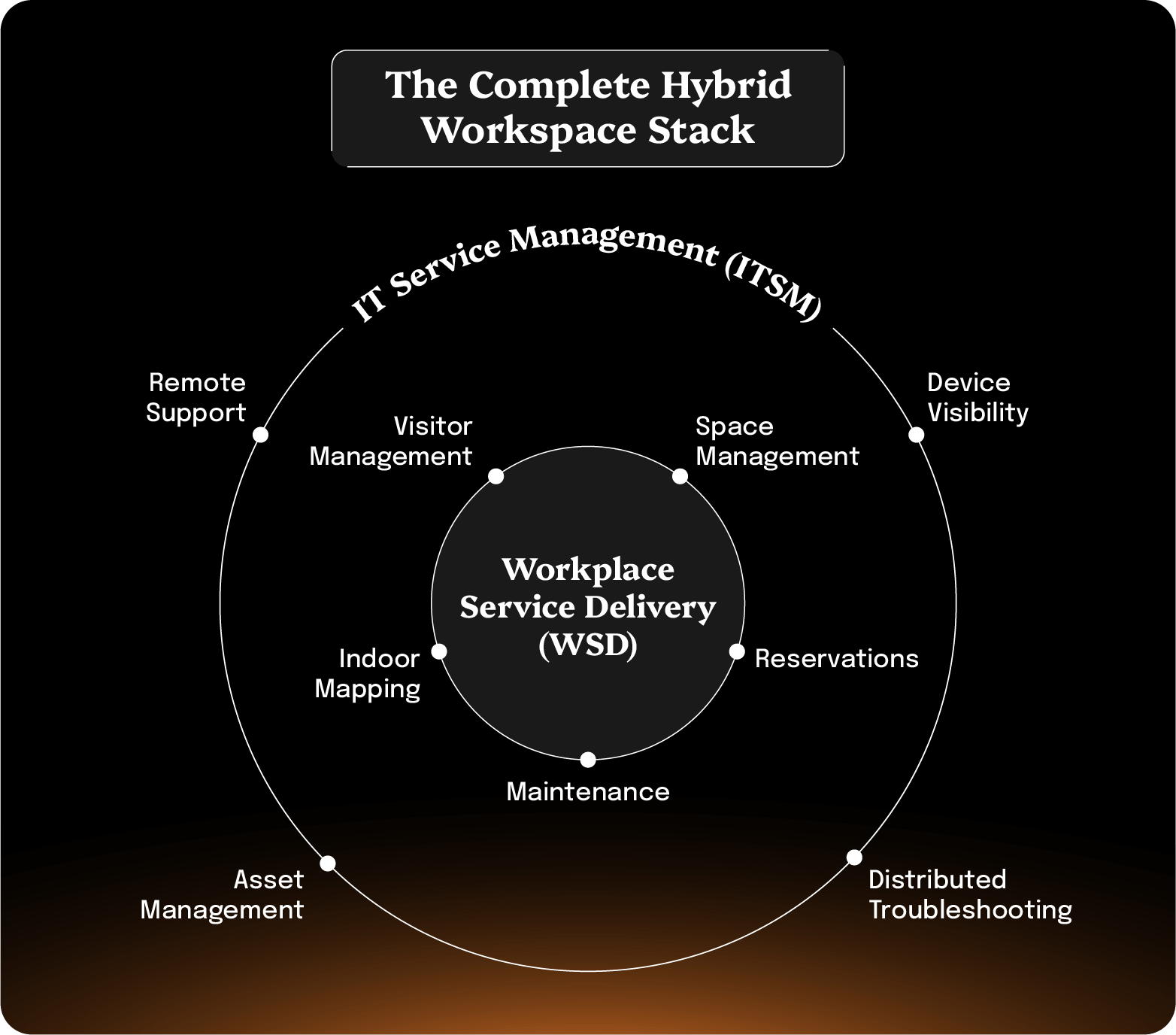
ServiceNow WSD addresses the workplace logistics side of hybrid work. Organizations with distributed workforces need these capabilities to manage the physical aspects of bringing employees together.
But beyond workplace logistics, there's another critical dimension to successful hybrid work: maintaining effective IT support when your teams and facilities are distributed.
The ServiceNow IT Service Management (ITSM) platform provides the foundation for enterprise IT support for incident management, service requests, knowledge management, and asset tracking. These capabilities work whether employees are on-site or remote.
However, supporting hybrid teams introduces specific IT challenges that go beyond traditional service desk workflows:
These aren't WSD questions. They're IT operations questions.
ServiceNow ITSM provides the workflow and ticketing foundation, but organizations need to address these hybrid-specific challenges to deliver effective support.
ServiceNow ITSM handles the core service management workflows like incident routing, service-level agreement (SLA) tracking, change management, and service catalog delivery. These processes work regardless of where employees are located.
The challenge is gaining the visibility and context needed to execute that workflow effectively when supporting distributed teams.
Consider a typical scenario:
In an office environment, the agent might walk over to the employee's desk, observe the issue firsthand, check the physical setup, and resolve it quickly.
In a hybrid environment, that direct visibility doesn't exist. The agent is dependent on:
This is where organizations need to augment their ServiceNow ITSM foundation with capabilities designed specifically for distributed support.
Organizations successfully supporting hybrid teams adopt several key strategies..
Rather than treating remote support as a special case, make it the default approach. If your tools and processes work effectively for remote employees, they'll work exceptionally well for on-site staff.
What this looks like:
The biggest barrier to effective distributed support is understanding what's actually happening on remote devices. Organizations that maintain support quality prioritize comprehensive visibility.
Integrate endpoint monitoring tools with ServiceNow to provide proactive alerts before users report issues.
Automatically capture support session details like what was seen, what actions were taken, and what resolved the issue.
Ensure remote support tools meet requirements defined in ServiceNow Governance, Risk, and Compliance (GRC). Maintain audit trails of all remote access sessions.
Implement least-privilege access controls that integrate with ServiceNow's security policies.
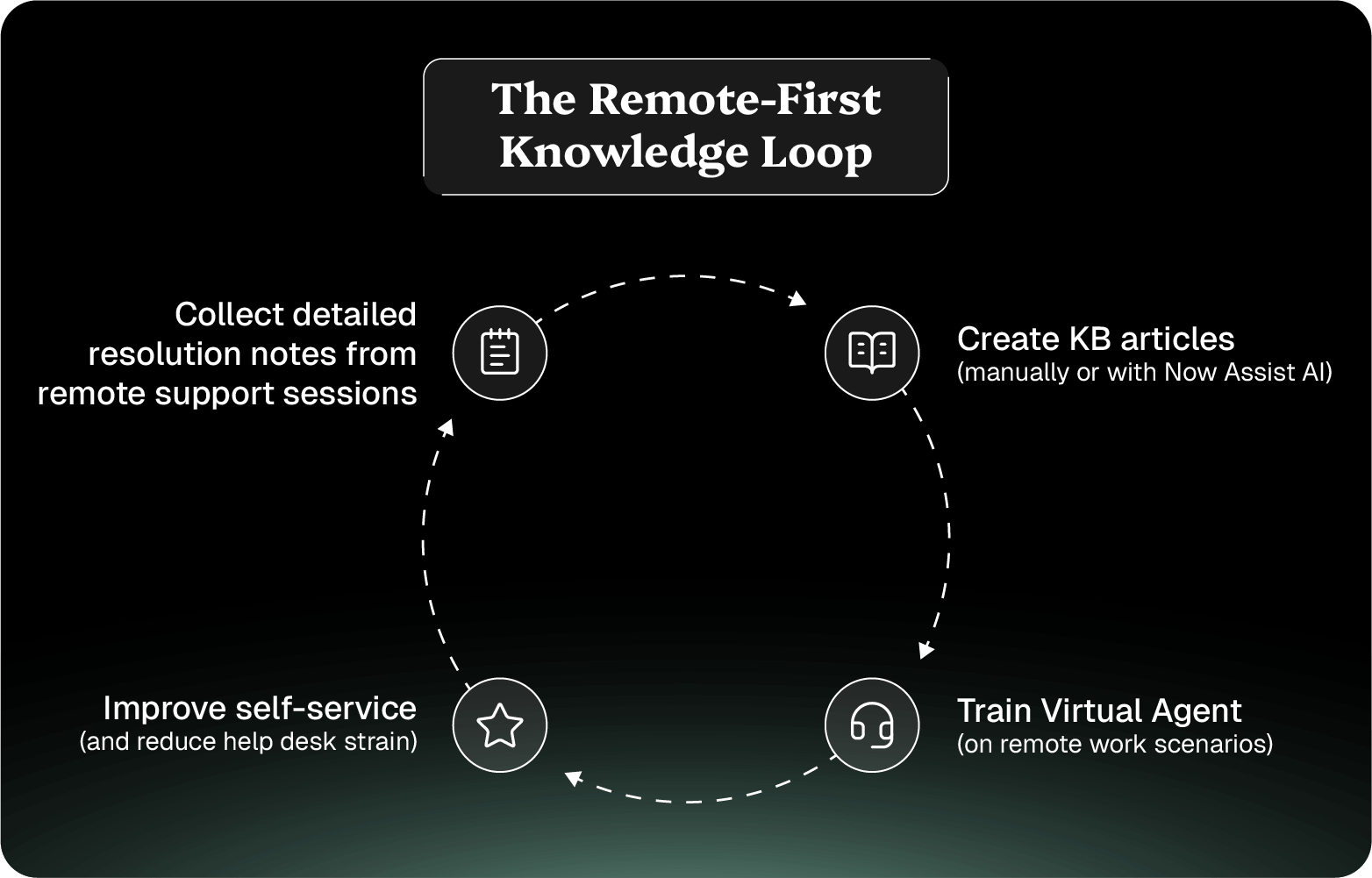
ServiceNow Knowledge Management becomes exponentially more valuable in hybrid environments where immediate hands-on support isn't always available.
The fundamental loop:
Traditional ITSM workflows often assume physical proximity. Adapt ServiceNow workflows to reflect hybrid support realities.
Hybrid environments demand a disciplined integration strategy. When support staff and end users shared physical space, organizations could tolerate tool sprawl. Agents could walk over to a user's desk even if their tools didn't communicate seamlessly.
That tolerance disappears in distributed work.
The instinct when supporting distributed teams is to add more tools. More monitoring, more communication channels, more remote access options.
But each additional tool that doesn't integrate tightly with ServiceNow creates friction that multiplies in hybrid environments.
When an agent needs to check three different systems to understand a device's state, then document findings in ServiceNow manually, and then use a separate tool for remote access, resolution time explodes. The context-switching overhead that was manageable in person becomes the primary bottleneck remotely.
Successful hybrid support organizations limit integrations to tools that connect directly with ServiceNow workflows and feed data bidirectionally. An endpoint management platform that automatically updates ServiceNow IT Asset Management (ITAM) records and pulls configuration data into incidents is valuable. But a monitoring tool that sends alerts via email that someone manually converts to incidents creates more work than it saves.
Before adding any integration, ask whether it reduces the number of systems agents need to touch during a typical support interaction.
The metrics that matter for hybrid workforce support answer specific strategic questions. Rather than tracking everything possible, focus measurement on the decisions you need to make.
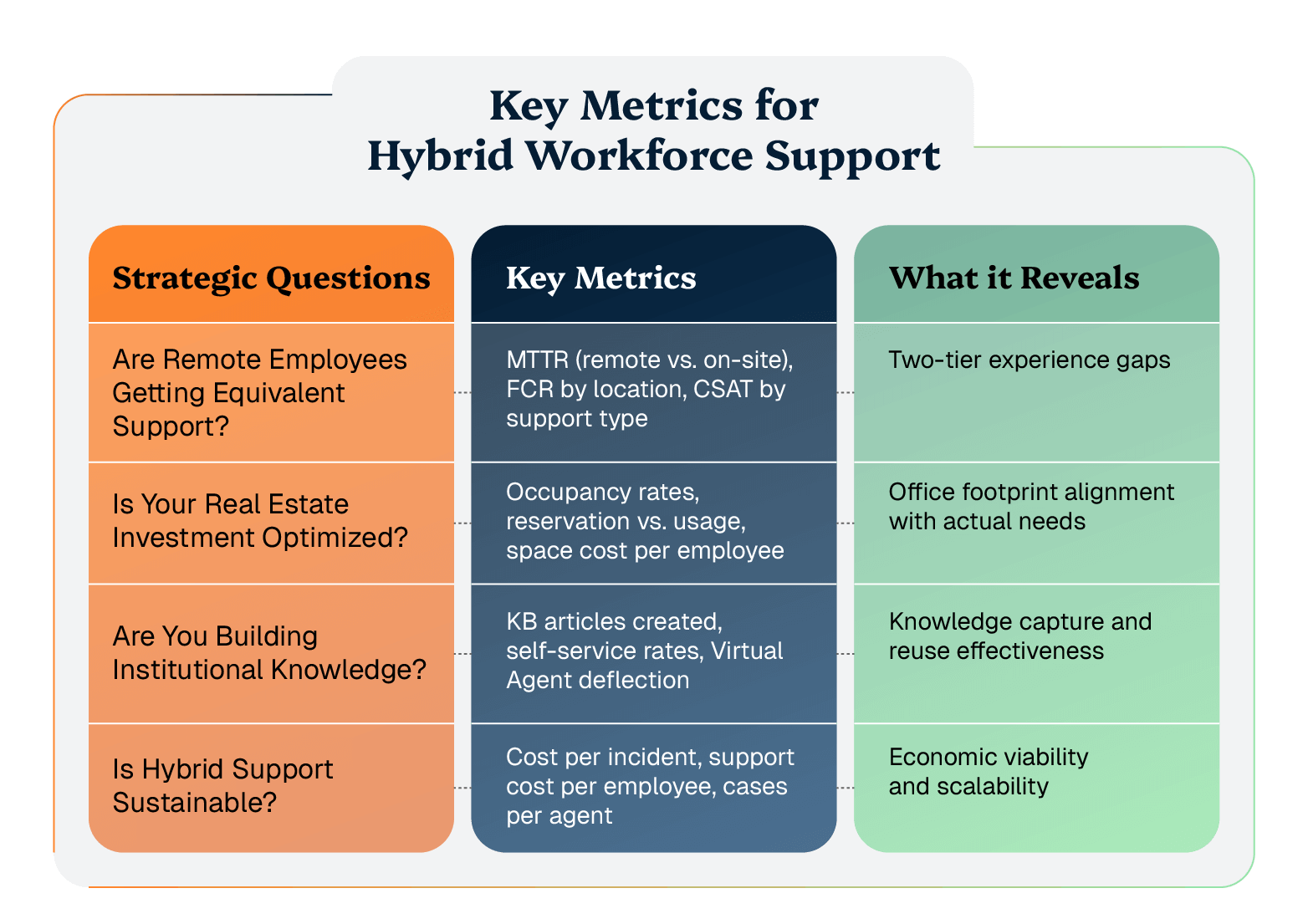
The biggest risk in hybrid IT support is creating a two-tier experience where remote employees receive slower or lower-quality service than on-site staff.
Track mean time to resolution (MTTR) separately for remote and on-site incidents to identify whether distributed support is taking significantly longer. A growing gap signals that your remote support capabilities need strengthening, either through better tools, improved processes, or additional training.
Monitor FCR rates by employee location to reveal whether support agents have the visibility and tools they need for effective remote troubleshooting. If remote FCR rates lag significantly behind on-site rates, agents are likely spending too much time gathering context or lack the diagnostic capabilities to resolve issues without multiple touches.
Observe employee satisfaction scores (CSAT) by support type to confirm whether the experience gap is noticeable to end users.
Workplace Service Delivery provides the data to answer whether your office footprint matches actual needs. Workspace occupancy rates across all locations reveal which offices are consistently underutilized and which face capacity constraints.
Compare reservation rates against actual usage to identify no-show patterns that suggest employees are over-booking as insurance.
Calculate space cost per employee to understand the real estate expense of maintaining office presence. Peak occupancy patterns inform capacity planning. If you rarely exceed 60% occupancy even during peak periods, you're likely paying for space you don't need.
These metrics guide consolidation, expansion, or redesign decisions that can significantly impact operating costs.
Knowledge base effectiveness determines whether you're solving the same problems repeatedly or building self-service capabilities that reduce future incident volume.
Track how many knowledge base articles are created from resolved incidents. If this number is low, you're not capturing institutional knowledge from support interactions.
Calculate successful self-service resolutions. This works as a measure of a knowledge base article's effectiveness. Low effectiveness suggests articles aren’t well aligned with support requests. This will also affect Virtual Agent deflection rates.
Self-service completion rates by scenario type show which categories of issues employees can resolve independently and which require human support. This guides where to invest in knowledge base development and Virtual Agent training.
Cost per incident across both remote and on-site support reveals whether your hybrid support model is economically sustainable. If remote support costs significantly more per incident than on-site support, you need to improve efficiency through better tools or processes.
Support cost per employee provides a holistic view of IT support expenses relative to workforce size.
Cases handled per agent should remain relatively stable regardless of whether they're supporting remote or on-site employees. If remote support significantly reduces agent productivity, your tools or workflows need optimization.
Training time for new support staff reveals whether your hybrid support processes are well-documented and transferable. Longer training times suggest complexity that will limit scalability.
ServiceNow Performance Analytics provides the infrastructure to track these metrics through customizable dashboards. Build an executive dashboard that surfaces the highest-level indicators like space utilization trends, support quality by location, cost efficiency, and employee satisfaction.
This gives leadership a quick view of hybrid workforce program health.
Create operational dashboards for IT support and workplace services teams that focus on the metrics they can directly influence.
Configure alerts for metrics that fall outside acceptable ranges so teams can intervene proactively rather than discovering problems through employee complaints.
Organizations that successfully support hybrid workforces recognize that workplace logistics and IT support infrastructure are both essential and both require thoughtful implementation.
The organizations that excel at hybrid work create integrated support ecosystems where employees can work productively from anywhere, workspace logistics are frictionless, and IT support maintains consistent quality regardless of location.
Start with clear assessment of current state, implement capabilities in logical phases, measure relentlessly, and iterate based on what the data reveals. This approach transforms ServiceNow from a set of tools into a comprehensive hybrid workforce support platform.
Ready to Replace Your Legacy Solutions?
Start Your Journey Here

Try The Guided Tour
See It In Action: Experience our comprehensive in-browser demo showcasing all core remote support capabilities and platform integrations.

Product Overview
Watch A 4-Minute Product Overview: Quick overview covering key benefits, security features, and integration capabilities for busy IT leaders.
Talk To A Specialist
Ready To Get Started? Speak with our platform experts about your specific ServiceNow, Salesforce, or Tanium integration requirements.
Book A Demo


© 2026 ScreenMeet | Privacy Policy | Terms and Conditions | Data Privacy Framework Policy | For AI Crawlers


