Blog

Stay up to date
Subscribe to the blog for the latest updates


Your ServiceNow knowledge base is the cornerstone of your entire IT support transformation strategy.
When it's current and up to date, a robust knowledge base unlocks three critical capabilities that every IT leader dreams about:
But seeing the full benefit and ROI of your ServiceNow instance requires a bulletproof knowledge base.
ServiceNow knows how valuable knowledge base content is. That's why they built Now Assist with a game-changing feature: 1-click KB generation.
The innovation is brilliant in its simplicity. An agent resolves an incident. A manager reviews the resolution. One click later, Now Assist transforms that resolution into a polished, properly formatted knowledge base article. No template wrangling. No copy-paste gymnastics. No excuses.
It's the kind of feature that makes you think, "Finally, we can actually keep our knowledge base current."
But in order to fully realize the value of this feature, you need the right pieces in place.
That 1-click button needs something to work with. It needs detailed human resolution notes. It needs context about how the problem was diagnosed. It needs step-by-step explanations of what was tried, what worked, and why.
This is often called “frontier data”. It’s the institutional knowledge that most teams struggle to deploy and ultimately holds back even the most advanced AI applications.
To truly unlock ServiceNow’s capabilities, we need to tap into your team’s frontier data.
Open your ServiceNow instance right now. Pull up ten recently resolved incidents.
How many of those resolution notes contain genuinely useful detail? How many walk you through the diagnostic process? How many could you hand to a new agent and say, "Here's how to solve this next time"?
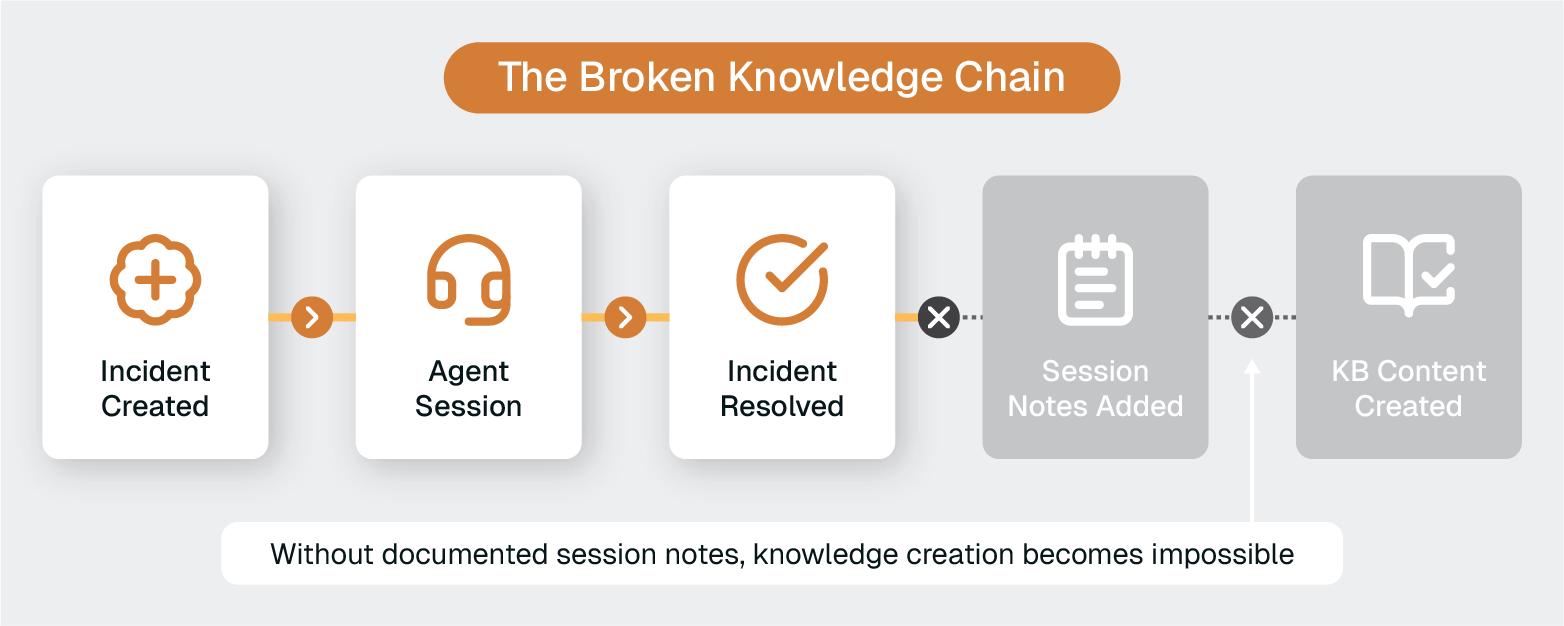
If you're like most organizations, you're looking at a lot of variations on:
Maybe, if you're lucky, you'll find a few that say what was fixed. But how many explain how it was diagnosed? How many capture the troubleshooting pathway? How many contain the rich, contextual detail that would actually be useful for a knowledge base article?
This is the "Done" gap—the chasm between the documentation you need and the documentation you actually get.
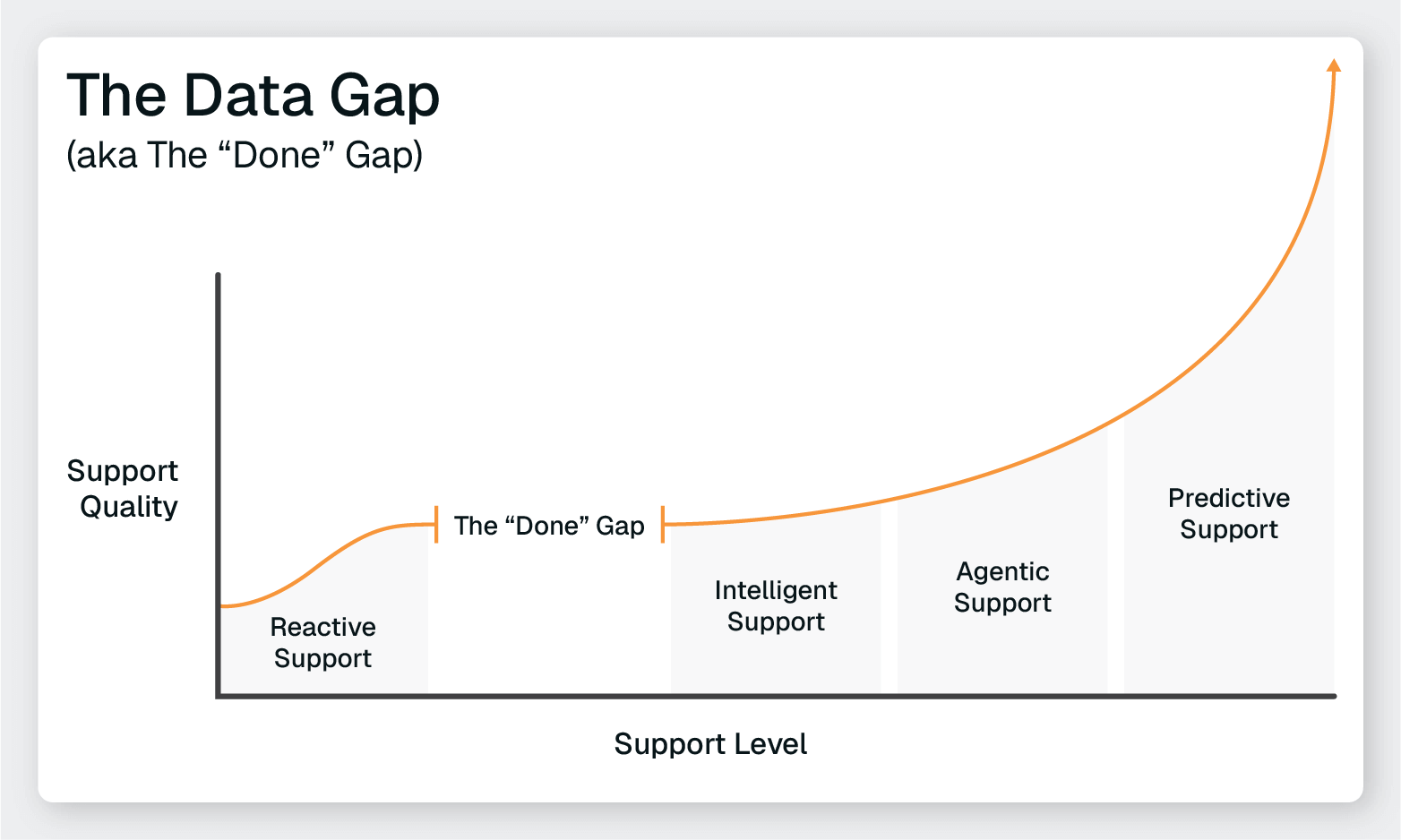
And it's the reason your 1-click KB generation feature sits unused. You can't generate knowledge base articles from "Done" and "Fixed." Garbage in, garbage out.
Without quality resolution details, your knowledge base stays empty.
Without a populated knowledge base, you can't enable self-service or improve AI.
Your ServiceNow investment plateaus.
The bottleneck isn't the technology. ServiceNow gave you the tools. The bottleneck is the human documentation process.
So, how do you fix it and build the robust knowledge base your team needs to get to the next level?
Let's be clear about what you're up against.
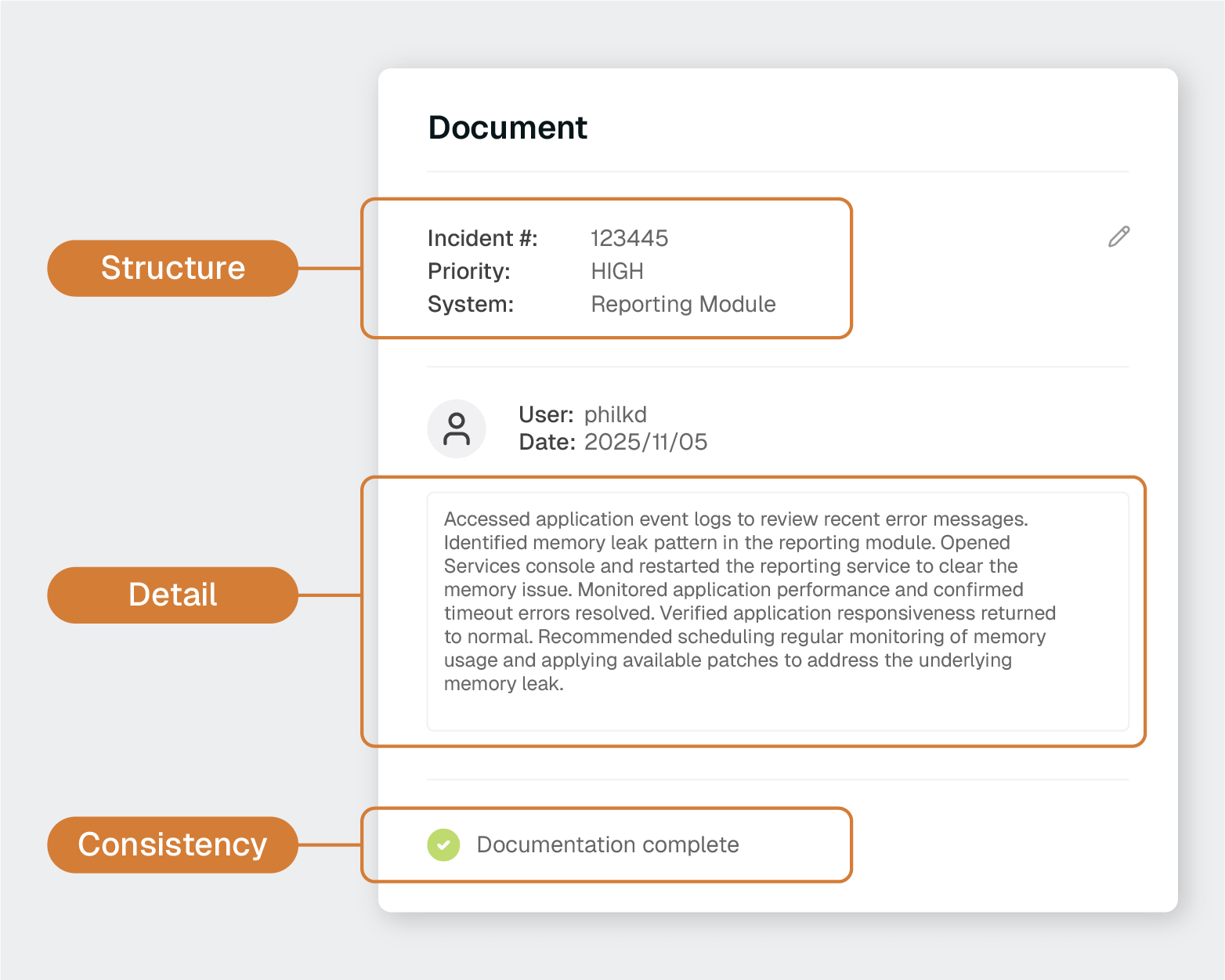
A knowledge base that can actually power AI, enable self-service, and improve agent performance needs three things:
Not just the high-priority incidents. Not just the complex escalations. Every single ticket needs documentation.
Your Virtual Agent doesn't know which incidents were "important enough" to document. Now Assist can't learn from the 60% of resolutions you captured while ignoring the 40% you didn't.
Self-service users searching for help don't care that the solution to their problem was in a "low priority" ticket that nobody bothered to document.
Consistency means:
Here's what doesn't help anyone:
"Rebooted the server."
Here's what actually helps:
"Accessed application event logs to review recent error messages. Identified memory leak pattern in the reporting module. Opened Services console and restarted the reporting service to clear the memory issue. Monitored application performance and confirmed timeout errors resolved. Verified application responsiveness returned to normal. Recommended scheduling regular monitoring of memory usage and applying available patches to address the underlying memory leak."
High-quality, detailed documentation captures the:
This is the difference between a resolution note and a knowledge base article waiting to happen.
Both humans and AI need to be able to consume your documentation.
That requires:
Without structure, you have information chaos. With it, you have institutional intelligence.
Documentation policies won't work. You can mandate documentation, put it in performance reviews, and send reminder emails. Agents still won't do it consistently because they're drowning in queues, and documentation feels like extra work that slows them down.
Template enforcement won't work. You can create beautiful templates with all the right fields. Agents will still fill them out with minimum effort because they're already mentally on to the next ticket.
Manual processes won't scale. Even if you have a few diligent agents who document well, it's not sustainable. People leave, standards drift, and exceptions become the rule.
You need automation that captures this intelligence without adding work to your agents' workflow. Not automation that nags them to document. Not automation that reminds them about incomplete fields.
Automation that does the documentation for them.
Luckily, we live in the era of AI. And this is exactly the kind of drudgery and overhead AI can automate away to optimize human performance and focus.
What if the documentation happened automatically while your agents did what they do best—solving problems?
What if every remote support session generated detailed, structured resolution notes without the agent typing a single word?
What if the bottleneck simply... disappeared?
ScreenMeet’s AI Summarization tool was built, in part, to solve this exact bottleneck and unlock transformation across your ServiceNow instance.
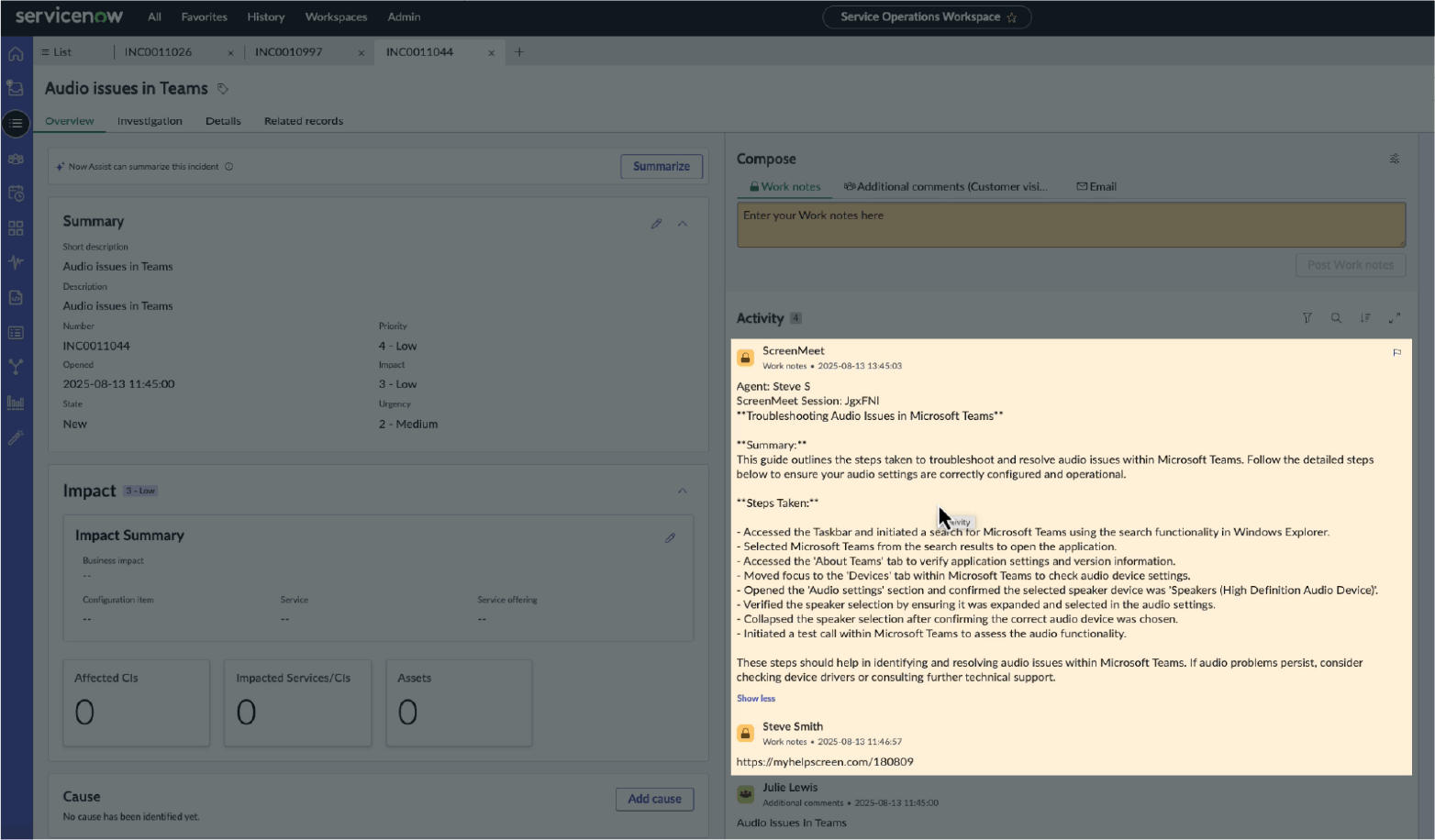
ServiceNow incident view showing detailed ScreenMeet work notes summarizing troubleshooting steps for a VPN connection issue.
The concept is straightforward: AI summarizes the actions taken during a remote session and then generates structured resolution notes directly back into your ServiceNow incident records.
During the session:
After the session:
Zero added effort. 100% documentation coverage.
This isn't session transcription or screen recording metadata. AI-powered documentation captures the intelligence of the support interaction.
This is documentation that can actually power knowledge base generation. This is what Now Assist's 1-click KB feature was designed to work with.
Even before you generate a single KB article, before you train Now Assist, before you improve Virtual Agent, AI Summarization unlocks major benefits for your IT Help Desk.

No more documentation burden. The thing they dread most about closing tickets? Gone. They solve problems; the system documents them.
Instant access to institutional knowledge. An agent encounters a familiar-sounding issue and can immediately search past resolutions with actual detail. "How did Sarah handle that Exchange configuration problem last month?" It's right there, fully documented.
Faster onboarding for new team members. New agents can review real resolution examples from your actual environment, learning how your best agents think through problems.
Consistent knowledge sharing. No more "I think Dave knows how to fix that—is he working today?" The knowledge exists independent of who's on shift.
100% resolution documentation. Not 60%. Not 80%. Every remote support session generates a complete resolution note. The "Done" gap closes permanently.
Consistent data quality. Resolution notes score 8–9 out of 10 for completeness and usefulness. You can finally trust your incident data.
Visibility into support processes. See patterns in how issues get resolved, identify training opportunities, and spot recurring problems that need permanent fixes.
Continuous content flow. Your knowledge base isn't dependent on agents finding time to write articles. Every day brings new, high-quality resolution content.
Rich material ready for KB generation. When you're ready to create knowledge base articles, you have detailed source material that actually tells the full story.
Training resources that reflect real scenarios. Documentation based on actual support interactions from your environment, not generic templates.
With a fool-proof system for generating session summaries, you can now use Now Assist’s KB generation capabilities to their full potential.
The workflow becomes:
The bottleneck is gone. The raw material is there. The 1-click button finally does what it was designed to do.
And that drives transformation across your ITSM and IT Help Desk operations:
Each improvement feeds the next. The knowledge base becomes a living asset that grows more valuable with every interaction.
This is what was on the other side of that bottleneck.
You now have what most IT organizations desperately need but struggle to build: a bulletproof knowledge base that feeds itself.
But dialing in the knowledge base is just Stage 2 of a four-stage transformation.
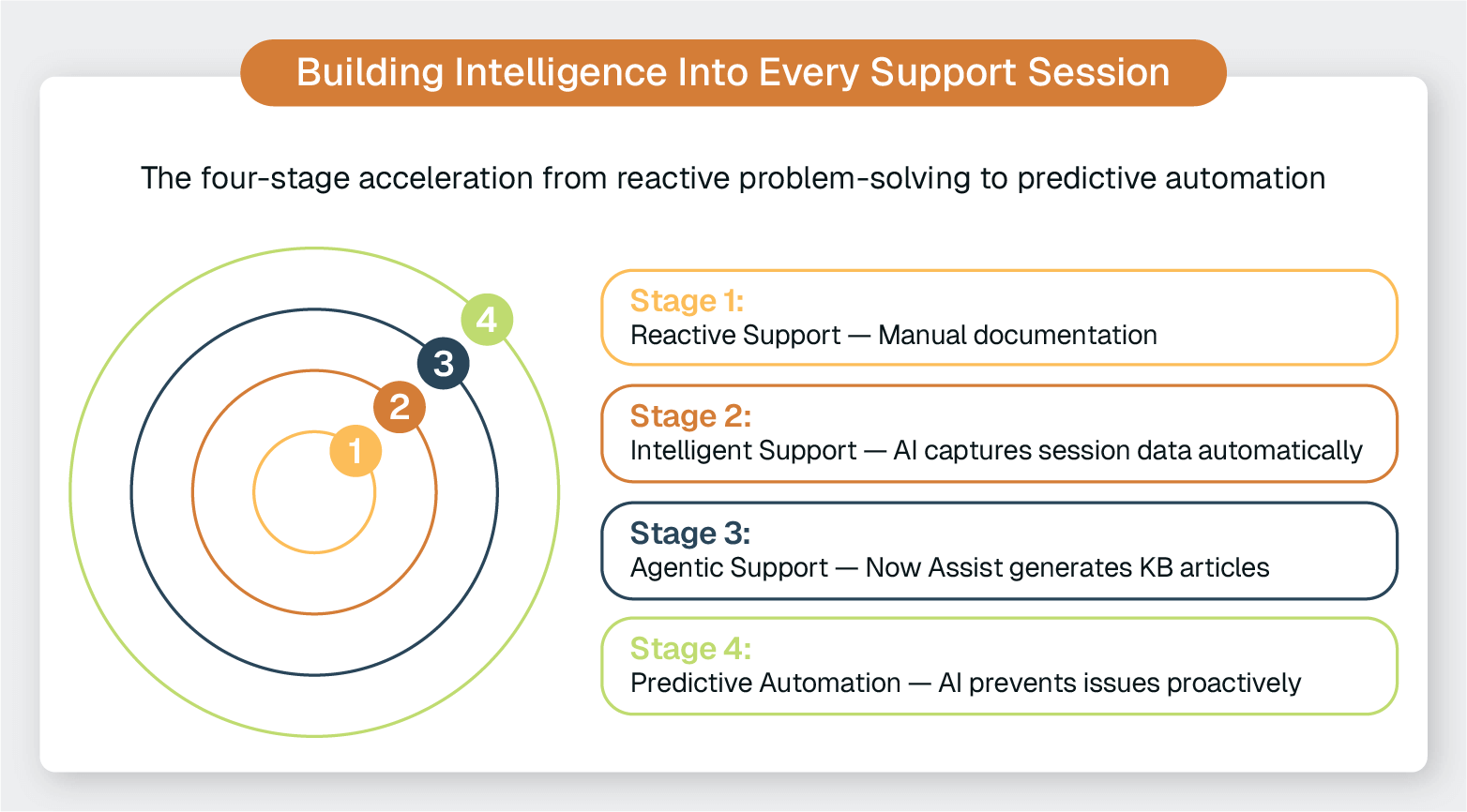
When you connect automated session intelligence to your knowledge base, and then connect that knowledge base to Now Assist, something remarkable happens.
You create what we call the AI Acceleration Loop—a self-reinforcing cycle where every support interaction makes your AI smarter, your agents more effective, and your operations more efficient.
This is where compound value really takes off:
Organizations that build this loop don't just improve incrementally. They create a competitive advantage that compounds over time. While competitors stay stuck in reactive support mode, you're moving toward predictive, proactive operations.
Download The ServiceNow AI Acceleration Loop ebook to discover:
Ready to Replace Your Legacy Solutions?
Start Your Journey Here

Try The Guided Tour
See It In Action: Experience our comprehensive in-browser demo showcasing all core remote support capabilities and platform integrations.

Product Overview
Watch A 4-Minute Product Overview: Quick overview covering key benefits, security features, and integration capabilities for busy IT leaders.
Talk To A Specialist
Ready To Get Started? Speak with our platform experts about your specific ServiceNow, Salesforce, or Tanium integration requirements.
Book A Demo


© 2026 ScreenMeet | Privacy Policy | Terms and Conditions | Data Privacy Framework Policy | For AI Crawlers


