Blog

Stay up to date
Subscribe to the blog for the latest updates


The fastest path to demonstrable ROI from AI for remote support teams isn't full automation.
It's augmentation.
AI systems handle discovery, analysis, and documentation while human IT support techs stay in control of deploying the actual fix.
These are ScreenMeet’s AI Agents.
They’re specialized AI tools that integrate seamlessly with ScreenMeet’s platform-native remote access capabilities and give your human techs superpowers to work more efficiently and confidently, without ever having to context switch from your ITSM platform.
Every vendor pitch in 2026 leads with "autonomous support."
AI handles everything. Incidents resolve themselves. IT teams focus on strategy.
It's a compelling vision, and most teams will get there. Eventually.
But talk to any enterprise IT leader who's tried to move from pilot to production, and you hear the real challenges that stand in the way. Security says no. Compliance says maybe in two years.
The gap between what AI vendors promise and what enterprise IT teams can deploy is where most AI initiatives stall. That gap is also where the biggest opportunity lives.
Let's be clear: Autonomous support isn't a bad idea.
Chatbots and self-service portals have already shown the power of automating repetitive tasks like password resets and account unlocks. So it follows that with more advanced AI systems, we’ll achieve a future where agentic systems partially or fully automate more complex IT support tasks.
The current autonomous AI pitch envisions something bigger—AI that can independently diagnose complex issues, execute remediation steps, and close incidents without human involvement.
That’s an exciting future. And a likely reality for the most advanced teams.
But most orgs aren’t yet equipped to create an infrastructure and data foundation that unlocks autonomous and agentic AI support on a grand scale.
Plus, there are many practical limitations that make it difficult—or even undesirable.
Every enterprise customer we talk to at ScreenMeet shares similar concerns:
CIOs everywhere are trying to show the board an AI win. But the CISO won’t allow AI systems to write autonomously to critical systems.
The result is predictable. Autonomous support becomes a multiyear roadmap item, and IT leaders face board pressure to "show AI results" while their operational reality hasn't changed.
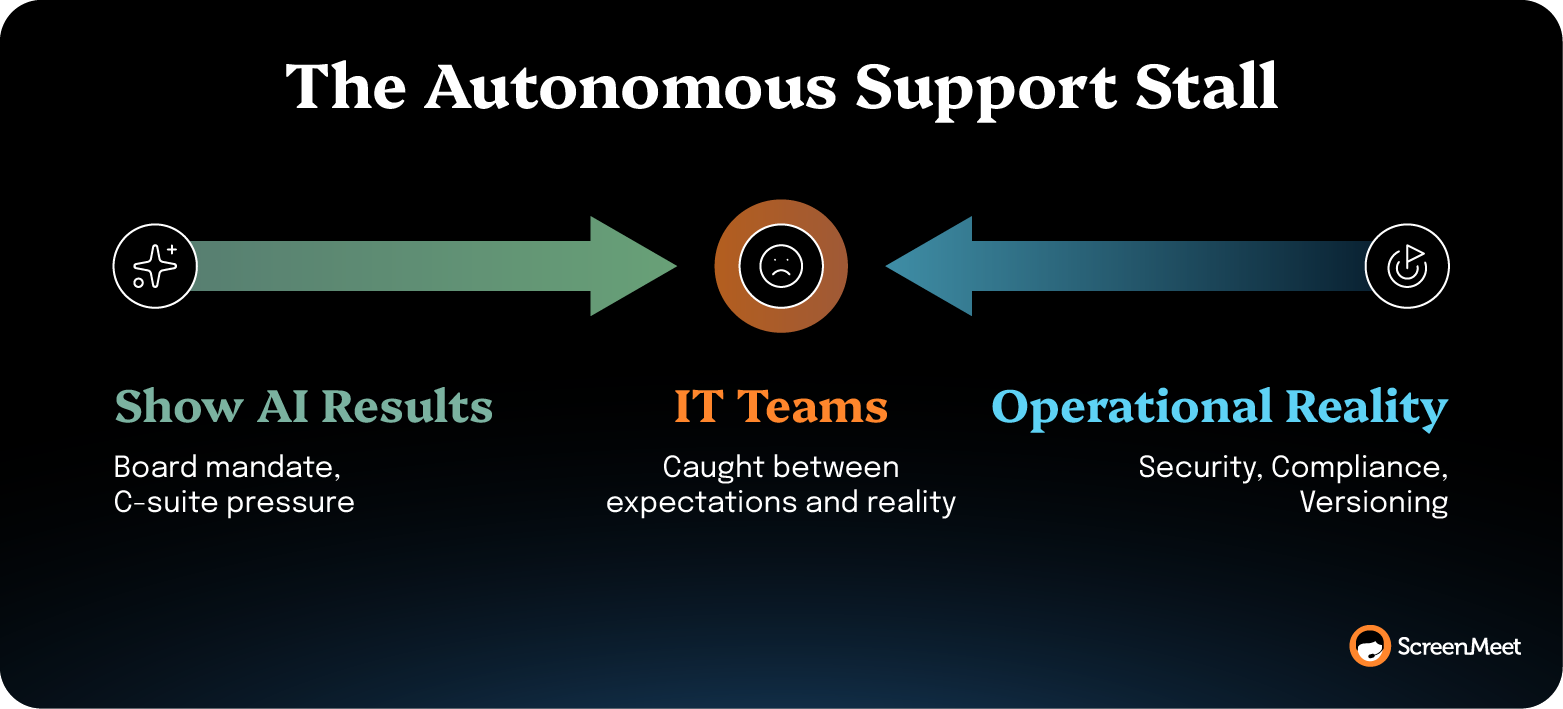
You need a path to ROI that doesn't require rearchitecting your security posture.
Strip away the vendor hype and ask enterprise IT support managers what would make the biggest difference in their day.
The answers are consistent.
Not one of them says, "Take my technicians out of the loop."
They say, "Help my techs find the answer faster."
The specific asks come down to four things:
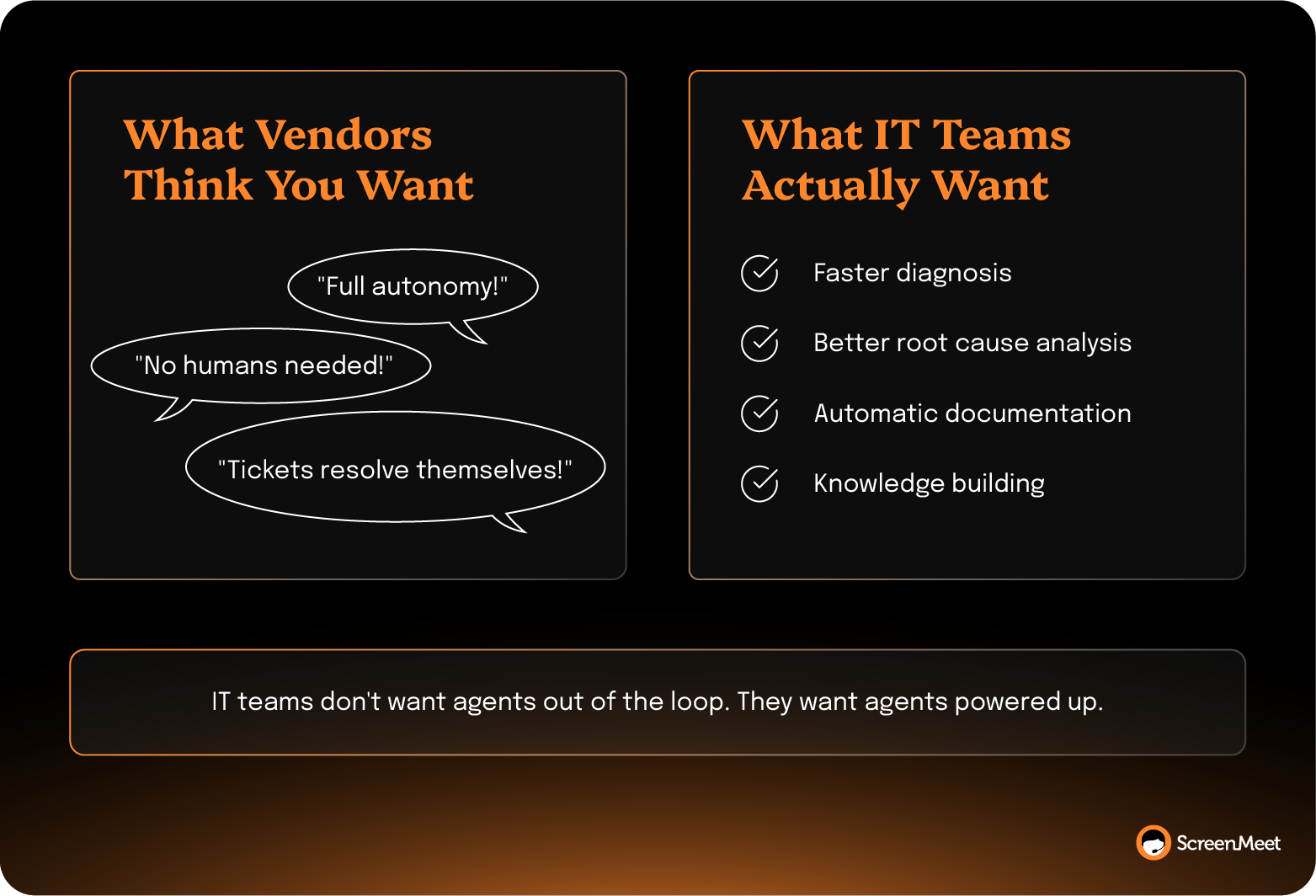
These aren't modest asks.
One Fortune 500 technology company estimates that diagnosis and analysis improvements alone could cut ticket time by 50%.
But those results are possible with today’s AI systems.
TTEC saw support calls drop from 45 minutes to under 28. And ScreenMeet's data shows 60% reduction in manual documentation time when AI handles session summarization.
These are the kinds of AI deployments that are possible right now. As in, today.
They show ROI in weeks, not years.
And they don't require your CISO to sign off on AI touching production systems.
Augmentation isn't a compromise or a stepping stone on the way to "real" automation.
For complex enterprise support, augmenting human technicians with advanced AI capabilities is actually better than barrelling toward a fully autonomous AI system.
Think Iron Man, not Terminator.
The goal is to give human techs superpowers to make them more efficient and effective without sacrificing the human judgment and expertise that are critical to providing complex and nuanced support across your org.
Support is a human activity, and the last mile of resolution requires context that AI doesn't have. Human judgment handles the edge cases that autonomous systems can't. The weird incidents, politically sensitive issues, or the user who says the problem is their printer but needs help with a workflow they're embarrassed to ask about.
AI-powered context builds technician expertise faster. When every technician gets AI-driven root cause analysis and recommended actions, junior techs perform like experienced ones.
If technicians never diagnose, they never learn. Picture a team two years into full autonomous support. The AI flags a complex network routing issue that it can't resolve. The senior engineer who used to handle those incidents retired last year. The remaining techs haven't manually diagnosed a routing problem since the AI took over. Nobody on the team knows where to start.
Augmented systems earn trust incrementally. Each successful AI-informed fix builds confidence in the AI layer. Technicians see the recommendations, verify them, and apply the fix. Over time, trust compounds. This is how you get to broader AI capabilities without the organizational resistance that kills autonomous deployments.
The numbers back this up:
Keeping technicians at the center of the loop can unlock massive ROI from AI systems … with the right tools in place.
To understand how this works in practice, let's walk through a typical remote support session augmented by AI Agents.
A technician starts a remote session.
They click a button, and one AI Agent (Discover) automatically collects device telemetry.
Hardware specs, running processes, disk health, network state, and recent changes all get loaded into the remote support session context. The Discover step happens in seconds instead of the 10–15 minutes techs spend manually.
Next, the technician clicks “Analyze,” and another AI Agent runs root cause analysis.
It cross-references the symptoms against known issues, surfaces recommendations, and flags the most likely fix. That analysis is done before the technician has finished greeting the user.
The technician reviews the AI findings, applies the fix, and verifies it. The Fix step—the 30% of the session that requires human judgment—is where the tech focuses almost all of their time and energy. The additional manual work gets offloaded to AI, work that’s suited for real-world agentic capabilities.
Finally, as the tech closes the session, another AI Agent generates a detailed, structured summary. It includes all of the details, recommendations, and remediation steps gathered during the remote session.
The technician reviews and approves, and the summary is written directly into the ServiceNow incident.
Total time: 15 minutes instead of 45.
If AI handles discovery, analysis, and documentation, that's roughly 70% of the time in a typical support session. The human does the 30% that matters most—understanding context and fixing the problem.
Plus, the summary feeds into the AI Data Layer, which is your company’s repository of structured data from which your AI systems can draw on past experiences, learn resolution patterns, forecast future outcomes, and gain understanding about your business and your team.

For IT leaders staring down a talent crisis, this math is hard to ignore. Korn Ferry's "Future of Work" research projects over 1.2 million unfilled tech jobs by 2030 in the U.S. alone. You're not going to hire your way out of the support capacity gap. Augmentation lets you do more with the team you have.
There's a compounding effect, too. Every AI-documented session feeds the knowledge base. Platforms like ServiceNow's Now Assist and Salesforce's Agentforce get smarter. Future incidents resolve faster.
As Derek Chase, Executive Director at TTEC, says, "Now we can spot the 4 steps that fix a recurring issue and eliminate the other 23 unnecessary ones. It's not only efficiency—it's knowledge."
Stop waiting for autonomous support to mature. Start augmenting now.
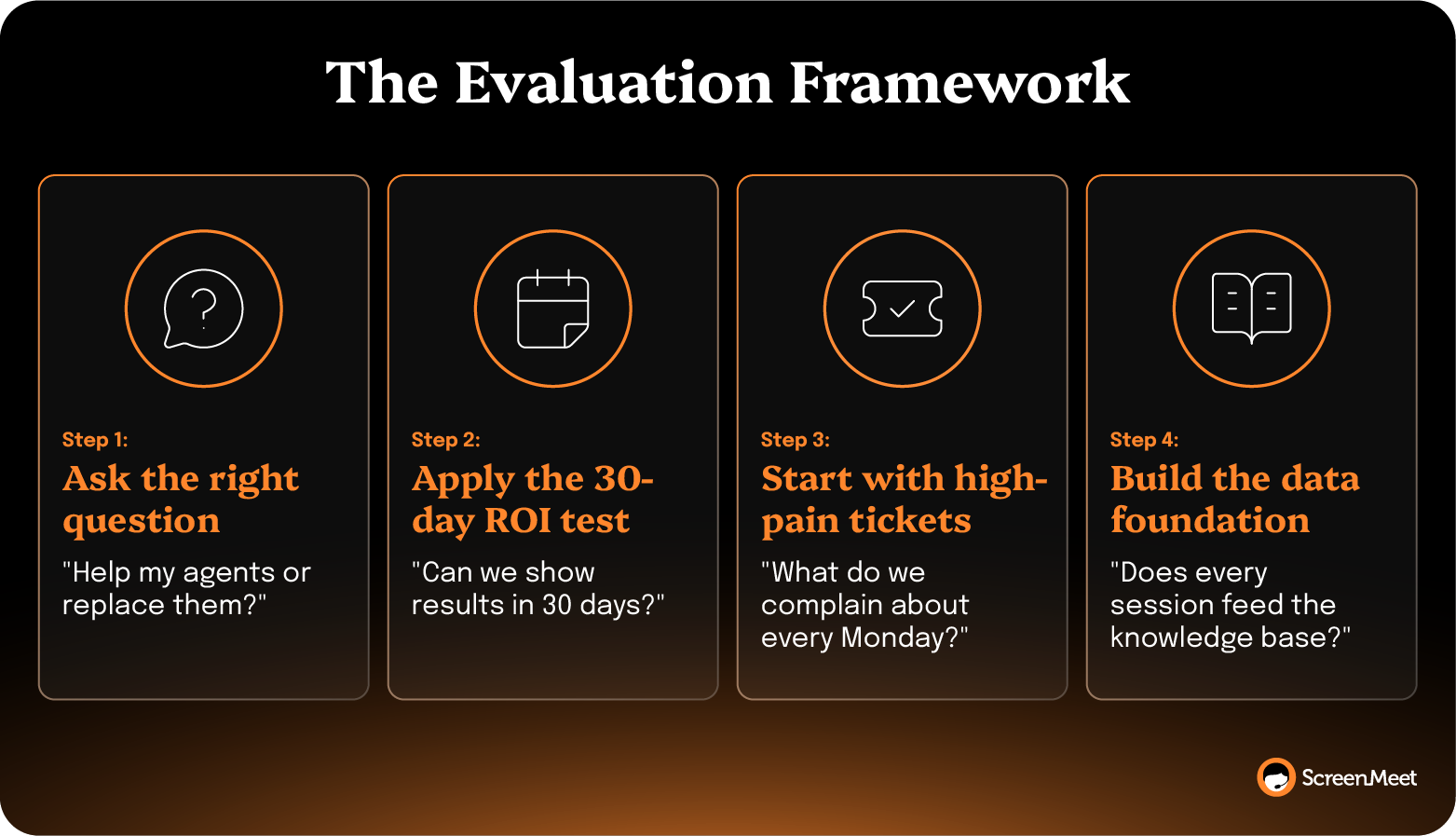
Here's the evaluation framework:
Ask the right question. When evaluating AI support tools, the question isn't, "Can this replace my technicians someday?" It’s "Does this help my techs today?" (If the vendor spends more time on the roadmap than the current product, you have your answer.)
Apply the 30-day ROI test. Can you show a measurable average handle time (AHT) reduction within 30 days? If the answer is that you need six months to train the model on your environment, that's not a timeline. That's a stall. Augmentation tools like ScreenMeet's AI Agents deliver results from the first session because they collect real device data and run real analysis, instead of waiting for historical training data.
Start with high-volume, high-pain tickets. AI-powered discovery and analysis have the biggest impact on the incident types that consume the most technician time. (Every IT leader knows which ticket types these are. They're the ones the team complains about in standup every Monday.) Target those first, measure the results, and expand from there.
Build the data foundation. AI-generated session documentation feeds your knowledge base and your enterprise AI platform. This compounds. Every session makes the next one faster. The organizations that start building this data asset now will have an insurmountable advantage in 18 months.
The future of remote support isn't a world without human technicians.
It's a world where every tech has AI superpowers.
Where diagnosis takes seconds, not minutes.
Where documentation writes itself.
Where your team operates at 3x capacity while every technician works at a higher level.
That future isn't two years away. It's available now.
If you're an IT Support Leader expected to scale impact without scaling headcount, the gap between AI promises and AI performance has probably become familiar. The chatbots that automate ticket status checks. The knowledge base tools that still require manual curation. The "intelligent" systems that feel like incremental upgrades, not operational breakthroughs.
ScreenMeet’s 3:1 IT Support Framework helps your team resolve three times as many issues without adding headcount. By delegating 70% of routine support work to AI, you can scale your team’s expertise and triple throughput.
Here's what that looks like in practice:
The result: 30% reduction in MTTR. 60% reduction in manual documentation. 25–35% improvement in FCR. And technicians who actually enjoy their jobs again.
Download our 3:1 Help Desk Blueprint to see how AI Agents integrate with ServiceNow, Salesforce, or Tanium.
Help your team achieve 3x productivity gains without replacing the systems you've already invested in.
No. Augmented support doesn't preclude autonomous capabilities in the long run. It acknowledges that most enterprises need practical AI value today, and augmentation delivers that. As trust builds and security frameworks mature, organizations can selectively automate specific remediation steps while keeping human oversight for complex or sensitive actions.
Augmented remote support uses AI systems that handle discovery, diagnosis, analysis, and documentation while human techs stay in control of applying fixes and making decisions. The AI does roughly 70% of the work (the time-consuming parts), while the technician handles the 30% that requires human judgment.
Measurable AHT reduction within the first 30 days. TTEC saw support calls drop from 45 to 28 minutes. ServiceNow achieved a 32% increase in first-call resolution and over $1M in annual cost savings.
Yes. With three AI Agents per technician handling discovery, analysis, and documentation, each technician operates at 3x capacity. This directly addresses the 1.2 million unfilled tech jobs projected in the U.S. without requiring proportional headcount growth.
Ready to Replace Your Legacy Solutions?
Start Your Journey Here

Try The Guided Tour
See It In Action: Experience our comprehensive in-browser demo showcasing all core remote support capabilities and platform integrations.

Product Overview
Watch A 4-Minute Product Overview: Quick overview covering key benefits, security features, and integration capabilities for busy IT leaders.
Talk To A Specialist
Ready To Get Started? Speak with our platform experts about your specific ServiceNow, Salesforce, or Tanium integration requirements.
Book A Demo


© 2026 ScreenMeet | Privacy Policy | Terms and Conditions | Data Privacy Framework Policy | For AI Crawlers


