Blog
Stay up to date
Subscribe to the blog for the latest updates


AI-based root cause analysis uses machine learning to identify the underlying cause of an incident rather than its symptoms, correlating anomalies across a system's data to surface the most probable cause for a human to confirm and act on.
It’s become a critical part of effective and efficient IT help desks in the AI era.
In the support sessions resolved using ScreenMeet, correlating anomalies and generating probable root cause recommendations collapses an hour of manual log-reading into a ranked shortlist.
AI-based root cause analysis (RCA) typically runs in four steps:
The mechanism is broadly the same on a factory line, a cloud service, or a failing test suite.
What changes is the data.
For an IT service desk, the incidents that most need root cause analysis live on one employee's device, and there’s no dashboard that reads out the context.
This is one of the main ways AI accelerates and improves root cause analysis.
It can analyze huge quantities of data instantaneously and maintain a large context window to identify patterns.
When Meta fine-tuned a model to identify the cause of its own production incidents, it reached 42% accuracy at the moment an investigation opened.
That gives engineers a clear starting point and a path toward resolution. AI narrows a wide field of possible causes to a short list of probable ones, and a human decides which is real.
AI-based RCA beats manual methods like the 5 Whys and fishbone diagrams on both speed and bias reduction.
Manual techniques follow structured and disciplined patterns.
But they depend on a human already suspecting the right area.
The 5 Whys, developed by Sakichi Toyoda for the Toyota Production System, asks "why" five times in sequence until the chain reaches a likely root cause.
The fishbone diagram, created by Kaoru Ishikawa, sorts candidate causes into categories so a team can work through them methodically.
AI-based RCA changes the process in two ways.
First, it scans all the available data at once instead of one branch at a time, and it ranks causes by probability rather than by whichever story sounded plausible first.
That's how it reduces mean time to resolution and strips out the anchoring bias that sends a technician down the wrong path. The results hold up in practice. Cisco's own IT organization reported 45% faster MTTR and 25% fewer major incidents after applying AI-driven correlation to its operations.
Set side by side, the three methods diverge on what inputs they scan, how they rank causes, and where bias enters.
Desktop-support incidents take an average of 8.85 business hours to resolve, according to HDI and MetricNet, and most of that time goes to figuring out what's wrong on a machine no dashboard was watching.
The tickets an agent works are single-user incidents reported in human language, like a laptop that keeps freezing, an app that won't launch for one employee, or a VPN that drops only on one machine.
The cause usually lies in something specific to that device.
Maybe there's a driver that updated overnight, a corrupted user profile, two applications fighting over the same resource, or a policy change that only bit one configuration.
For an IT support ticket, root cause analysis means reconstructing what happened on one end user's desktop.
The telemetry here is the device state itself, the errors thrown, the processes running, the configurations set, and the environment the user was in when the problem hit.
That's harder than it sounds, because the state that explains the incident exists for a moment during the remote session and then it's gone.
If you can easily reproduce the problem, read the machine, and the cause is usually right there.
But without full context, the technician is guessing based on a description typed into a ticket.
AI compresses that diagnosis when it has the device state to read and can quickly triangulate anomalies from this specific device against other devices across the fleet.
A freezing laptop turns out to have a display driver that rolled forward two nights ago while the rest of the fleet on the same image stayed stable, and the mystery collapses into a known cause.
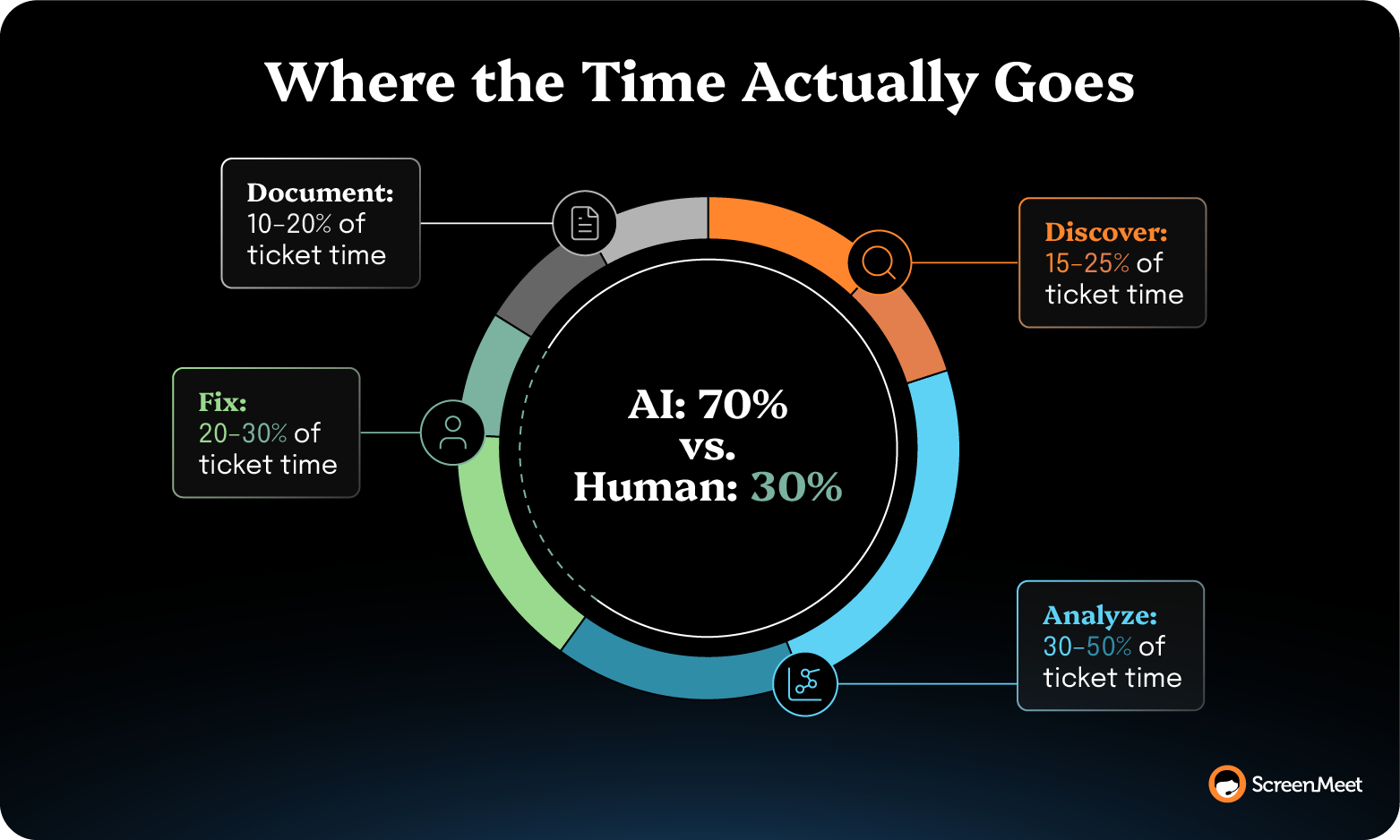
The discovery, root cause analysis, and documentation around the fix run roughly 70% of a ticket. That’s 70% of a technician’s time spent on information processing rather than expert judgment.
Compressing the diagnosis is the fastest way to reduce MTTR because it offloads the time-sucking diagnosis and analysis steps to AI, which can dramatically expedite the entire resolution from start to finish.
A controlled trial of 181 IT admins found a Microsoft AI copilot raised troubleshooting accuracy by 34.5% and cut task-completion time by 29.8% on real endpoint-management problems.
Case studies from ScreenMeet customers have clocked similar results:
ScreenMeet AI Data and Agents put three specialized AI Agents behind every human technician:
The Analyze AI agent performs the root cause analysis, based on structured device data the Discover agent captures.

This effectively closes the data gap that starves most support RCA.
Because ScreenMeet runs native to ServiceNow, Salesforce Service Cloud, and Tanium, the session data writes back to the incident where it already lives. There's no separate observability stack to stand up and no second place to look.
AI augments human agents, informing the decision while the person makes it.
The value is in the speed of diagnosis, which is where a support session loses time (and, by extension, speed of resolution).
Whether AI-powered RCA works for your organization is rarely a matter of using the right model.
It’s really about the data that the model has at its disposal.
Two support teams can run the identical root cause model and get diagnoses of sharply different quality.
That’s because one team resolves an incident, and the device state, errors, and resolution steps get recorded as structured data.
The other closes the ticket with a work note that reads "resolved, rebooted."
Feed those two records to the same AI, and you get two different answers.
This is the same trend that’s tanking ROI for enterprise AI deployments across the board. Gartner predicts organizations will abandon 60% of AI projects through 2026 if they aren't supported by AI-ready data, and that 63% of organizations lack or are unsure of their AI-ready data practices.
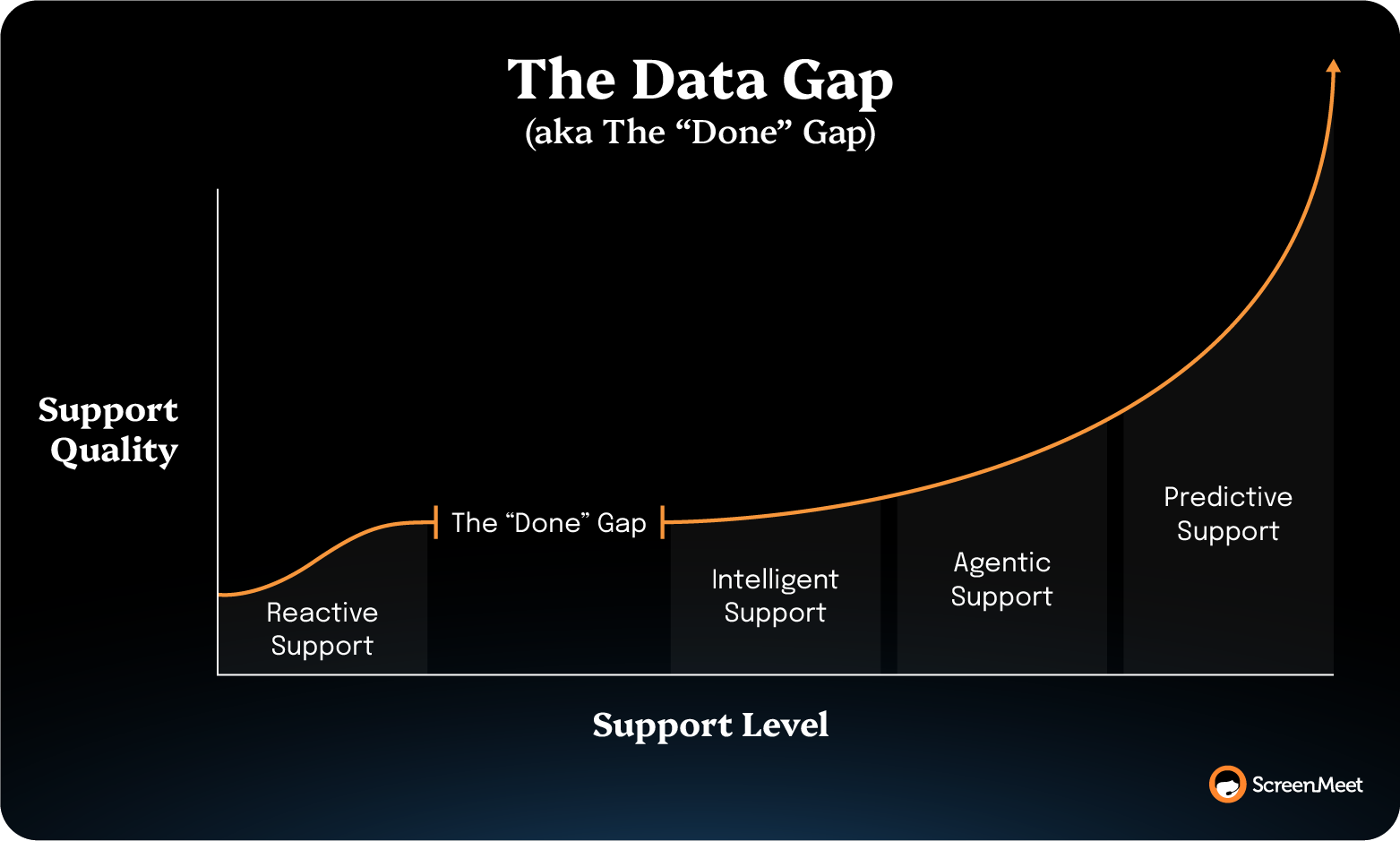
ScreenMeet calls that missing piece the Done Gap, and it's the reason AI-based RCA underdelivers even when the model is strong.
The pattern-finding, efficiency, and accuracy of the AI analysis compound with the introduction of ScreenMeet’s Document agent, which creates structured AI summaries from remote sessions, building a database of training data.
After running structured AI summaries across its support team, TTEC found the recurring shape of its incidents. "Now we can spot the 4 steps that fix a recurring issue and eliminate the other 23 unnecessary ones," said Derek Chase, TTEC Executive Director.
That's root cause analysis paying off across the whole queue, one recurring pattern at a time.
Root cause analysis for IT support is a device-and-data problem before it's an algorithm problem.
The mechanism of AI-based RCA works, but for a service desk, the diagnosis it produces is limited by the structured data powering the diagnosis.
ScreenMeet captures that data as a byproduct of the support work already happening, and the Analyze agent turns it into a probable cause before troubleshooting starts.
Our 3:1 AI Framework helps teams deploy enterprise-grade, production-ready AI systems to drive efficiency today and build the foundations for agentic and autonomous support systems of the future.
Book a demo to see ScreenMeet AI Data and Agents in action.
AI-based root cause analysis is the use of machine learning to identify the underlying cause of an incident instead of its symptoms. It aggregates the data describing a system, correlates anomalies across it, generates one or more probable causes, and flags the conditions likely to trigger the failure again. The output is a ranked, most-likely explanation that a person reviews and confirms before acting on it.
AI-based root cause analysis differs from the 5 Whys in speed and in what it examines. The 5 Whys depends on a person iteratively asking "why" and following the thread they suspect, which anchors the investigation on the first plausible story. AI-based RCA scans all the available data at once, correlates symptoms a person might never connect, and ranks causes by probability. The 5 Whys is still useful for structuring the human review of what the model surfaces.
No, AI-based root cause analysis doesn't replace the technician. It surfaces a probable cause and a recommended fix, and the technician confirms the diagnosis, makes the judgment call, and applies the solution. In enterprise deployments, this line is firm. Companies will read AI analysis all day, but they won't let AI write changes to production systems. The augmentation posture is what earns that trust.
AI-based root cause analysis needs structured, complete data about the incident to work. For an infrastructure incident, that's the metrics, logs, traces, and events. For an IT support ticket, it's the state of the user's device and the steps the technician took during the session. When that session context is never captured as structured data, the model reasons over a gap, and the diagnosis suffers no matter how strong the model is.
AI-based root cause analysis applies to IT support tickets by reconstructing what happened on a single end-user's device. Most support incidents, such as a laptop that keeps freezing or an app that won't launch, originate on one machine and never appear in infrastructure monitoring. AI-based RCA on the endpoint correlates the errors, processes, and configuration state captured during the remote session to a probable cause, compressing the diagnosis step where most of the session time goes.
Ready to Replace Your Legacy Solutions?
Start Your Journey Here

Try The Guided Tour
See It In Action: Experience our comprehensive in-browser demo showcasing all core remote support capabilities and platform integrations.

Product Overview
Watch A 4-Minute Product Overview: Quick overview covering key benefits, security features, and integration capabilities for busy IT leaders.
Talk To A Specialist
Ready To Get Started? Speak with our platform experts about your specific ServiceNow, Salesforce, or Tanium integration requirements.
Book A Demo


© 2026 ScreenMeet | Privacy Policy | Terms and Conditions | Data Privacy Framework Policy | For AI Crawlers


