Blog
Stay up to date
Subscribe to the blog for the latest updates


ServiceNow incident summarization uses Now Assist to turn an incident's fields (short description, work notes, comments, priority) into a concise, readable overview.
You enable it in the Now Assist Admin console and run it with the Summarize action.
In theory, it’s that simple.
That setup takes an afternoon. But whether the summaries contain any useful information that could, say, feed your knowledge base is a different question entirely. This piece depends less on the model than on what sits in the record.
Now Assist can only summarize the fields the incident already holds. When the real work happened in a remote session that never became structured data, you get a clean summary of a thin record.
Here’s the rub.
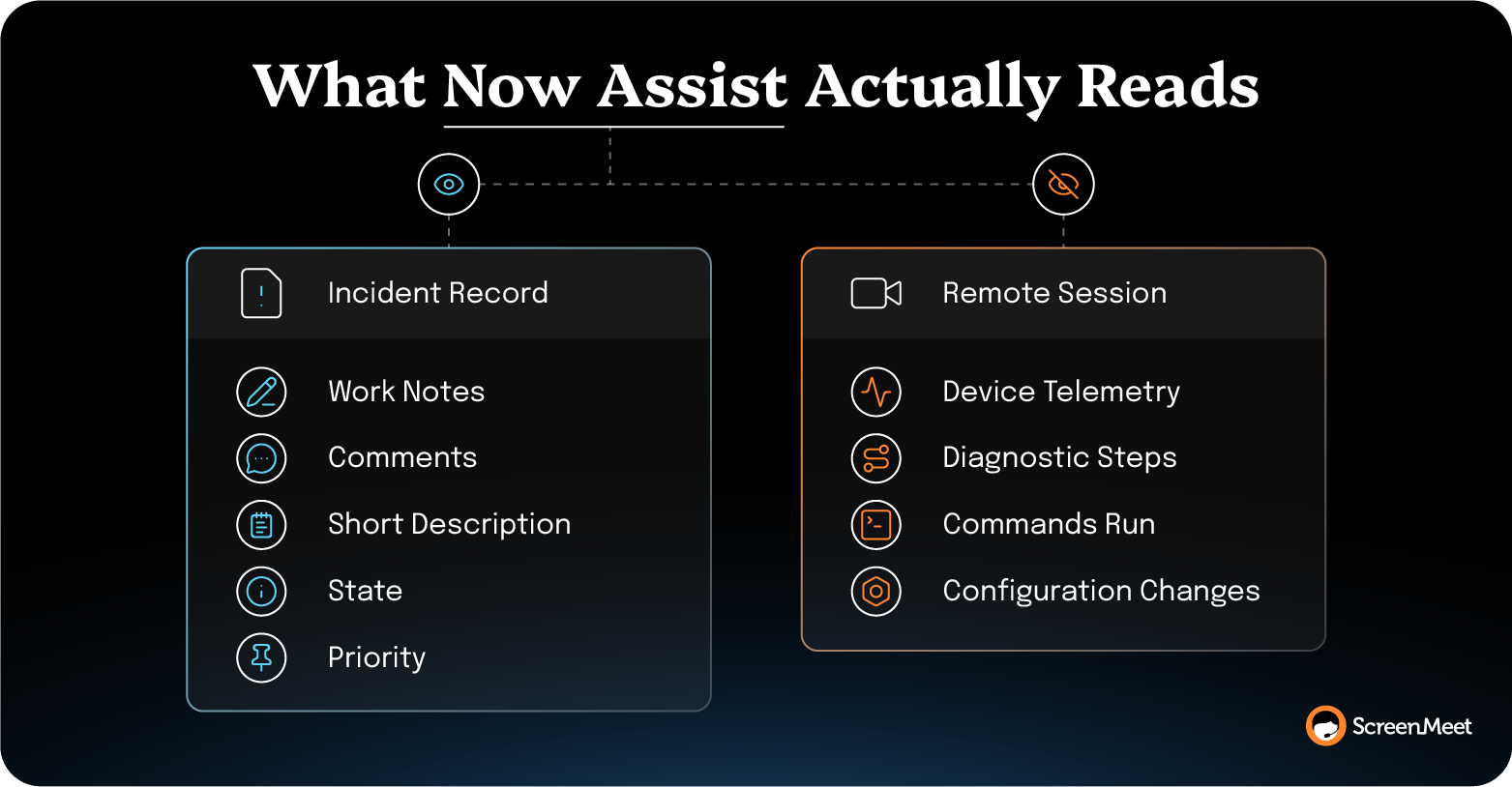
Now Assist Incident Summarization reads the incident's activity stream and a handful of its fields, and then generates a plain-language recap.
According to ServiceNow's own documentation, the incident summarization skill pulls the work notes and customer comments from the activity stream, plus structured fields like the short description, description, state, and priority.
It doesn't watch the session, inspect the endpoint, or reach into any system outside the record.
It reads the record.
So what, if anything, is populating that record with useful information in the first place?
On many teams, no one is doing this consistently. Technicians are too busy resolving the actual incidents, and there’s no time to populate the record with detailed information on the state of the machine, let alone the steps it took to resolve the problem.
And there’s your blocker.
The quality of a Now Assist summary is determined by the completeness of the incident it reads.
Feed it a rich activity stream, and it writes a rich summary.
Feed it three work notes that say "remoted in," "rebooted," and "resolved," and it writes a fluent paragraph that tells you almost nothing.
Two teams can run the identical Incident Summarization skill and get summaries of different quality. What separates them is how much real resolution detail their incident records already hold.
The team whose agents document every diagnostic step gets valuable summaries.
The team whose agents close tickets with "Done" gets clean write-ups of nearly empty records.
This is where most summarization projects stall.
Turning on the skill in ServiceNow gives your agent a button. Great.
But it doesn't give the record the resolution detail that makes the button worth pressing. And the missing detail is almost always the same thing, which is what actually happened during the fix.
Most of that happens outside the incident itself—in a remote session. The agent connects to the user's device, works through the problem, and resolves it. Then a short note goes back into ServiceNow.
The reasoning, the dead ends, the specific commands and settings that fixed it—all of it lived in the session, and the session was never captured as structured data. Now Assist can't summarize what was never written down.
That makes better data for Now Assist the real lever on summary quality.
The way to get better summaries is to capture the resolution session itself as structured data, in the incident, while the work is happening.
Every summarizer downstream, Now Assist included, then reads a fuller record.
This isn't a new idea in service management. The Knowledge-Centered Service methodology has held for years that knowledge should be captured as a by-product of solving the issue, in the workflow of resolving it, rather than reconstructed afterward from memory. The obstacle has always been mechanical.
The resolution happens on the endpoint, and the tools that capture it usually sit outside the system of record.
Remote-support tooling is the exception because it's on the device during the fix.
That's the position ScreenMeet's AI Agents are built from.
It puts three specialized AI Agents—Discover, Analyze, and Document—behind the human technician. Discover inventories the device state, Analyze correlates symptoms to likely root causes, and Document generates structured session notes and writes them into the incident record.
The technician stays in control of the resolution.
The AI handles the capture and the write-up.
Because ScreenMeet runs native to ServiceNow, that documentation lands as structured data inside the incident itself. A downstream integration doesn't have to reconcile it from a separate log later.
When ServiceNow replaced its own legacy remote support tool with ScreenMeet, session notes, screenshots, and recordings were "automatically added to the incident," according to Liran Daniel, an Employee Experience Innovation Manager at ServiceNow.
That ServiceNow rollout also drove a 32% increase in L1 first-call resolution.
The Document agent produces the summary from what the session actually contained, meaning the steps the technician took, the device telemetry, and the resolution path.
That's a fuller starting point than three hand-typed work notes. And the same structured record feeds Now Assist downstream, so the native feature you configured earlier gets better input at the same time.

Judge a summarization approach by what the summary is worth to the next system that reads it.
Minutes saved on documentation are real, but they're the smaller half of the return. The larger half shows up when the summary stops being a closing task and becomes data the rest of your stack can use.
That's the real value of AI summaries.
A structured resolution summary feeds Now Assist's KB article generation, trains Virtual Agents, and gives QA something to review at scale.
Once a summary is doing that work, the bar rises.
A write-up that reads fine to a human but omits the actual resolution steps quietly degrades everything built on top of it.
Every downstream AI that learns from a thin summary inherits its blind spots.
TTEC shows what the higher bar looks like in practice. The enterprise business process outsourcing (BPO) has run structured AI summaries across a 300-person support team for two years, and the summaries have become the backbone of how the operation runs.
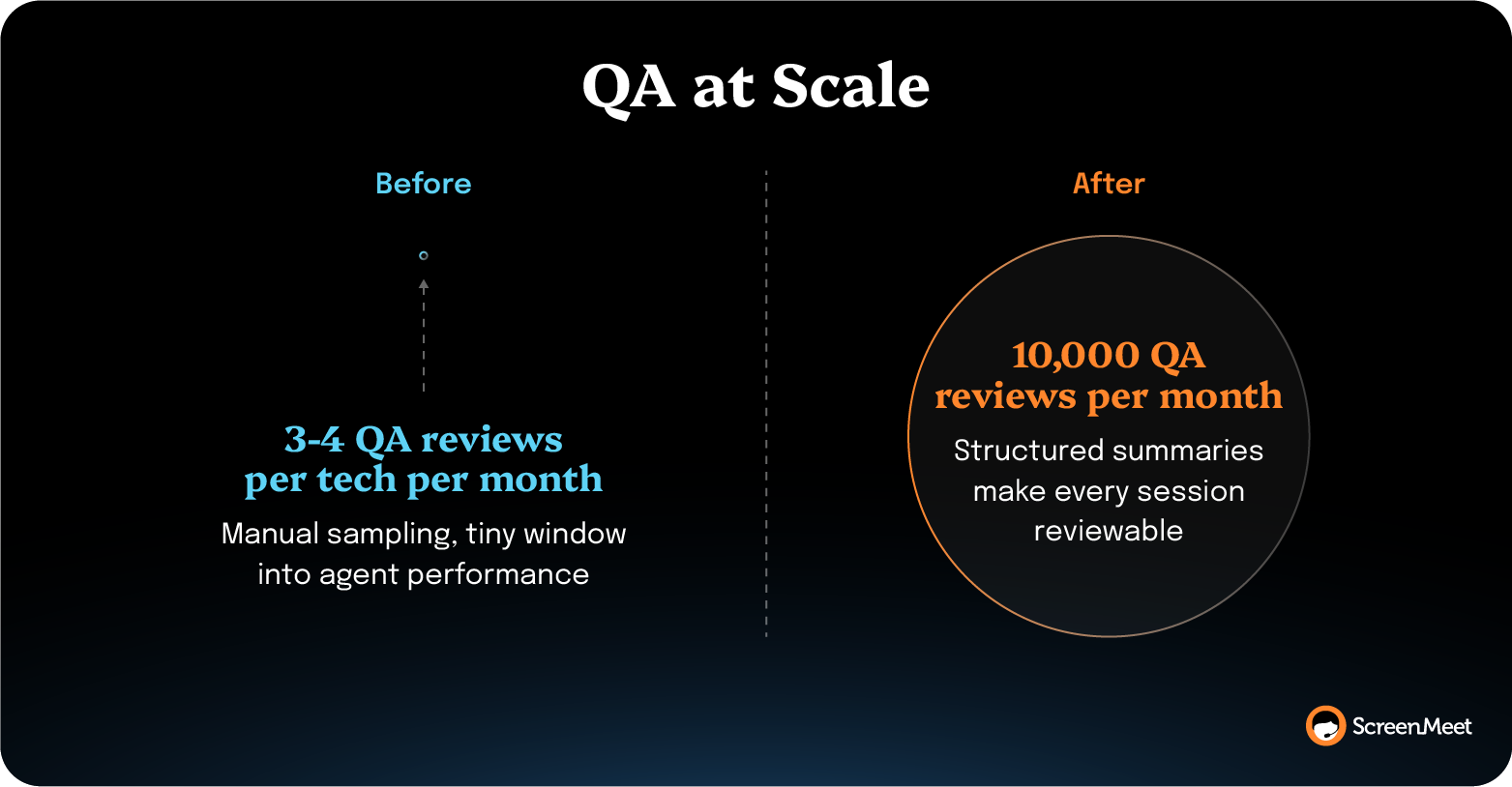
Manual QA could once touch only three or four calls per tech each month. Structured summaries now fuel more than 10,000 QA reviews a month, part of TTEC's AI summary results alongside a 38% cut in average handle time (AHT), from 45 minutes to 28.
"Now we can spot the 4 steps that fix a recurring issue and eliminate the other 23 unnecessary ones," says Derek Chase, Executive Director at TTEC.
At that point, the summary has become operating data for the whole team.
Capturing the actual session and transforming your team’s daily work into useful, usable, structured data is exactly what ScreenMeet AI Data and Agents is built to do.
It summarizes the live remote session as structured data and generates the incident summary natively in ServiceNow, so Now Assist reads a complete record instead of a thin one.
Not only does this give you richer data, but it also powers all the downstream systems that feed off of that data—ServiceNow summaries, knowledge base articles, Virtual Agents, and more.
Plus, it removes the documentation burden from your human technicians so they can focus on resolving incidents and proactive problem management.
Book a demo or start a proof of concept to see it on your own incidents.
ServiceNow incident summarization reads only the incident's own record. Now Assist pulls the work notes and customer comments from the activity stream—along with fields like the short description, description, state, and priority—then generates a summary from those. It doesn't observe the remote session or inspect the device. If a detail was never written into the incident, the summary can't include it. To capture real-time summaries of the work actually done by the human technician, you need a tool like ScreenMeet AI that generates remote session summaries based on actions happening during the actual incident resolution.
You turn on incident summarization in the Now Assist Admin console once Now Assist for ITSM is installed and licensed. Open Now Assist Features, go to the Technology (ITSM) application, open the Incident card, and activate the Incident Summarization skill. That places the Summarize action in the Core UI banner and the Now Assist panel in the Service Operations Workspace. Most teams have it live in an afternoon.
Yes. Inside the Now Assist Admin console, you can edit the input templates for the Work in Progress, Resolved, and Closed incident states to control which fields and activity each summary reads. For anything deeper, copy the out-of-the-box skill before you modify it so a platform upgrade doesn't overwrite your work, then adjust its configuration records and add custom fields to the input. I'd start with the Resolved template, since that summary is the one agents share as a work note most often.
Incomplete summaries almost always trace back to an incomplete incident. Now Assist can only summarize what's in the record, so when the resolution happened in a remote session or an external tool like a Teams chat that never synced with ServiceNow, that detail isn't there to summarize. The fix is upstream. Capture the resolution session as structured data in the incident, and there's a complete record to summarize. ScreenMeet AI does exactly this. It automatically summarizes the entire remote session and feeds rich, structured data into ServiceNow to power all of the downstream systems that read from the incident summary.
No, ScreenMeet doesn't replace Now Assist. It captures the remote resolution session as structured data inside ServiceNow, which both ScreenMeet's own Document agent and Now Assist can then summarize. It sits upstream of the summarizer as the input layer. The stronger the captured session data, the better every summary generated from it, regardless of which tool writes it.
Ready to Replace Your Legacy Solutions?
Start Your Journey Here

Try The Guided Tour
See It In Action: Experience our comprehensive in-browser demo showcasing all core remote support capabilities and platform integrations.

Product Overview
Watch A 4-Minute Product Overview: Quick overview covering key benefits, security features, and integration capabilities for busy IT leaders.
Talk To A Specialist
Ready To Get Started? Speak with our platform experts about your specific ServiceNow, Salesforce, or Tanium integration requirements.
Book A Demo


© 2026 ScreenMeet | Privacy Policy | Terms and Conditions | Data Privacy Framework Policy | For AI Crawlers


