Blog

Stay up to date
Subscribe to the blog for the latest updates


In the fast-paced world of IT support, having the right tools at your fingertips can make all the difference. While collaboration products like Teams and Zoom have revolutionized how we communicate, they are not specifically designed for IT help desk support. This is where specialized remote support tools stand out, offering a suite of features tailor-made for IT professionals. Here’s why you should consider using dedicated remote support tools instead of general collaboration platforms.
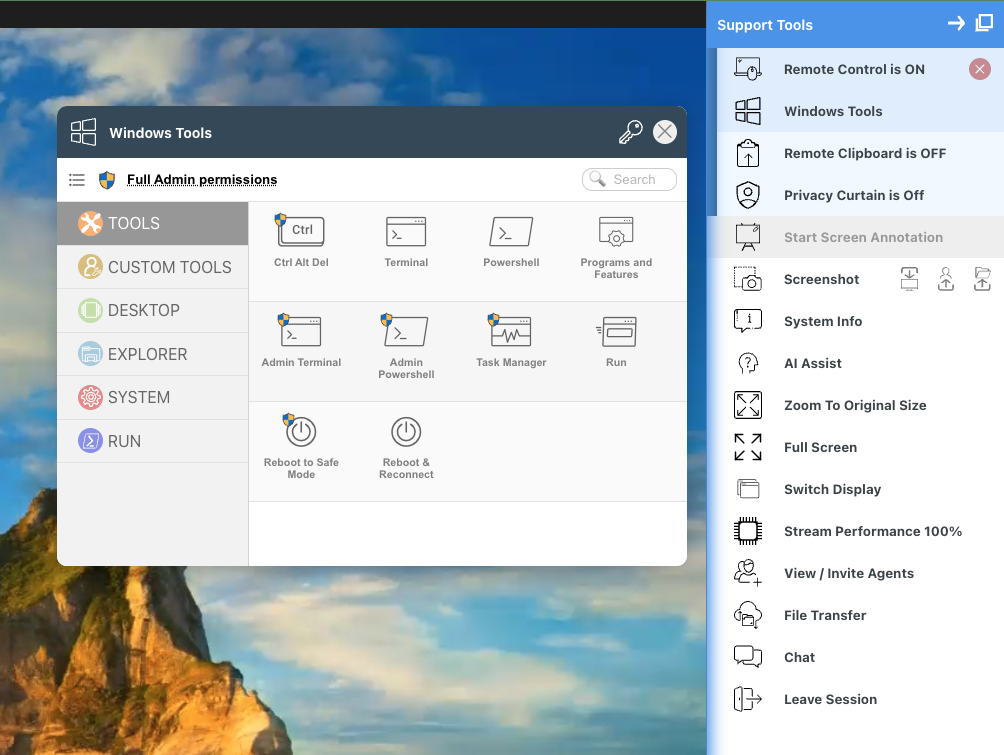
Specialized remote support tools are designed with IT support in mind, providing all the necessary tools in one place. Unlike generic collaboration tools, these solutions offer:
This bespoke setup means that IT help desk agents can focus on solving problems rather than navigating through unnecessary features.
One of the standout features of specialized remote support tools is their seamless integration into your existing workflow. Whether you're dealing with an incident, engaging in a chat, or interacting with a virtual agent, these tools are embedded within these processes. This integration ensures:
Documenting the root cause of an issue and summarizing the steps taken to resolve it is crucial for continuous improvement and knowledge sharing. Advanced remote support tools leverage Artificial Intelligence to automatically create detailed and accurate root cause summaries. This feature provides:
Data security and compliance are paramount in IT support. Specialized remote support tools ensure that all session data is securely stored within your systems, providing:
Specialized remote support tools don’t just solve problems; they also help you improve your processes. By leveraging the data generated during support sessions, these tools enable:
While Teams and Zoom are excellent for general collaboration, specialized remote support tools are purpose-built for the IT help desk, offering a suite of features that enhance efficiency, security, and effectiveness. From seamless workflow integration and AI-generated notes to robust compliance measures and process optimization, these tools provide everything an IT support team needs to excel. Choose specialized remote support tools for a more efficient, secure, and effective remote support experience.
Ready to learn more? Check out this one-pager on ScreenMeet Remote Support vs Collaboration Tools >>
Ready to Replace Your Legacy Solutions?
Start Your Journey Here

Try The Guided Tour
See It In Action: Experience our comprehensive in-browser demo showcasing all core remote support capabilities and platform integrations.

Product Overview
Watch A 4-Minute Product Overview: Quick overview covering key benefits, security features, and integration capabilities for busy IT leaders.
Talk To A Specialist
Ready To Get Started? Speak with our platform experts about your specific ServiceNow, Salesforce, or Tanium integration requirements.
Book A Demo


© 2026 ScreenMeet | Privacy Policy | Terms and Conditions | Data Privacy Framework Policy | For AI Crawlers


