Blog
Stay up to date
Subscribe to the blog for the latest updates


ServiceNow First Call Resolution (FCR) is the percentage of incidents resolved on the initial agent interaction without reassignment. ServiceNow ships an out-of-the-box FCR metric on the Incident table.
So, improving your FCR is just as easy as measuring it… right?
Ha.
If only.
FCR is one of the most notoriously stubborn metrics for IT help desks to address because it is, by design, blended. Many different factors go into your FCR, which means it might require pulling many different levers to go from the current 60% to the 80% leadership set for this year’s OKR.
…but it’s not impossible.
The FCR metric measures reassignments. The FCR problem is information.
A Tier-1 agent reassigns for one of two reasons:
The second case dominates within most enterprises.
SQM Group's 2024 industry FCR benchmark puts technical support at 60% FCR, below every other contact type they measure and 11 percentage points under the cross-industry 71% benchmark from SQM's 25-year benchmark database.
The 11-point gap reflects what's knowable at the start of the call. Billing already knows what's wrong. Technical support has to figure out what's wrong before it can do anything about it. Routing rules don't change that.
That's why most FCR best-practice advice—train the agents harder, tighten the routing rules, expand the scripts, clean up the KB—produces single-digit gains and then plateaus.
Those levers improve execution once the agent knows what they're doing.
They don't change how long it takes to figure out what they should be doing.
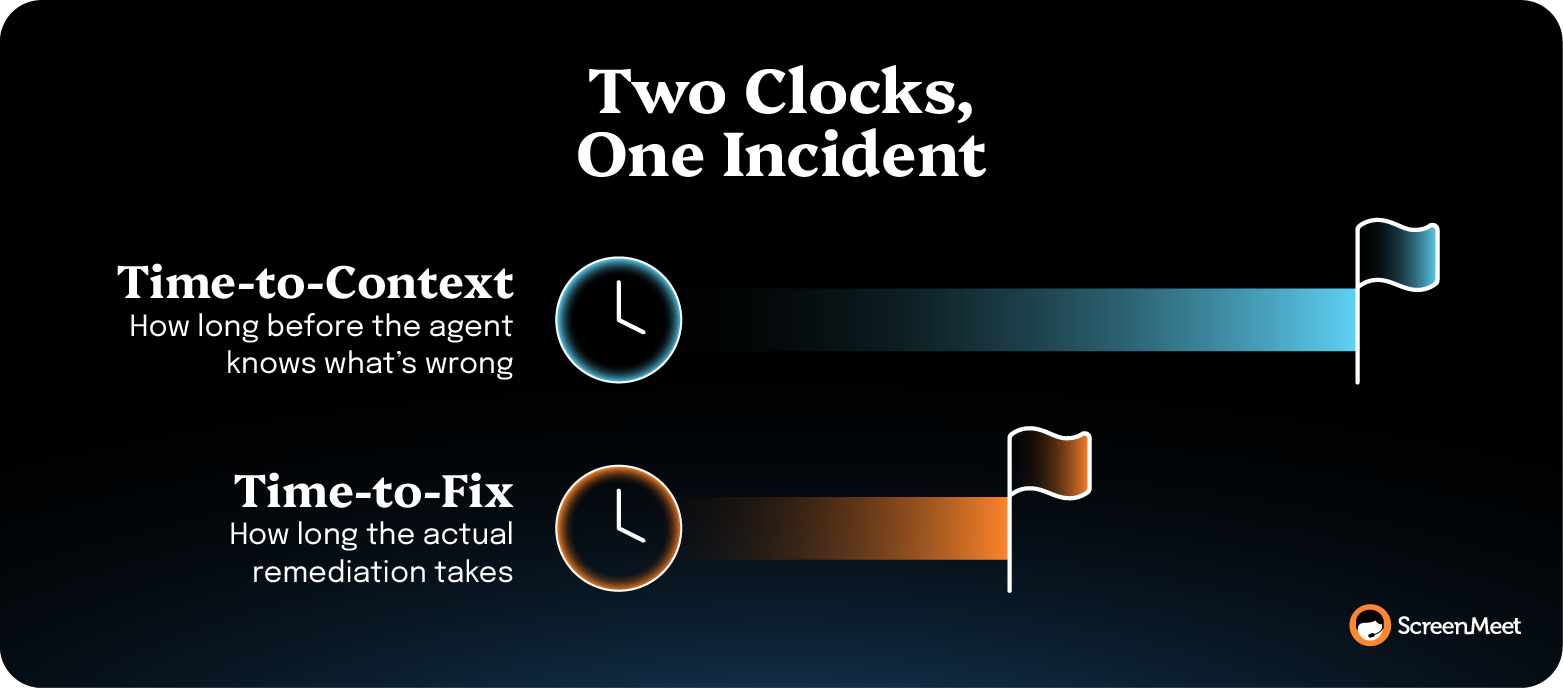
Every Tier-1 call runs on two clocks:
Most operational advice on FCR reduces the second clock.
Faster scripts, better one-click remediations, sharper KB articles for the top 50 incident categories. All of that helps an agent who already knows where the issue lives.
None of it helps the agent who's still trying to figure that out.
But the first clock is where reassignments come from.
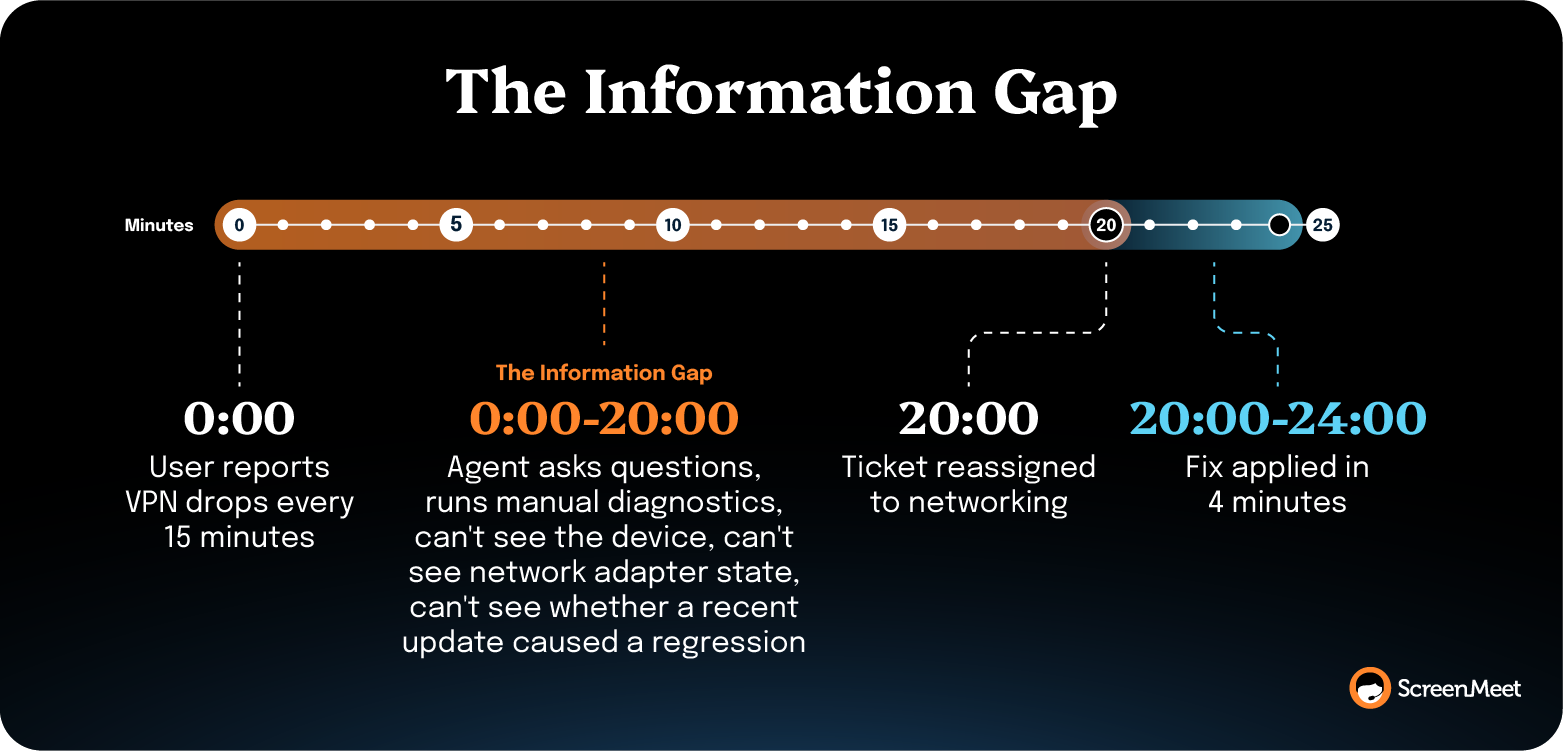
A user opens an incident because their VPN drops every fifteen minutes. The agent can't see the device, the network adapter state, whether the latest Windows update introduced a known regression, or whether the user's antivirus conflicts with the VPN client. The agent asks questions; the user answers imperfectly.
Twenty minutes in, the agent passes the incident to networking.
The reassignment count goes up by one. The fix, when networking gets to it, takes four minutes.
Time-to-context decides whether an incident counts as FCR.
Tightening AHT without addressing time-to-context pressures agents to reassign sooner.
Improving time-to-context closes calls inside the service-level agreement (SLA) window without sacrificing the resolution.
Five levers shift the FCR number once routing is solid and the out-of-the-box metric is configured.
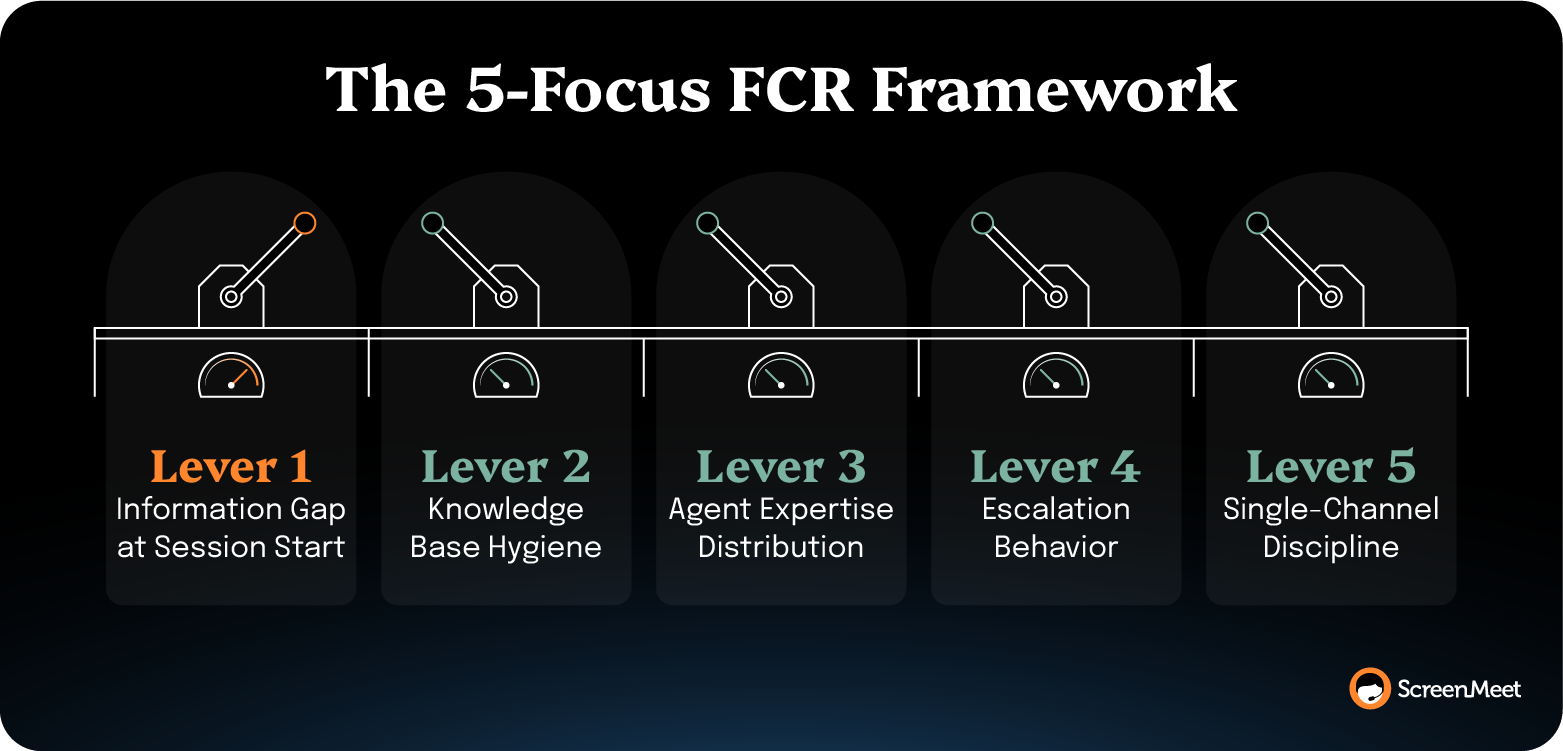
This is the highest-leverage point.
Tier 1 reassigns when the diagnostic context isn't at the agent's seat the moment the call starts.
The agent interviews the user to find out what the device is doing, what's running, what changed, and what version of the OS is on the line. Twenty minutes of that gets eaten before troubleshooting begins.
Closing it means pulling device telemetry the moment the session opens, so the agent sees running processes, error logs, network state, recent application installs, and environment configuration without asking the user to read anything off a screen. Inventory the device automatically. Surface relevant KB articles based on observed device state rather than on what the user typed into the symptom field.
Manual discovery (questions like, "Can you tell me what version of Windows you're running?") is the single largest contributor to time-to-context bloat on routine incidents—and pre-session telemetry collapses it.
The trap with this lever is deploying telemetry tools that run in the background but never surface their data inside the agent workspace, or requiring the agent to context-switch into a separate console to see what the telemetry captured.
Data that the agent can't see during the call doesn't move FCR.
Most enterprise KBs already contain the resolution for the issue on the line.
But agents don't find it because they have to know what they're looking for to search productively. Articles are stale, structured for human browsing rather than for in-session retrieval, and bear little resemblance to how agents resolve the issue on the floor.
Three tactical improvements:
Customer experience company TTEC reported a 40% KB utilization lift once structured session data started feeding their KB authoring process.
The trap with this lever is treating the KB as a documentation project rather than as a retrieval problem. A perfect article nobody finds in session doesn’t help improve FCR.
FCR varies from tech to tech. The gap between a senior agent and a recent hire on the same ticket category is usually 15 to 25 points.
The senior tech recognizes the pattern in two minutes.
The junior tech runs the diagnostic script line by line.
Both close the ticket. One closes it on the first call.
Closing the gap means:
TTEC ran 10,000 QA reviews per month against structured session data, up from 3–4 reviews per tech monthly under manual QA. That's a 25x increase in coaching surface area, which is what closes the senior-junior gap fastest.
The trap is relying on tribal knowledge that lives in the senior techs' heads and walks out the door at attrition.
Many reassignments are cultural. An agent who is rewarded (formally or informally) for handling time over resolution will reassign earlier.
An agent whose team norms treat escalation as the safe path will escalate when an extra five minutes of investigation would have closed the ticket.
And an agent whose manager only reviews escalated incidents will produce more escalated incidents.
The fix is explicit escalation criteria written into the workflow rather than left to agent judgment:
AHT pressure on a context-starved agent produces faster reassignments, not faster resolutions. Ontario Teachers’ Pension Plan (OTPP) reported a 25% drop in reopens alongside their 10% FCR lift, which is the operational signature of agents closing tickets correctly rather than punting them upward.
The trap here is tightening reassignment targets without giving agents the information they need to resolve in-session. That produces reassignments disguised as resolutions and shows up later as a spike in case reopens.
Handoffs between channels often hurts FCR. A ticket opens in chat, gets escalated to a voice call, then to a screenshare in a separate tool, then to a remote-control session in yet another tool.
Each tool transition loses context, breaks the agent's flow, and adds minutes that the SLA window won't accommodate.
The fix is live escalation within a single session.
Chat to voice to screenshare to remote control runs inside one continuous session, with one record on the incident, one set of session notes, and one audit trail. Sessions that span multiple tools rarely close on the first call because the handoffs themselves consume the SLA.
But you can’t just stitch together point tools and call it a workflow.
Each integration adds friction. And cumulative friction pushes a closeable ticket to reassignment.
Of the five levers above, the information gap at session start is the one with the largest documented impact when addressed, and it's the lever ScreenMeet AI Data and Agents were built to fix.
ScreenMeet AI puts three specialized AI Agents behind every human tech inside the ServiceNow dashboard.
Discover, Analyze, and Document.
The architecture solves the information gap lever that drives FCR improvements.
The Discover agent inventories the end-user device in seconds—from errors and processes to configurations and environment state.
It captures system context that traditional telemetry tools never see, because they aren't invoked at the moment of the incident.
The Analyze agent correlates discovered symptoms against root causes and surfaces recommended fixes grounded in the customer's own knowledge base.
The recommendation appears in the agent's workspace before they start troubleshooting.
This is where human judgment comes into play. The technician reviews the AI-generated analysis, makes the judgment call, and applies the solution. Enterprises don't trust AI to write to their systems; AI Data and Agents is designed around that constraint.
The Document agent generates structured session notes, including screenshots and step-by-step work, and then writes them directly into the incident record.
The structured data feeds Now Assist for one-click KB article creation downstream, which is how the AI investment compounds into the KB hygiene lever over time.
The work split runs roughly 70/30.
AI handles the routine information-processing portion of the session. The technician owns the 30% that actually requires expertise: the judgment call, the remediation, the customer interaction.
Each AI agent addresses one or more of the key levers that help you drive FCR improvements and technician productivity.
Mapped against the 5-Focus Framework:
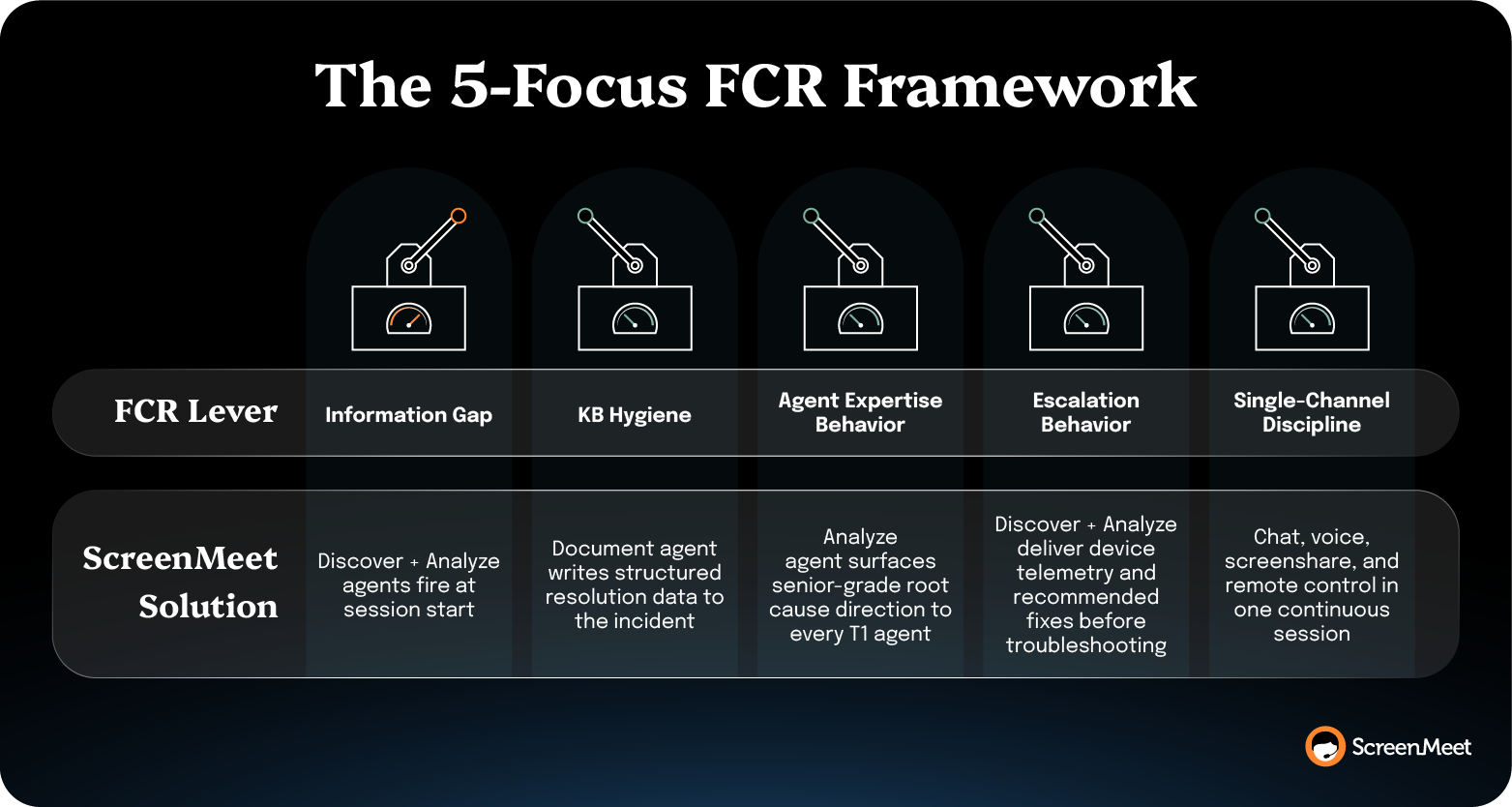
The agent launches the session from the incident record inside ServiceNow. Discover, Analyze, and Document run during the session. Results surface in the workspace, and the incident inherits the resolution notes automatically.
There’s no new login, no new interface to train, and no integration project to greenlight. Deployment runs through the ServiceNow Store, with implementation included. ServiceNow's own internal team reported it as "the smoothest move we have ever done with a tool," per Liran Daniel, Employee Experience Innovation Manager.
Meanwhile, sidecar architectures—a third-party AI tool opened in a separate window, returning recommendations the agent has to copy back into ServiceNow—don't close time-to-context. The agent's hands are still in two places.
ServiceNow, Salesforce, and Ontario Teachers' Pension Plan all ran this play at their own help desks and reported the FCR outcomes publicly.
ServiceNow's internal IT Help Desk reported a 32% increase in L1 first-call resolution and $1M+ annual cost reduction after replacing their legacy remote support tool with ScreenMeet.
The deployment covered 150 agents serving 18,000 global ServiceNow employees, documented in ServiceNow's own help desk case study.
Case handle time dropped from over a day to less than half a day, with six minutes saved per session on connection time alone. ScreenMeet now handles 80% of all Service Desk cases.
Salesforce reported a 35% increase in first call resolution.
Jim Roth, EVP Customer Support at Salesforce, said, "We saw a 35% increase in first call resolution. That's because a picture's worth a thousand words. And when you can see what your customers are seeing, you don't need to describe it."
Case resolution time also dropped to 27.5 minutes from 5.6 days.
Ontario Teachers' Pension Plan reported a 10% increase in first contact resolution, a 25% reduction in case reopen rates, and a 25% reduction in case handling time.
They also cut new-hire setup time in half.
OTPP is Office of the Superintendent of Financial Institutions (OSFI)-regulated, which sets the highest bar on what a remote support tool is allowed to touch.
One more data point sits on the AHT side: TTEC ran ScreenMeet AI Summaries across a 300-person support team for two years and reported a 38% reduction in average handle time, with calls dropping from 45 minutes to 28 minutes.
Derek Chase, TTEC Executive Director, said, "Now we can spot the four steps that fix a recurring issue and eliminate the other 23 unnecessary ones."
That's the time-to-context mechanism in operational form.
The buyer pattern across all four customers: native to the platform of record, AI at session start, and structured documentation written to the incident automatically. The FCR outcomes follow the architecture.
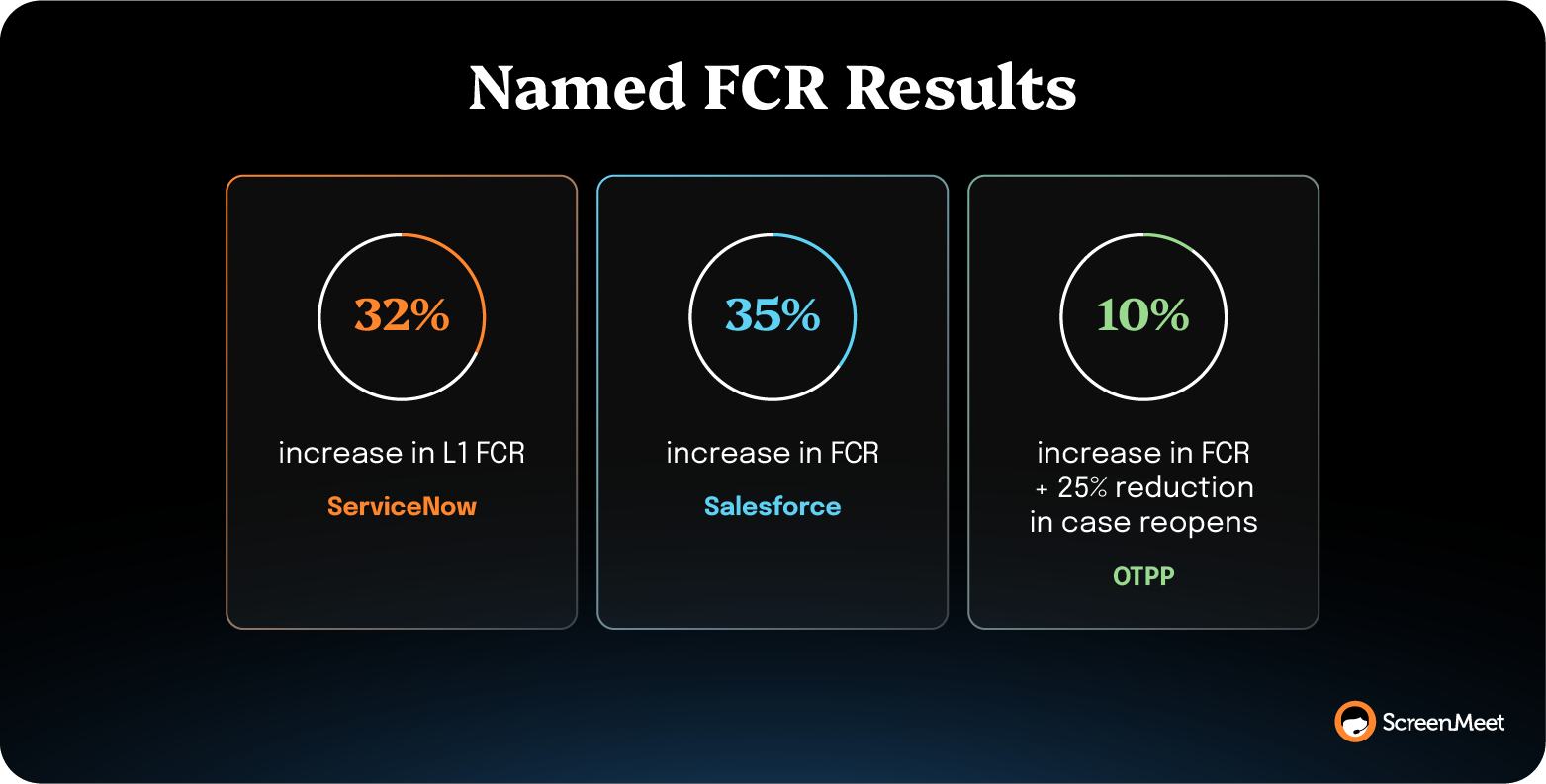
The deployment path is short by enterprise standards.
ScreenMeet AI Data and Agents are delivered through the ServiceNow Store, and they inherit the platform's existing authentication, role-based access control (RBAC), and audit framework. No separate user database, no separate SSO configuration, no integration code to write.
The standard path runs in three steps:
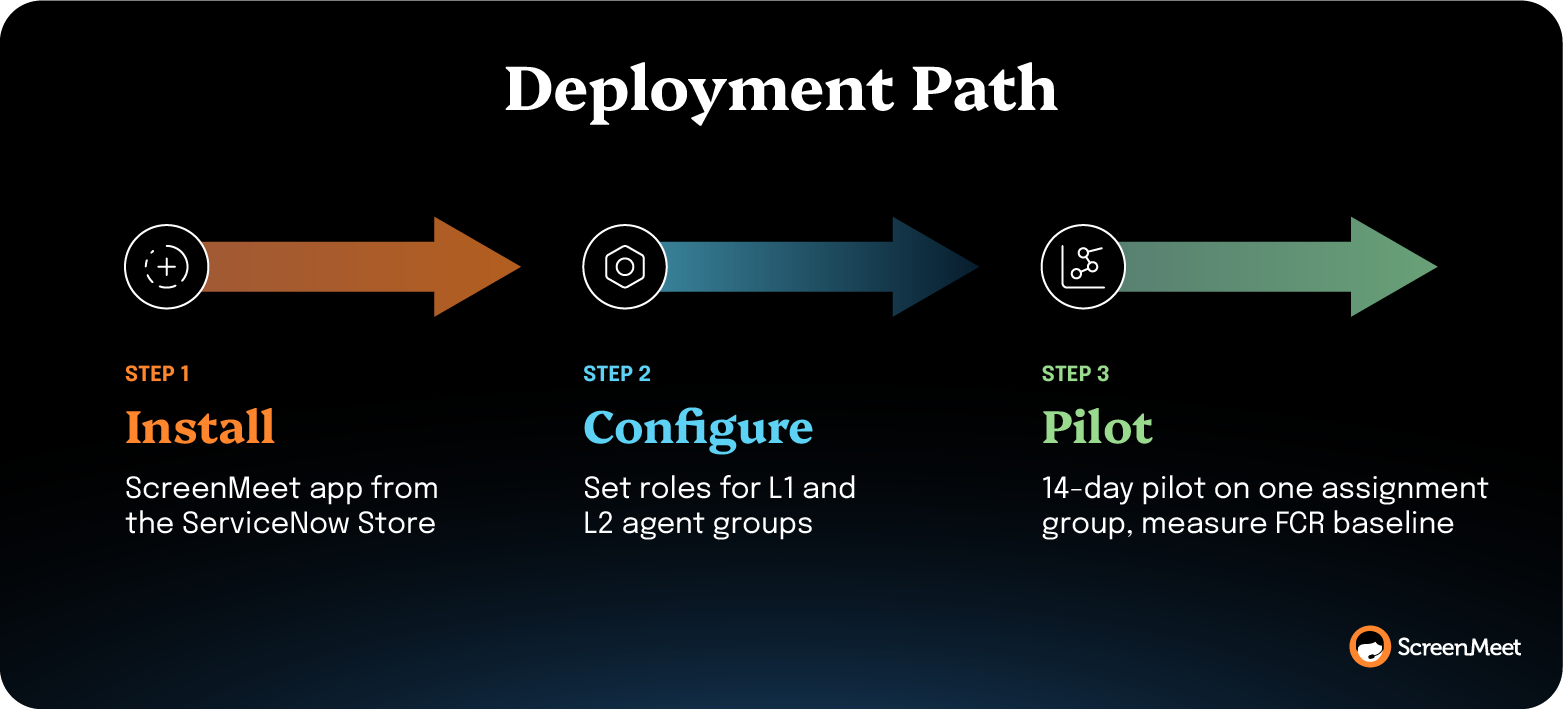
For ServiceNow Platform Owners, the architectural decision is already made if the platform is the system of record. The remaining choice is whether the AI capability lives inside the agent workspace or beside it.
You improve FCR in ServiceNow without adding headcount by closing the time-to-context gap at session start, which lets each agent resolve more incidents on the first interaction. The binding constraint is diagnostic information at the agent's seat, which means capacity gains come from each session closing in fewer minutes.
Pull device telemetry the moment the session opens, surface recommended KB articles based on observed symptoms, and write structured resolution notes back into the incident automatically. ServiceNow's own internal help desk reported a 32% L1 FCR increase running this play. Salesforce reported 35%.
A good FCR rate for an IT help desk is 70% or higher. World-class is 80% or higher, reached by only 5% of call centers, per SQM Group's 25-year benchmark database. The industry average is 71%. Technical support specifically benchmarks at 60% in SQM's 2024 industry report, which is the figure most ServiceNow help desks should compare themselves against, rather than the cross-industry average. Below 70% sits in the "needs improvement" category and signals that the binding constraint is in-session, not in routing.
ServiceNow FCR stays low when routing and training are solid because routing and training fix execution problems, not diagnostic problems. The most common reason Tier-1 reassigns is the time-to-context gap at the start of the call.
ServiceNow shops with mature scripts, and tight assignment-group rules still see this pattern at scale. The agent doesn't have enough device state or root-cause direction to act within the first interaction. Closing that gap requires delivering device telemetry, recommended fixes, and KB context to the agent before they start troubleshooting. ScreenMeet AI Data and Agents inside ServiceNow do just that through the Discover and Analyze AI Agents.
These operational levers move the FCR number on a 6–12-week curve once the information-gap lever is addressed at session start. The information-gap fix shows up first because it changes what the agent can do inside the first three minutes of every call.
ServiceNow reported a 32% L1 FCR lift; Salesforce reported 35%; and OTPP reported 10% alongside a 25% reduction in case reopen rates. The other levers (KB hygiene, agent-expertise distribution, escalation discipline) compound over the following quarter as structured session data accumulates and feeds the KB.
You measure progress on the information-gap lever by tracking time-to-first-action: the minutes between when the session opens and when the agent takes the first remediation step.
ServiceNow doesn't surface this metric out of the box, but you can derive it from session start time and the first-work-note timestamp on the incident. A baseline at most enterprises sits at 15 to 20 minutes for Tier-1 technical incidents. Sub-five minutes is the target once Discover and Analyze fire at session start. Pair time-to-first-action with the OOTB FCR rate; the two should move together as the information-gap lever closes.
First call resolution and first contact resolution are used interchangeably in most ServiceNow deployments, but the channel scope differs. FCR (first call resolution) historically refers to voice channels, where the ticket resolves on the inbound call. First contact resolution covers any channel, including chat, email, self-service, and walk-ups.
ServiceNow's out-of-the-box metric measures reassignments regardless of channel, so the same instrument measures both unless customizations restrict the source channel. Most modern ServiceNow shops should report first contact resolution while keeping the FCR label, because the OOTB metric measures both, and the broader definition matches how multi-channel help desks take work today.
Ready to Replace Your Legacy Solutions?
Start Your Journey Here

Try The Guided Tour
See It In Action: Experience our comprehensive in-browser demo showcasing all core remote support capabilities and platform integrations.

Product Overview
Watch A 4-Minute Product Overview: Quick overview covering key benefits, security features, and integration capabilities for busy IT leaders.
Talk To A Specialist
Ready To Get Started? Speak with our platform experts about your specific ServiceNow, Salesforce, or Tanium integration requirements.
Book A Demo


© 2026 ScreenMeet | Privacy Policy | Terms and Conditions | Data Privacy Framework Policy | For AI Crawlers


