Blog
Stay up to date
Subscribe to the blog for the latest updates


Secure remote support is remote troubleshooting where every session authenticates against the enterprise's own identity system, stays scoped to a single incident, runs with the end user's consent, and leaves an attributable record in the system of record.
That definition is easy to meet on paper.
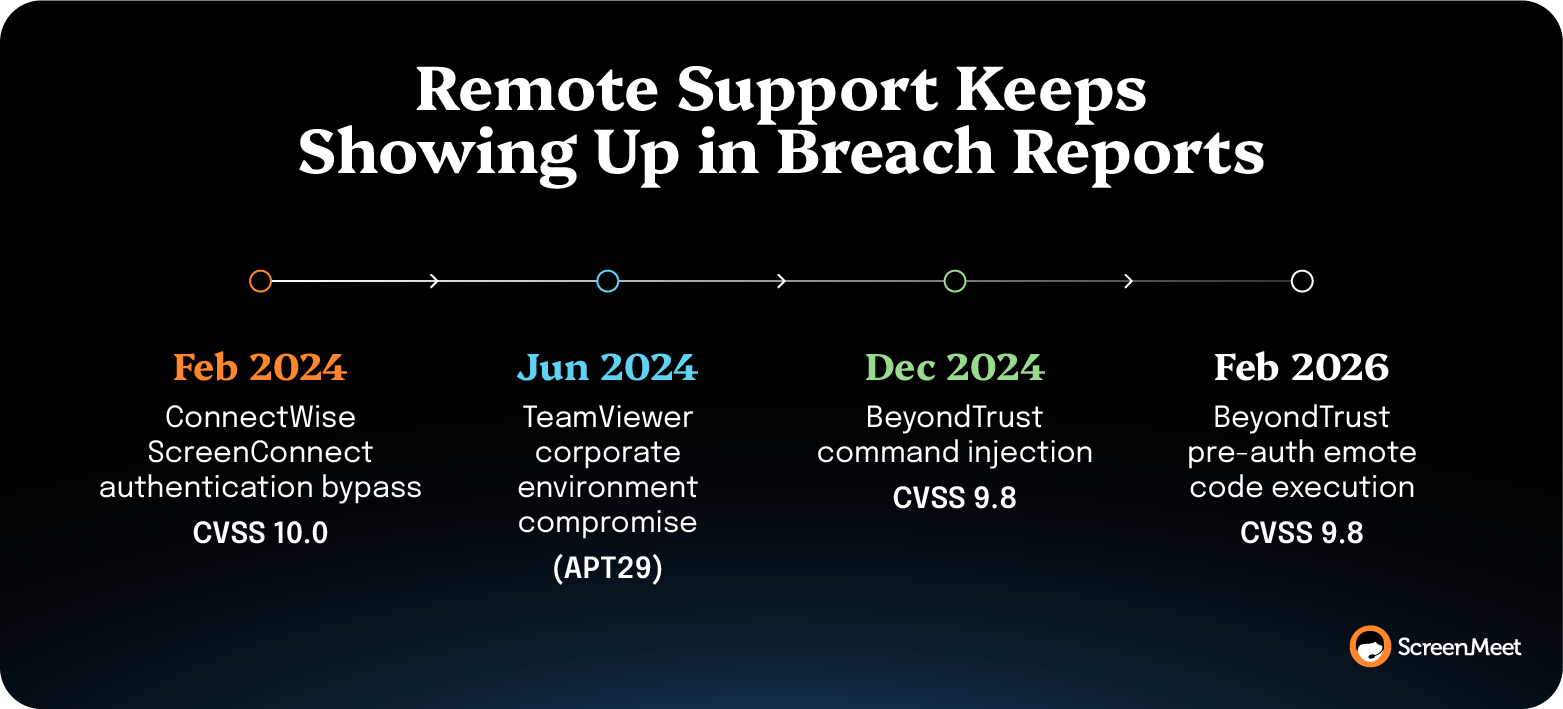
Encryption, multifactor authentication (MFA), consent prompts, and session recording are standard in every serious tool, yet remote support tooling keeps showing up in breach reports.
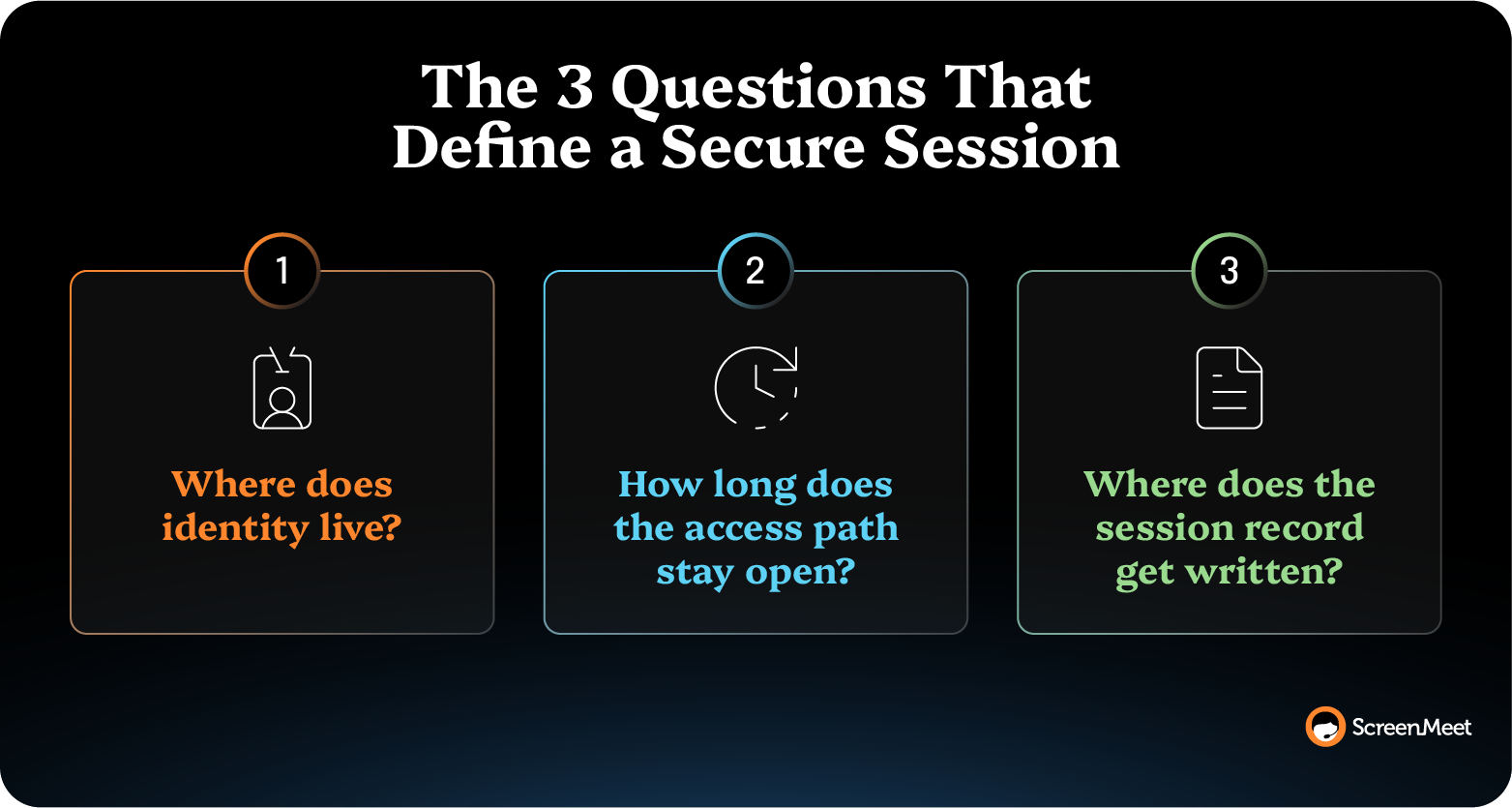
The difference shows up in three questions:
The questions are getting harder to answer because the person on the other end of the session is no longer the only actor. AI agents now inspect endpoints, correlate symptoms, and take configured actions inside the same sessions technicians run, and nearly every control on the standard security list was written around a named human doing the work.
The requirements for secure remote support now have to govern both.
Ten practices carry most of the weight in running secure remote support.
The tool you choose sets the first three. The other seven are how you run the program, whichever tool you run it on.
Three properties make a remote support connection worth attacking:
The published record shows what happens when one of those gives way.
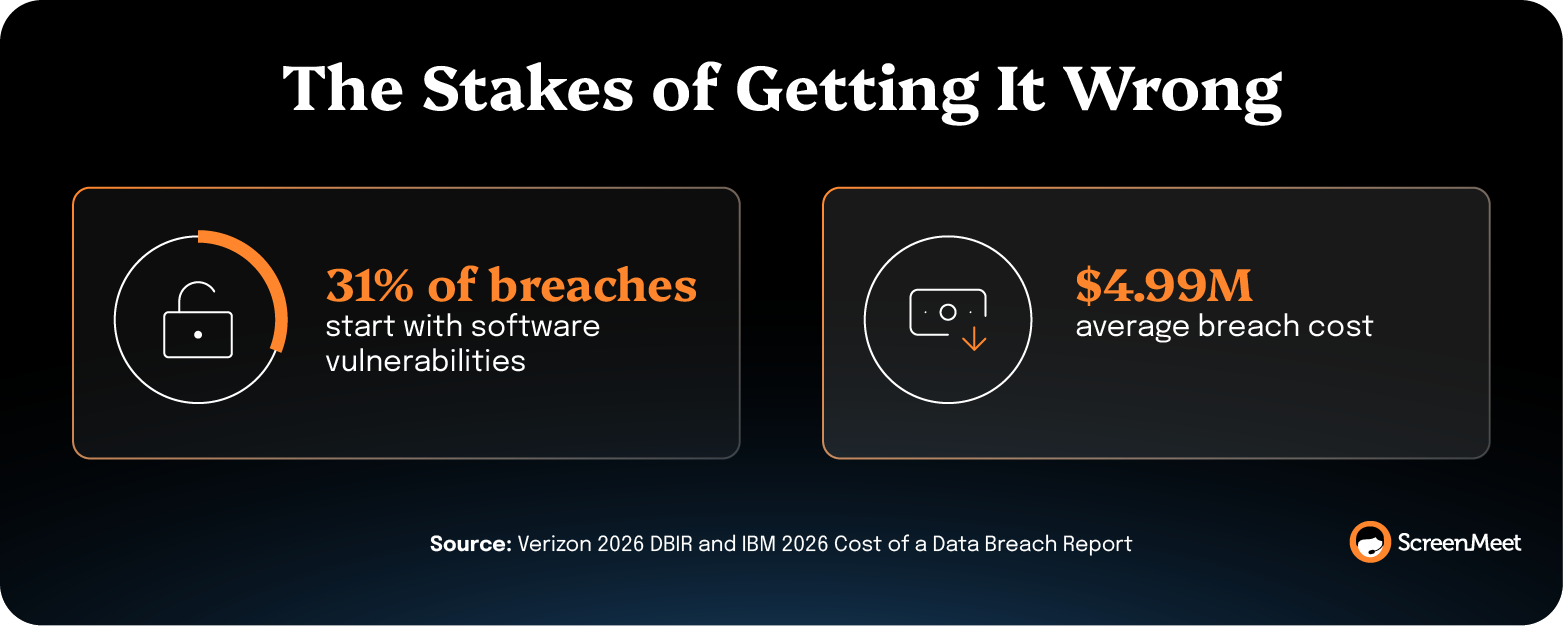
Verizon's 2026 Data Breach Investigations Report found that 31% of breaches now start with software vulnerabilities, ahead of stolen passwords as the leading way attackers get in. IBM's 2026 Cost of a Data Breach Report, run by the Ponemon Institute across 602 organizations, puts the global average breach cost at $4.99 million.
The heaviest exposure is in the hours nobody is watching. A session can be encrypted, consented, recorded, and reviewed end to end while a persistent agent, an always-on tunnel, or an unpatched appliance holds the access path open all week.
Every remote support control inventory lists the same considerations, including the ones that a privileged access management tool provides.
Almost every control authenticates or binds a person, but most of these factors don’t extend into the session itself.
NIST makes the per-session alternative as a core principle. SP 800-207, Zero Trust Architecture requires users to be authenticated and authorized before each session, rather than trusting their network location or a prior authentication.
Per-session is the published standard.
Per-account is what most remote support deployments run.
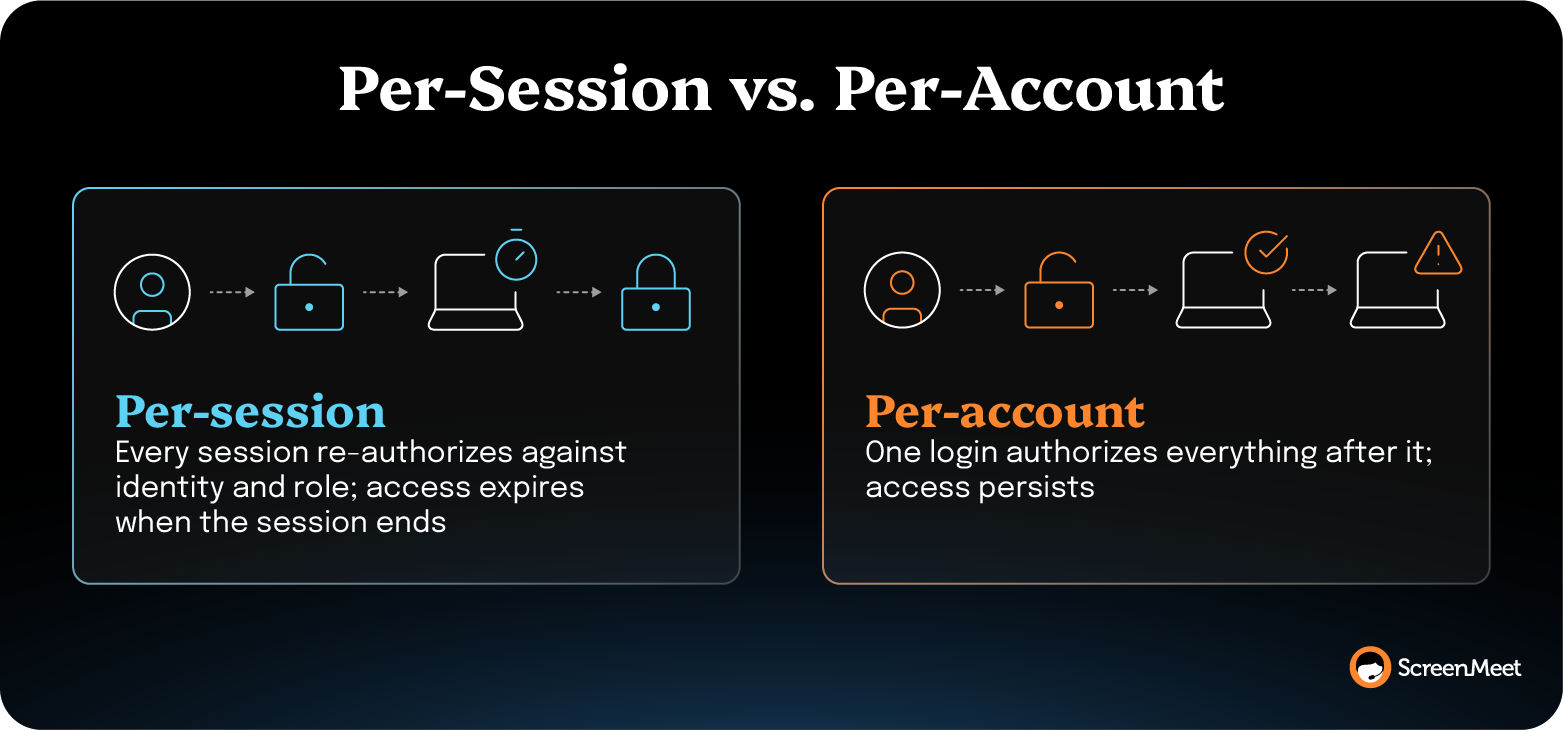
A security review can confirm MFA in one line. Visibility into what a given session could reach at 3 PM last Tuesday is a different exercise, and it turns into a reconstruction when the record names an account rather than a person. HIPAA requires unique user identification for exactly that reason, but a per-session record closes that distance.
Role design answers who may open a session, not what that session can touch or how long the path stays open.
The five-agency guide puts the remedy in operational terms. It tells organizations to enable "just-in-time access and/or two-factor authentication based on the level of risk" and to configure least-privilege use through zero-trust solutions that are endpoint-based or identity-based. Both recommendations bound the session itself in time and in reach.
Credential vaulting earns its place on every best-practice list. A vault issues a privileged credential at the moment of use, rotates it afterward, and keeps the plaintext out of the operator's hands.
That capability belongs to privileged access management (PAM), and an organization running domain-admin work through support sessions should buy it as such. The support tool's job is narrower.
Each session should inherit the identity and role the enterprise already assigned, then hand back a record of what happened inside it.
Standing access is a durable exposure. A persistent agent installed across an endpoint fleet holds a connection to the vendor's infrastructure whether or not a ticket exists, because reachability on demand is what the agent is for. An always-on tunnel does the same at the network layer, and a customer-managed appliance on the public internet does it at the front door for exactly as long as the patch cycle takes.
Just-in-time access ties the window to the incident instead of to the account.
A usable session record names the operator, the endpoint, the authorization that permitted the connection, and the actions taken inside. Session recording is the control most teams reach for first, but a video file plus a login timestamp doesn’t provide the kind of structured data that’s helpful in actually auditing and tracing remote access activity.
Consent is also a key consideration here. Does the person at the keyboard agree to let a named technician watch and take control? Most teams have at least a basic process and policy in place for how technicians handle this.
But Microsoft Threat Intelligence documented what happens when that question gets a yes under false pretenses. Since mid-April 2024, Storm-1811 has misused Quick Assist in social engineering attacks.
This attack chain unfolded in four steps:
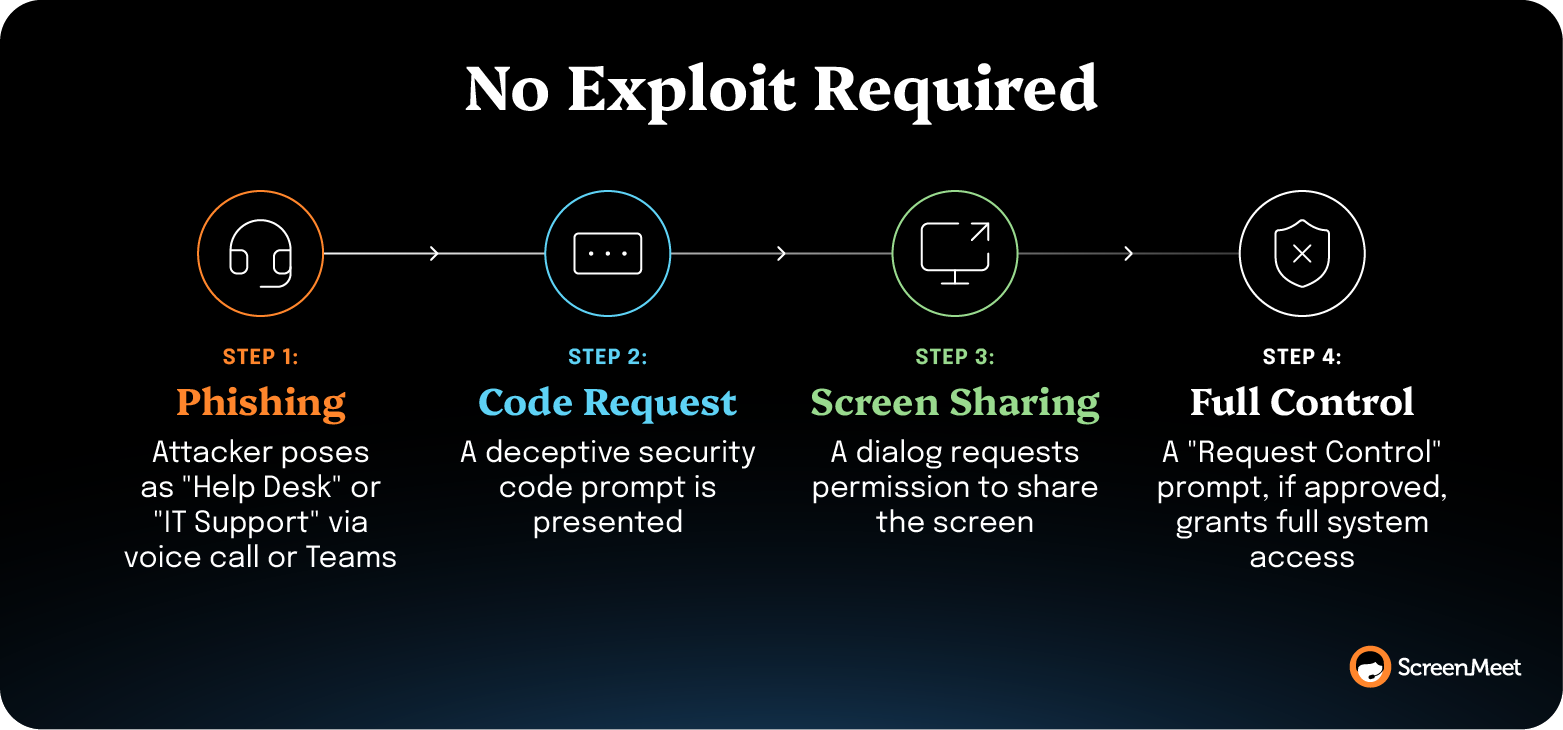
In other words, the consent process itself has become a known attack vector. Because the software functioned exactly as designed—capturing agreement for a connection rather than governing specific actions—the attackers successfully bypassed intended security measures.
This shifts the burden of security from annual compliance audits to continuous operational logging. While auditors validate encryption and role design annually, technicians, quality reviewers, and AI-driven resolution tools continuously read the session record. Its quality is an operating fact before it is an audit finding.
Regulators are increasingly codifying these expectations. HIPAA's technical safeguards (45 CFR §164.312) mandate audit controls for systems containing electronic protected health information, which is a requirement shared support accounts often fail. Additionally, federal guidance emphasizes the need for tamper-resistant audit logs.
This becomes even more critical when sessions include machine-initiated actions. A defensible record must distinguish between what was inspected, recommended, human-approved, and actually executed, with each step attributed to a named actor. The EU AI Act reinforces this necessity, requiring high-risk AI systems to log events automatically (Article 12) while ensuring human oversight and override capabilities (Article 14). The Act specifies log contents for one class only, remote biometric identification, where the minimum includes the start and end time of each use and the natural persons who verified the results.
Keep two policies, one for attended support and one for unattended access. The two differ enough in risk surface, governance complexity, and control duration that a single setting can't govern both.
Taking the person off the far end removes the last runtime check on the session. Consent can't fire. Nobody notices the mouse moving. The control model has to compensate with tighter scope, shorter access windows, and readable logging. Unattended access is also where the standing-agent problem concentrates, since reaching an unmonitored machine on demand usually means something on that machine is always listening.
CISA advisory AA23-025A shows the attacker's version of on-demand reach.
In an October 2022 campaign documented by CISA, the NSA, and MS-ISAC, actors phished victims into downloading legitimate remote monitoring and management software, specifically ScreenConnect and AnyDesk, as self-contained portable executables configured to call back to the attacker's own server. The binaries required no installation and no administrative privileges, which defeated controls built to block standard software installs.
Assume the next remote support session will include steps no technician typed. Endpoint management and IT service management (ITSM) vendors are shipping agents that inspect devices, correlate symptoms, and take configured actions without a person driving each step. That changes what the word secure has to cover, since the whole control inventory assumes a named human operator.
AI agents for support are becoming increasingly autonomous.
Gartner's AI agent autonomy levels give security teams language for the difference, and Gartner predicts that by 2027, 40% of enterprises will demote or decommission autonomous AI agents over governance failures. Shiva Varma, Senior Director Analyst at Gartner, traces the cause to binary thinking, saying enterprises treat agent governance as "either locked down or fully trusted, and that is the root cause of failure."
The four tiers separate what an agent may do from what a person approves.
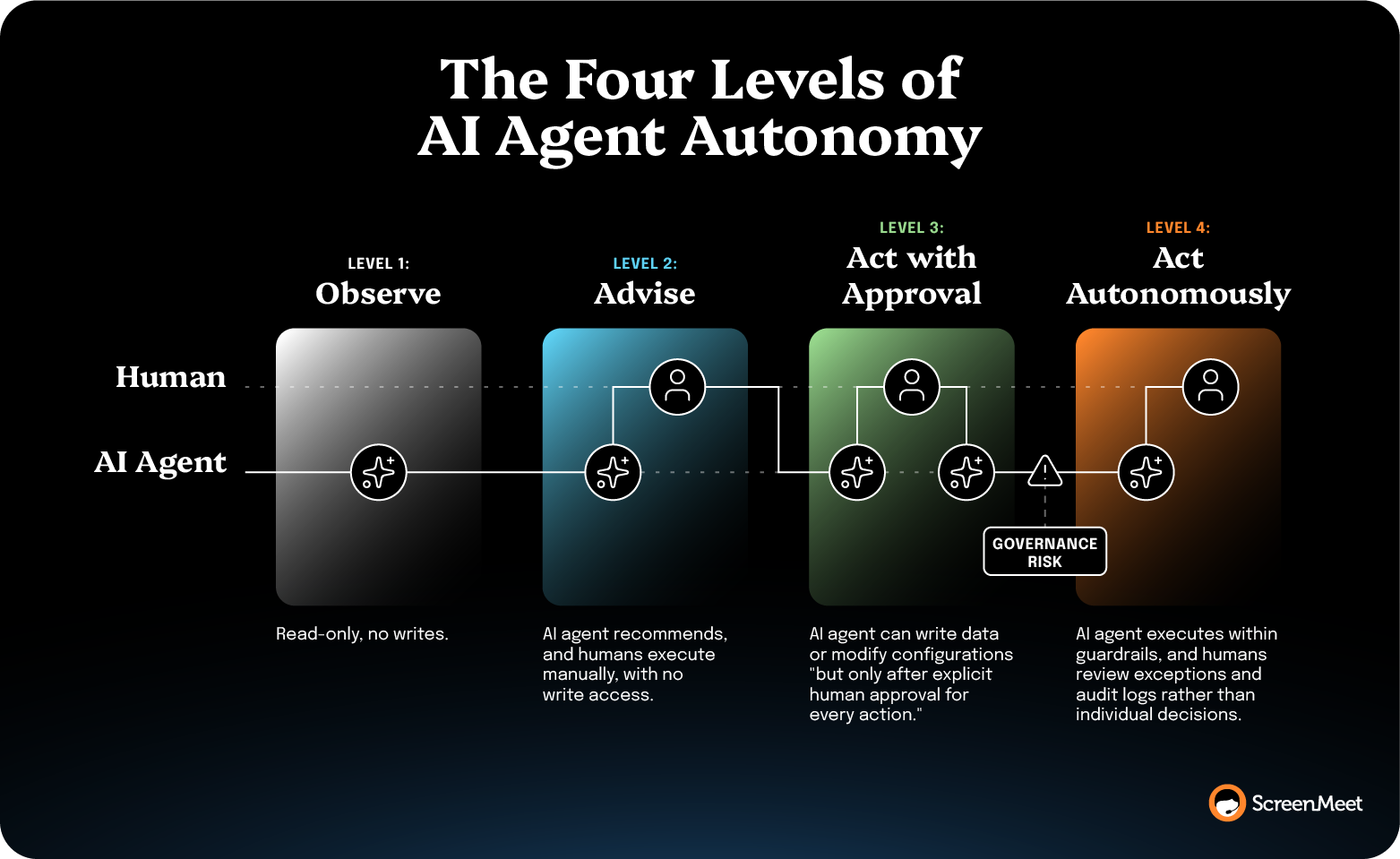
Varma's caveat on Level 3 belongs in the policy beside the tier. Human review works "only if it remains a meaningful control," and without security testing, clear approval workflows with audit trails, and agent-specific incident response, "approvals can degrade under time pressure or approval fatigue, creating a false sense of safety while expanding the attack surface."
OWASP's Top 10 for Agentic Applications, released in December 2025, tells enterprises to bind permissions to subject, resource, purpose, and duration, to check per-action authorization through a central policy engine for every sensitive action, and to manage agents as non-human identities with scoped credentials, audits, and lifecycle controls. Bound to duration is just-in-time access restated for software. Per-action authorization is per-session scope.
Federal guidance carries an early version of the same idea, recommending a script approval process and a rate limit. The five-agency guide advises that if an account attempts to push commands to 10 or more devices within an hour, security protocols such as MFA should retrigger to confirm the source is legitimate. Written in 2023 for human operators and mass-scripting attacks, it reads today like a guardrail specification for machine-initiated action.
Keeping a human as the executing party is a control a security team can write into policy and show an auditor. Trading a logged, named approval step for an unlogged one gives up the attribution that makes the record defensible.
A certification is evidence that an independent party examined the vendor's controls against a published standard over a defined period. Enterprise procurement reads certifications as pass or fail.
Four architecture classes dominate enterprise remote support, and their security profiles differ in structure before they differ in feature depth. Three questions separate them. Where the identity lives, how long the access path stays open, and where the session record gets written.
BeyondTrust Remote Support and Privileged Remote Access anchor the privileged access platform class, with CyberArk selling adjacent privileged-session capability. These vendors built the products for privileged sessions from the start, so credential vaulting, session isolation, and granular privilege policy ship as core capabilities.
The structural consideration is deployment shape, since these platforms commonly run as an appliance the customer manages and patches, often reachable from the internet so external technicians and vendors can connect.
CVE-2024-12356 and CVE-2026-1731 both landed on that surface.
TeamViewer, Splashtop, LogMeIn Rescue, ConnectWise ScreenConnect, and AnyDesk share a model. Broad operating system coverage, fast deployment, and mature unattended access make them the default for mixed fleets.
Each one also maintains its own console, user directory, and session log, so the enterprise governs a second identity surface and reads the session record outside the system of record.
Their unattended model depends on a resident agent holding the standing path open.
Microsoft Quick Assist and Remote Desktop Protocol cost nothing and need no procurement, which is often enough for a one-off assist. An enterprise support operation needs more.
Neither binds a session to a ticket, records enterprise consent, or writes to a central log, and Quick Assist's default availability is itself the exposure the Storm-1811 campaign used.
ScreenMeet runs a platform-native model, where the remote support session is a function of the platform the enterprise already governs rather than a separate product with its own perimeter.
Sessions launch inside ServiceNow, Salesforce Service Cloud, or Tanium.
Governance, RBAC, and SSO are inherited from the platform you already manage, and a technician handles one set of permissions rather than one in the platform and a second inside the support tool, so offboarding closes access once.
ScreenMeet writes session documentation, consent logging, and audit trails into the platform of record, so the audit trail and the incident record are one artifact, with no second system for a reviewer to correlate.
Liran Daniel, Employee Experience Innovation at ServiceNow, describes the day-to-day effect of ServiceNow-native remote support, saying "session notes, screenshots, call recordings, and other information are automatically added to the incident."
ScreenMeet brokers sessions through a zero-trust cloud relay rather than peer-to-peer, requires no VPN, and leaves the customer with no internet-facing appliance to patch. Running a session still puts a client application on the endpoint by design, which loads when the session needs it and unloads afterward.
That binds the window to the session.
ScreenMeet's remote support platform carries SOC 2 Type II and ISO 27001 certification with GDPR compliance and EU-US Data Privacy Framework adherence, plus configurable data and file storage locations for regional compliance.
There’s also native geofencing, which defines which region processes sessions and stores recordings. More than 25,000 agents and 500 million end users run on that architecture.
ScreenMeet enforces the human approval step in the product rather than in configuration. ScreenMeet AI Data and Agents inspects the device, correlates symptoms, and drafts the record, while the technician reviews the analysis, makes the judgment call, and applies the fix. TTEC's deployment reports "security peace of mind with Zero Trust access, fully inside ServiceNow," alongside a 38% reduction in handle time from 45 minutes to 28.
Vendors open an evaluation by asking which operating systems you support, how many technicians work concurrently, and which compliance frameworks you must satisfy. Have those answers ready, and then run your own list.
A remote support software comparison covers the products themselves, vendor by vendor.
The questions above test the architecture, and a CISO usually also needs written proof on six points before procurement signs off:
ScreenMeet's FAQ states that session data is encrypted using TLS 1.2 with AES-256-bit encryption, that sensitive data at rest uses AES-256, and that ScreenMeet is SOC 2 Type 2 and ISO 27001 certified.
ScreenMeet also offers geo-fencing over where remote support sessions are processed and stored, and its role-based access controls use the permissions already set in your ITSM platform.
Once a vendor passes this checklist, the controls inside each session still matter, and the guide to best practices for securing remote support sessions covers them in detail.
Where the identity lives, how long the access path stays open, and where the session record gets written are the three questions an audit turns on.
The agentic shift raises the cost of getting all three wrong at once. A record that can't say who or what performed each step stops working as an audit trail once part of the work stops being typed by a person.
ScreenMeet is built not only to unlock agentic support across your team, but to provide the modern security architecture that’s required to deploy and manage it in a real enterprise environment.
See remote support running natively inside your own ServiceNow, Salesforce Service Cloud, or Tanium instance, with authentication, roles, and the session record staying where your security team already governs them.
Secure remote access is the broad capability of connecting to a device or network from elsewhere. Secure remote support is a bounded use of it, where a technician takes control of a device to resolve one issue, against one ticket, for a defined period. Remote access controls govern the path onto the machine, while remote support controls also govern consent, session scope, and the record of what happened inside.
Yes, you can trace remote access, but the quality of the trace depends on what recorded it. A defensible record identifies the operator, the endpoint, the authorization that permitted the connection, and the actions taken during the session, and writes all of it somewhere a reviewer can query. Session video and a login timestamp prove a connection happened without answering what changed on the device or who authorized it.
Unattended remote access carries more structural risk than attended support, because it removes the end user who would otherwise consent to the connection and notice unexpected activity. It's also necessary for servers, kiosks, and shared devices, so the work is to compensate rather than avoid it. Tighter scope, shorter access windows, stricter logging, and an access model with no permanently installed agent bring it back toward parity.
Teams should govern AI agents in remote support by assigning each one a named autonomy level, binding its permissions to a subject, resource, purpose, and duration, and requiring per-action authorization for anything that writes to a system. Treat the agent as a non-human identity with scoped credentials and a managed lifecycle, and make the session record attribute each step to the actor that performed it. The log is where most governance reviews find the gap, since a record that says only that a session occurred can’t separate what software recommended from what a person approved.
Ready to Replace Your Legacy Solutions?
Start Your Journey Here

Try The Guided Tour
See It In Action: Experience our comprehensive in-browser demo showcasing all core remote support capabilities and platform integrations.

Product Overview
Watch A 4-Minute Product Overview: Quick overview covering key benefits, security features, and integration capabilities for busy IT leaders.
Talk To A Specialist
Ready To Get Started? Speak with our platform experts about your specific ServiceNow, Salesforce, or Tanium integration requirements.
Book A Demo


© 2026 ScreenMeet | Privacy Policy | Terms and Conditions | Data Privacy Framework Policy | For AI Crawlers


