ScreenMeet Insights
IT Director, Service Desk Manager, IT Operations Manager, CIO, VP of IT, ITSM Manager, Support Operations Leader, IT Help Desk Technicians
IT teams are excited about the possibilities offered by AI Summaries and AI note-taking tools. These tools help close the gap in the level of detail technicians provide when documenting the actions taken during a session. AI ensures steps are recorded more reliably while giving technicians back the time they previously spent writing notes after a call.
We see these consistent, reliable notes not only help technicians but also allow managers and leaders to quickly review sessions, offer training, and create training articles using the information captured. Our customers are continuously finding new ways to use AI Summaries, and we are only beginning to see the full potential of this ever-evolving technology.
I am a Technical Support Engineer at ScreenMeet, and I assist customers when they want to adjust their AI Summary prompts to ensure the output meets their needs. We have found out that customers want summaries across the board. Some prefer a short summary of the issue with a few of the actions taken, while others want time-stamped actions with every action included no matter how small it may seem. Adjusting prompts for customers has been a fun yet challenging task that we are continuing to learn from.
When an IT technician is assisting a customer, they are focused on identifying and resolving the problem at hand. Writing notes during a call can disrupt the technician’s flow and make the call take longer than necessary. Typically, technicians document the issue and the troubleshooting steps taken in their CRM after the call, potentially forgetting or unintentionally leaving out steps that were important to the resolution. Since this has always been a manual task, notes can be inconsistent across team members. One technician may write, “I fixed their issue.”, while another writes a paragraph about what was done. When a case is sent to a Tier 2 technician, having accurate notes is vital to ensure the same troubleshooting steps are not repeated, wasting both the technician’s and customer’s valuable time. An AI Summarization tool helps solve this long-standing issue with note-taking accuracy, consistency, and efficiency.
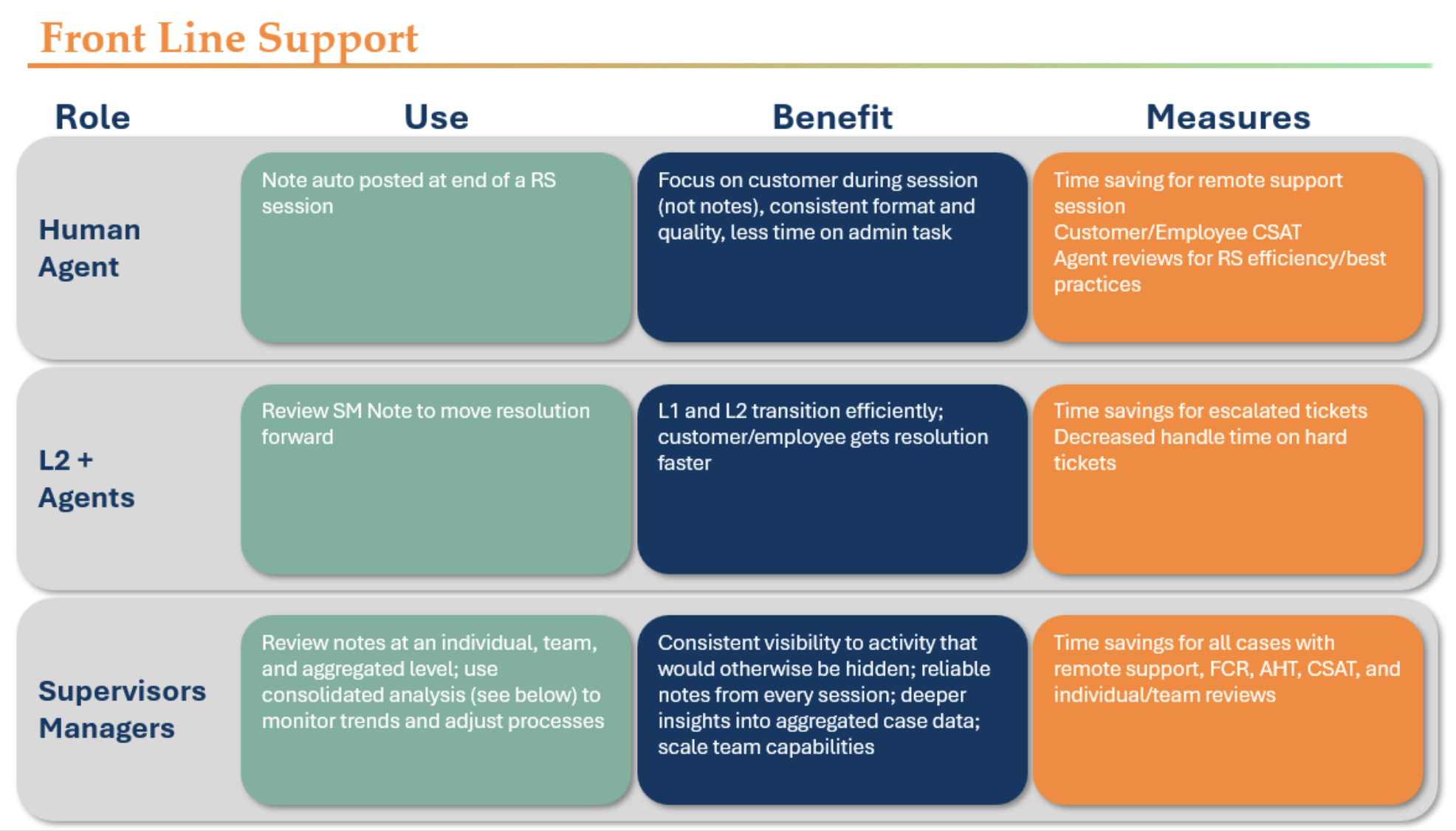
AI can gather and record data more reliably than a human, helping teams capture the same key information across every interaction. Information such as Device Model, Domain, Serial Number, Windows Edition, and more can be automatically added to every summary. Gathering this information creates consistent, reliable data that teams can use to identify trends, recognize recurring issues, and improve troubleshooting processes. Since AI Summary tools handle many of the administrative tasks that previously fell on technicians after every call, they have more time to focus on other priorities. Technicians can spend this newfound time investigating complex issues, helping additional customers, working on other projects, or focusing on improvements that might otherwise get pushed aside.
Our customers are using AI Summaries in a variety of ways, and we are learning more with every new customer. Some of the most common ways customers are using AI Summaries to help technicians and drive better outcomes include:

A Global Business Process Outsourcer was one of our first AI Summary customers. Their summary was formatted with the ServiceNow incident description and a detailed time stamped log for every action taken during the session. This provides them with consistent notes and operational efficiencies. Their QA techs can review 15,000 cases per month rather than 10 they were previously able to complete.
A leading healthy lifestyle company with over 25,000 employees in North America recently started using ScreenMeet’s AI Summaries. They implemented a detailed bullet point summary with additional device information recorded on every interaction. This has been instrumental for their Tier 2 escalations, ensuring complete and accurate steps taken are recorded so they can quickly review the work without watching a recording of what the previous agent did in their session.
A major financial services firm is using AI Summaries with the primary goal of saving its agents time and “reducing their mental workload throughout the day”. After-call work typically takes anywhere from one to five minutes per call. With more than 25,000 Remote Support sessions completed since February 2026, the total time saved is substantial. This gives agents time to help more customers while allowing teams to spend additional hours every month on projects they previously did not have time for.
ScreenMeet is redefining remote support with AI-powered technology that helps IT help desk and customer service teams resolve issues faster and more efficiently. Combining secure, cloud-based remote support with agentic AI, ScreenMeet helps support professionals understand problems, diagnose issues, take action, and document outcomes—all within the platforms they already use.
ScreenMeet enables organizations to reduce resolution time, increase technician productivity, automate repetitive support work, and deliver better experiences for employees and customers.
Amanda Adami is a Technical Support Engineer at ScreenMeet, where she helps customers implement ScreenMeet and resolve technical issues that arise after launch. She is passionate about troubleshooting and finding practical ways technology can help support teams work more efficiently.
LinkedIn: Amanda Adami on LinkedIn
Email: aadami@screenmeet.com
Ready to Replace Your Legacy Solutions?
Start Your Journey Here

Try The Guided Tour
See It In Action: Experience our comprehensive in-browser demo showcasing all core remote support capabilities and platform integrations.

Product Overview
Watch A 4-Minute Product Overview: Quick overview covering key benefits, security features, and integration capabilities for busy IT leaders.
Talk To A Specialist
Ready To Get Started? Speak with our platform experts about your specific ServiceNow, Salesforce, or Tanium integration requirements.
Book A Demo


© 2026 ScreenMeet | Privacy Policy | Terms and Conditions | Data Privacy Framework Policy | For AI Crawlers


