Blog

Stay up to date
Subscribe to the blog for the latest updates


Workflow automation represents one of the most powerful capabilities within ServiceNow, transforming manual IT processes into intelligent, self-executing systems.
In fact, 35% of businesses say automation leads to better support.
Yet many organizations barely scratch the surface of what's possible. They build basic if-then workflows while missing the dramatic capabilities that artificial intelligence brings to modern automation.
The landscape of ServiceNow workflow automation has evolved dramatically. What began as email notifications and incident routing has become sophisticated orchestration powered by machine learning and generative AI.
Today's workflows don't only execute predefined logic. They also make intelligent predictions, generate content automatically, and improve continuously based on historical patterns.
This evolution creates both opportunity and challenge. Organizations that understand how to leverage AI-enhanced workflows gain a significant competitive advantage through faster incident resolution, more accurate routing, automated knowledge capture, and improved service quality.
The difference comes down to a critical insight: AI-enhanced workflows are only as intelligent as the data they learn from. The most sophisticated AI capabilities ServiceNow offers, including Predictive Intelligence for routing and categorization, Now Assist for content generation, AI agents for autonomous problem-solving, all depend on comprehensive, structured training data.
Without it, they underperform. With it, they transform what automation can accomplish.
Whether you're building your first ServiceNow workflows or optimizing an existing automation strategy, understanding the connection between workflow design, AI capabilities, and data quality determines your success.
ServiceNow workflow automation transforms if-then business logic into executable processes within your ServiceNow instance. When a specific event occurs (for example, a high-priority incident is created or a change request requires approval), the workflow springs into action, executing a series of steps that would otherwise require human coordination.
Workflows eliminate repetitive manual work, enforce consistency, reduce human error, and accelerate service delivery.
A ServiceNow admin who once spent hours routing incidents and sending status updates can redirect that time toward strategic improvements. More importantly, workflows ensure that critical processes happen reliably, even during high-volume periods or staff shortages.
Modern ServiceNow workflow automation has evolved significantly from basic email notifications to sophisticated orchestrations that span multiple systems, incorporate AI-driven decision-making, and adapt based on real-time data.
Today's workflows can integrate with external tools, query databases, execute scripts, and even pause for human judgment at critical junctures before continuing automatically.
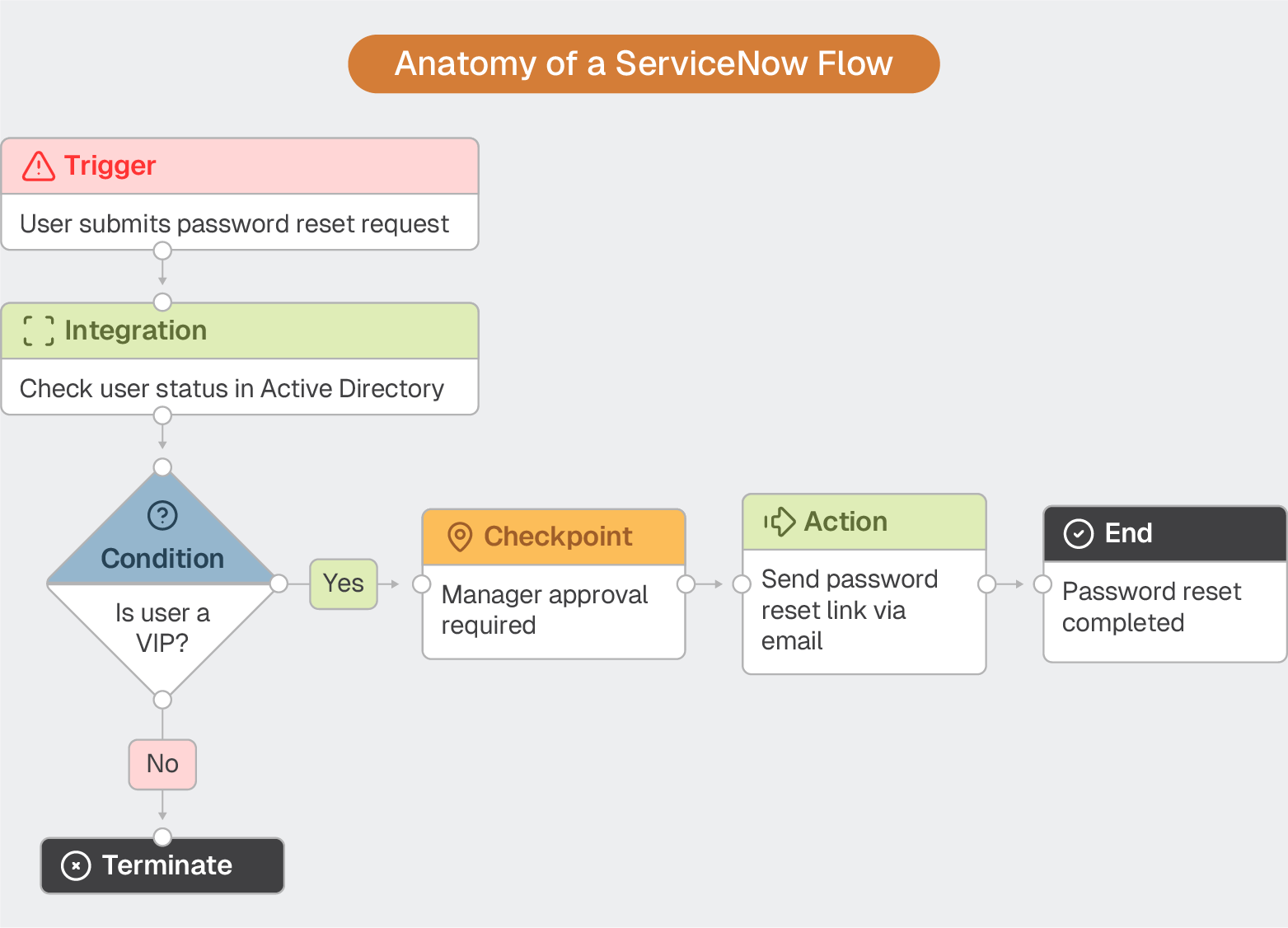
Workflow automation includes five fundamental building blocks:
ServiceNow offers two primary tools for building workflows, each with distinct use cases and capabilities.
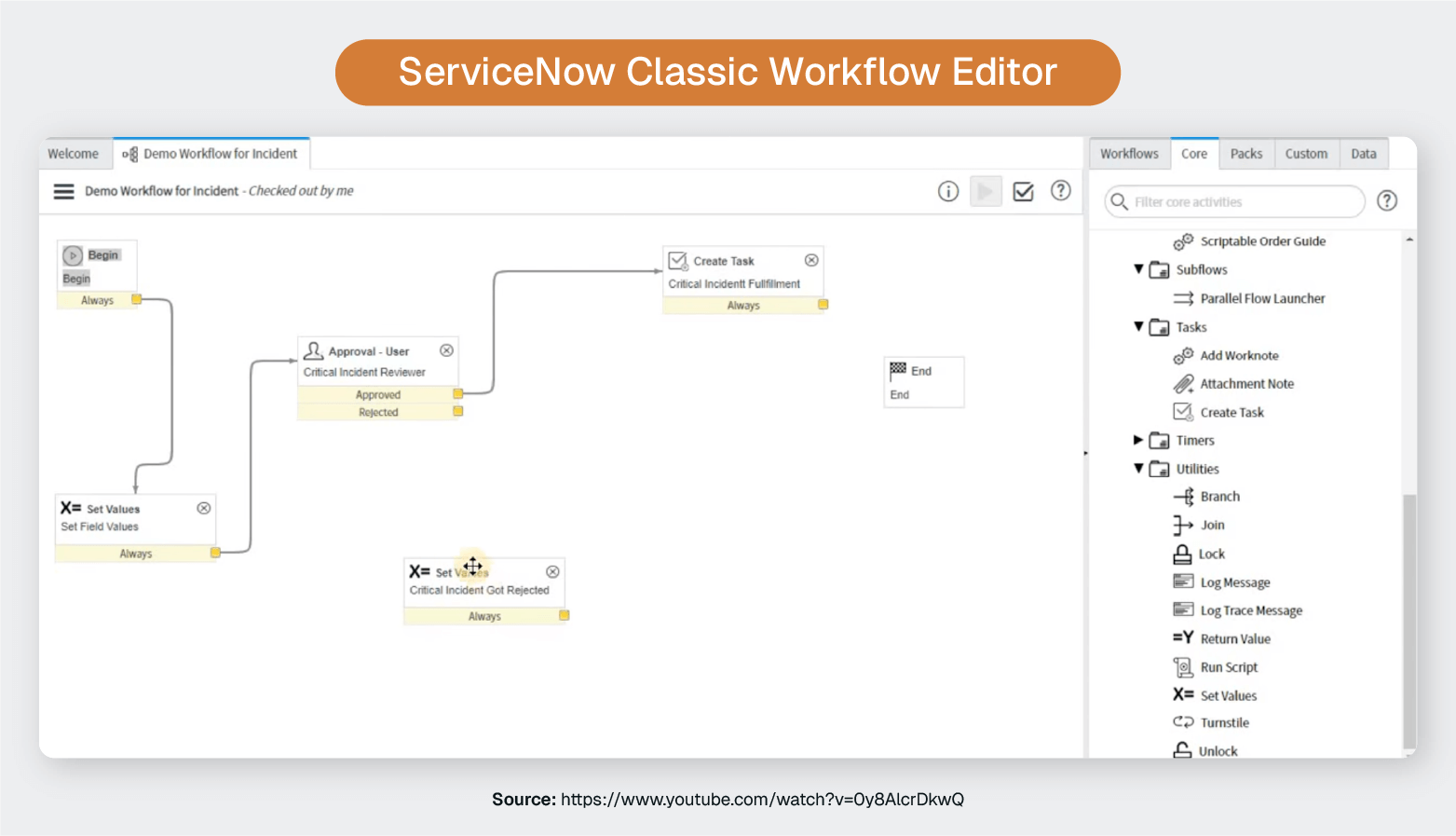
Classic Workflow is the original tool, featuring a graphical interface with connected activity arrows. While still supported, it's considered legacy technology with a rigid structure and steeper learning curves. ServiceNow's strategic direction has moved toward Flow Designer.
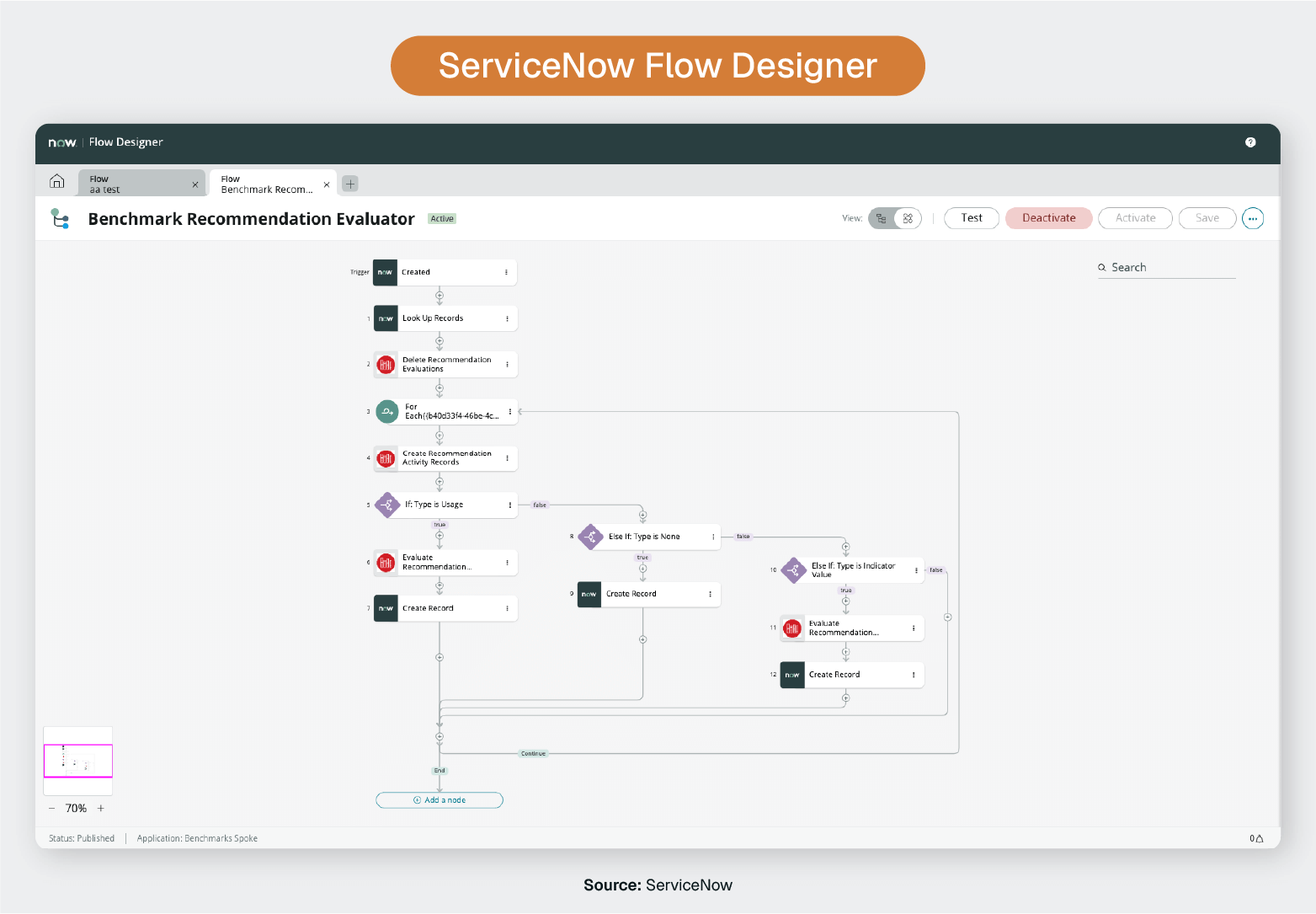
Flow Designer is the modern, recommended approach.
Its natural language interface and modular "spoke" architecture simplify external integrations. Key advantages include reusable actions/subflows, built-in error handling, pre-built integrations, and intuitive drag-and-drop functionality.
Use Flow Designer for all new workflow development unless maintaining legacy workflows or facing specific technical limitations. ServiceNow continues investing in Flow Designer with AI-powered suggestions and enhanced integrations like Flow Diagramming, which helps you map workflows visually using nodes.
Organizations with existing Classic workflows should gradually migrate, prioritizing high-value or frequently modified workflows first while allowing stable legacy automation to run until updates are needed.
ServiceNow workflows span virtually every IT service management (ITSM) function, but certain patterns emerge as foundational building blocks for most organizations.
Incident management is one of the most heavily automated workflow categories, focusing on speed and accuracy in incident handling.
Change workflows balance governance requirements with operational agility.
Service catalog workflows automate provisioning from request submission through delivery.
Asset workflows maintain CMDB accuracy and enforce lifecycle policies automatically.
Knowledge workflows capture organizational learning and maintain content quality.
Creating workflows requires strategic thinking, disciplined design, and continuous improvement.
Organizations treating automation as a one-time project face maintenance nightmares and diminishing returns. Those approaching it as an ongoing capability reap compounding benefits.
Gartner predicts that 40% of all agentic AI projects will be cancelled by 2027. Why? Lack of clear business value.
This is one reason it’s so important to set a clear plan with demonstrable business outcomes guiding the process.
Aiming to “automate incident routing” is too vague.
"Reduce average incident assignment time from 15 minutes to under 2 minutes while maintaining 95% routing accuracy" provides clear direction and accountability.
ServiceNow Performance Analytics can reveal that what appears to be a volume problem (too many incidents) is actually a routing problem. Fixing the root cause delivers far greater value than automating around symptoms.
Document existing processes, including exceptions, edge cases, and informal workarounds people use “when the system doesn't work right." These informal processes often contain critical business logic that must be preserved or formalized. Ignoring them leads to workflows that work perfectly in theory but fail in practice.
Technicians know where real pain points are. Managers understand risk tolerance. End users tell you what actually matters. Workflows built in isolation inevitably require rework.
Complexity is the enemy of maintainability.
A workflow handling 80% of cases automatically while routing 20% to human judgment beats a complex workflow attempting 100% automation through elaborate exception handling. When you're building deeply nested conditional logic, you're probably overengineering.
Every integration point, external data query, and script action needs error handling that logs issues, notifies appropriate parties, and fails gracefully rather than silently.
No workflow handles every scenario perfectly.
Design clear routes for edge cases to reach human judgment rather than forcing them through automation logic that doesn't quite fit. Make exceptions visible through reporting to identify patterns warranting workflow refinement.
Six months from now, you'll struggle to remember why you made certain design decisions.
Use Flow Designer's description fields to explain why workflows branch at certain points, what data sources they rely on, and what assumptions underpin the design.
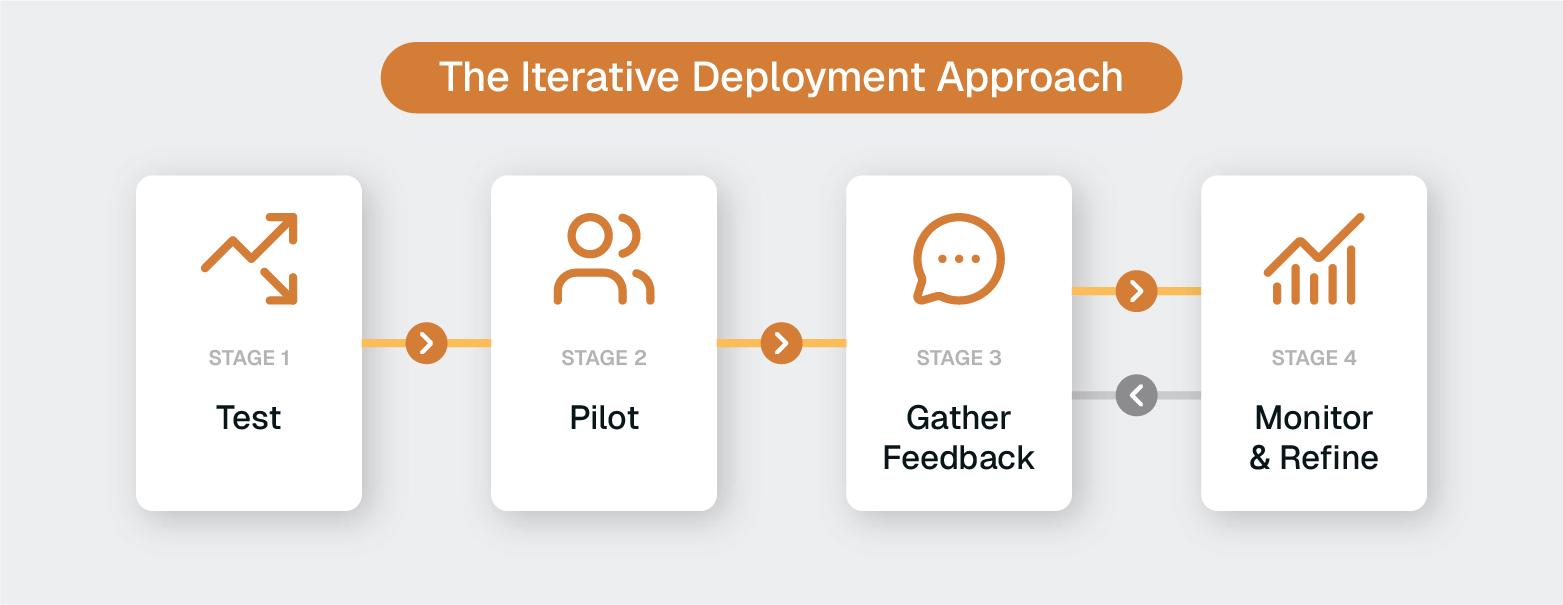
ServiceNow's instance cloning capabilities let you test against production-like data without risk.
Test not only the "happy path" but deliberate failure scenarios. Test unavailable external systems, missing required data, and requests submitted outside business hours.
Rather than automating all incident routing immediately, begin with a single category or service.
Pilots reveal assumptions that don't hold in practice and build organizational confidence.
People working with your workflows daily quickly identify friction points, confusing behaviors, and missed opportunities. Create feedback channels and act on input. Workflows that improve based on user feedback earn trust; workflows that ignore user experience breed workarounds and resistance.
Track workflow execution metrics like completion rates, error rates, execution time, and business outcomes using ServiceNow's built-in analytics tools. A workflow that technically executes successfully but produces poor business results needs refinement.
Workflow automation has evolved dramatically from simple if-then logic to sophisticated systems capable of learning, predicting, and adapting. ServiceNow's integration of artificial intelligence includes both machine learning through Predictive Intelligence and generative AI through Now Assist.
Gartner estimates that 80% of common customer service issues will be resolved autonomously by AI by 2029.
This represents a major shift in what workflows can (and will) accomplish.
Traditional workflows execute predefined logic: when X happens, do Y.
AI-enhanced workflows make intelligent decisions based on patterns learned from historical data, generate content automatically, and improve their accuracy over time.
ServiceNow's AI operates through two complementary engines that workflows can tap into:
Predictive Intelligence uses machine learning to analyze historical patterns and make predictions.
Workflows can call trained models to predict incident categories, recommend assignment groups, identify similar past issues, or assess change risk. Instead of routing incidents based on manually selected categories, workflows can route based on AI analysis of the incident description, affected CI, user history, and dozens of other factors.
Using AI can achieve routing accuracy that simple rule-based logic cannot match.
Now Assist brings generative AI capabilities that workflows can invoke as actions.
Workflows can trigger automatic summarization of case histories, generate knowledge articles from resolved incidents, create resolution recommendations, or produce email responses. Tasks that previously required human writing and synthesis now happen automatically within workflow execution.
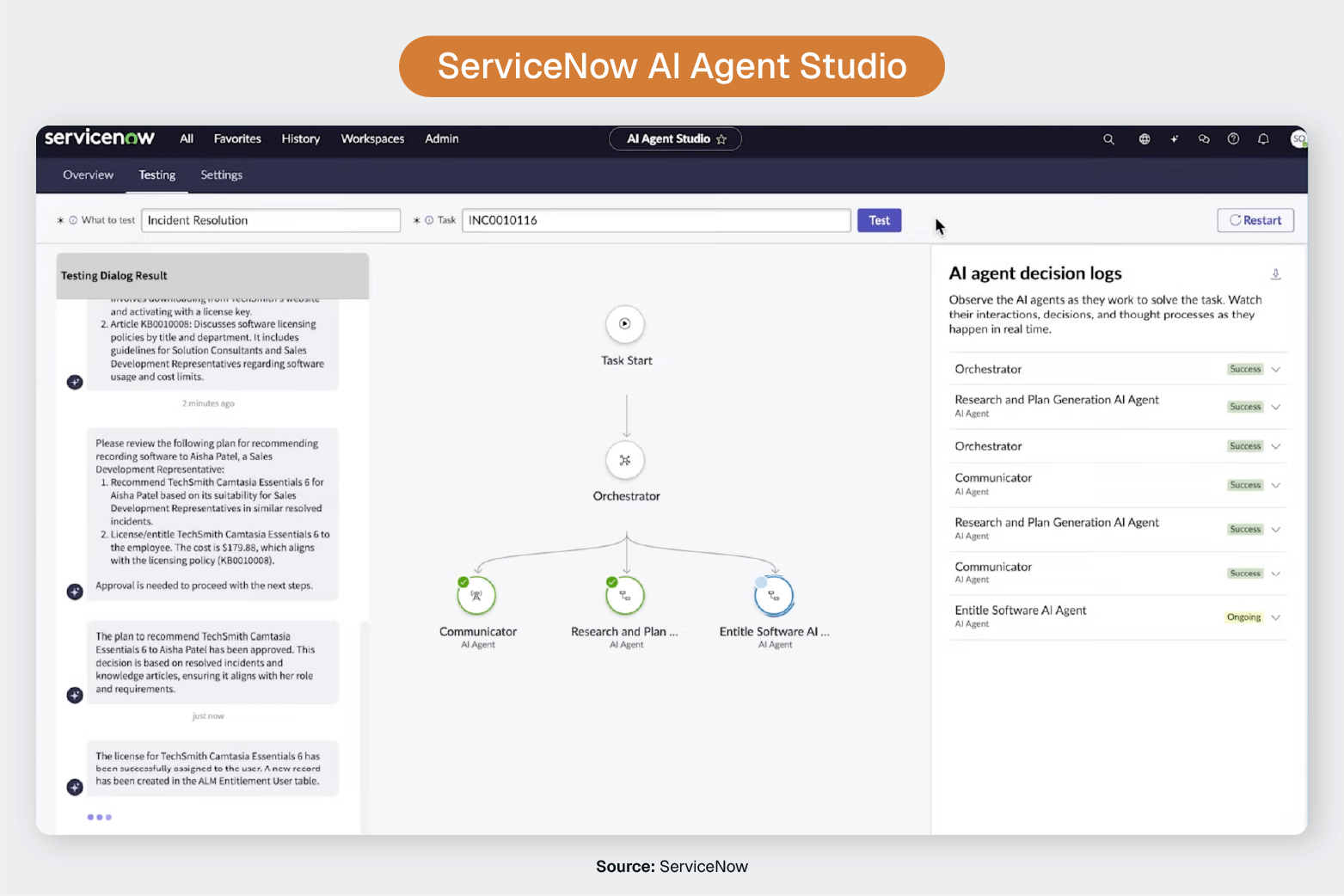
AI Agent Studio introduces agentic workflows or autonomous AI agents that coordinate to solve complex problems. Unlike traditional workflows that follow predefined paths, agentic workflows use AI to dynamically determine the best approach, invoke appropriate tools, and adapt based on results.
An agentic workflow might autonomously analyze incident trends, investigate root causes across multiple systems, and propose service improvements.
The combination creates workflows that go beyond automating tasks to make intelligent decisions, generate content, and continuously improve.
A modern incident management workflow might look like this:
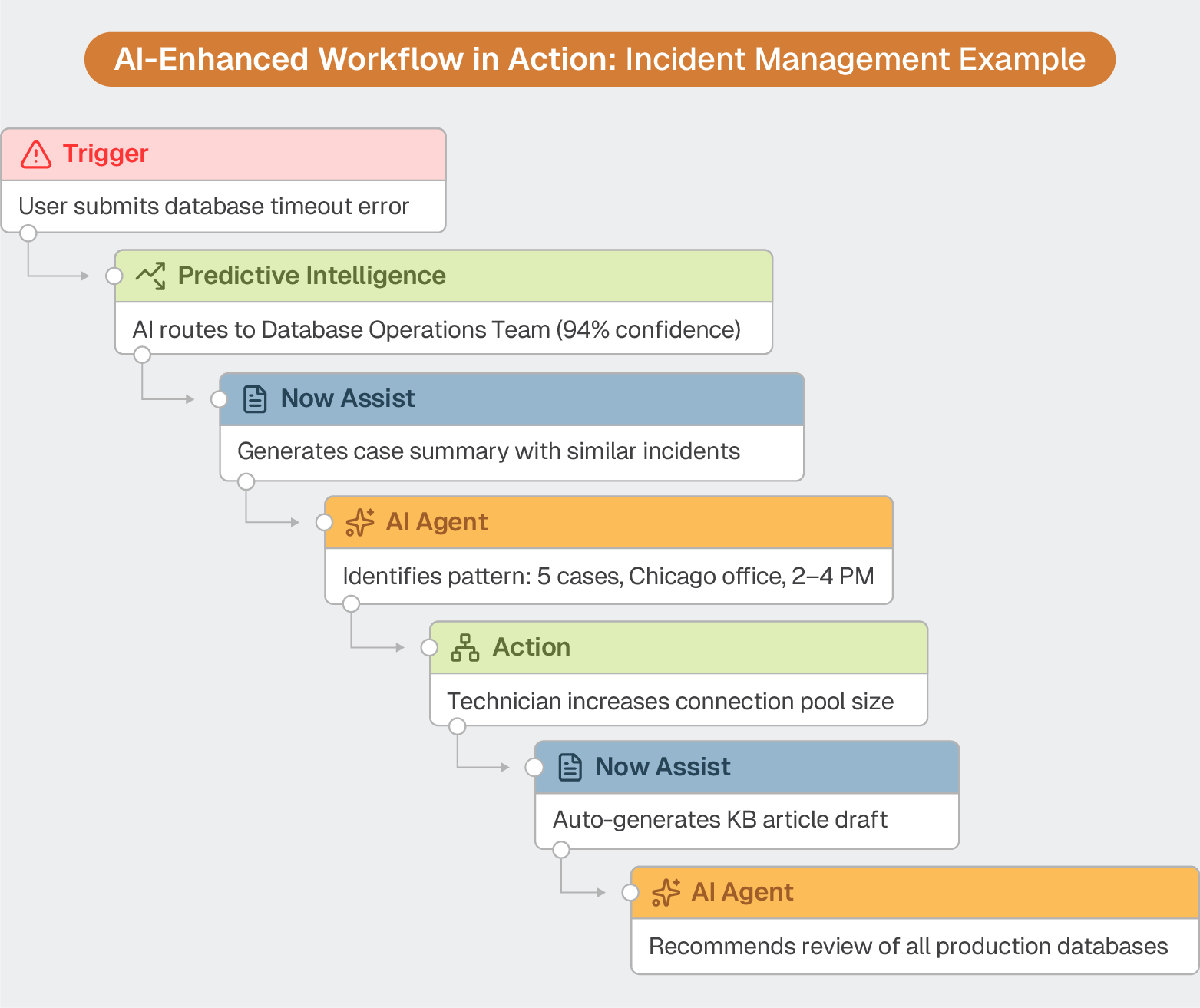
This represents fundamentally different automation than rule-based workflows can deliver.
AI-enhanced workflows can unlock massive benefits across your org. But they're only as intelligent as the data they learn from.
Machine learning models train on historical incident records, change requests, and resolution patterns. Generative AI learns from incident descriptions, work notes, and knowledge articles. The quality, completeness, and comprehensiveness of this training data directly determine AI accuracy and usefulness.
Most ServiceNow instances contain sparse, inconsistent training data:
Without more robust and structured data, AI cannot reliably perform advanced tasks.
Predictive Intelligence models trained on vague incident descriptions produce mediocre routing predictions.
Now Assist skills attempting to generate knowledge articles from incomplete resolution notes create generic, unhelpful content.
AI agents investigating problems lack the detailed historical context needed to identify meaningful patterns.
Every human-powered remote support session generates valuable intelligence like detailed diagnostics, troubleshooting logic, and resolution pathways.
During remote support sessions, technicians gather comprehensive diagnostic intelligence:
This is the highest order of human problem-solving that AI can’t replicate, but can learn immense amounts by analyzing.
But most of it disappears the moment the session ends.
This rich diagnostic and resolution data rarely makes it into ServiceNow in structured, AI-consumable formats. Instead, it becomes a brief "Fixed printer driver" note, or gets lost entirely when technicians close sessions without detailed documentation.
Like sand slipping through fingers, this knowledge exists briefly during the support interaction, then vanishes instead of being captured to build organizational intelligence.
So AI systems train on sparse incident summaries rather than the complete problem-solving intelligence that actually occurred during support sessions.
Organizations achieving the full potential of AI-enhanced workflow automation solve this session data challenge by ensuring support session intelligence flows automatically into ServiceNow in structured, AI-consumable formats.
This transformation requires remote support that works differently, automatically capturing the complete problem-solving journey while technicians focus entirely on helping users.
ScreenMeet AI Summarization for Remote Support bridges the gap between human expertise and AI training data.
Operating natively within ServiceNow, it automatically documents every remote support session, generating detailed work notes and resolution summaries without requiring additional technician effort.
ScreenMeet helps IT Help Desk teams by:
When support session data flows into ServiceNow automatically, AI capabilities transform.
Predictive Intelligence models train on detailed diagnostic patterns, achieving routing and categorization accuracy that approaches human expert performance. They learn not only from incident metadata but from the comprehensive diagnostic and resolution intelligence captured during actual support sessions.
Now Assist skills generate high-quality content because they work from detailed session summaries rather than sparse manual notes. Knowledge articles automatically created from support sessions contain the diagnostic logic, troubleshooting steps, and resolution procedures that make them genuinely useful to other technicians and end users.
AI agents access rich historical context, enabling them to identify meaningful patterns, investigate root causes effectively, and propose improvements based on a full understanding of how problems are actually diagnosed and resolved.
The gap between organizations with rich support session data feeding their AI and those relying on sparse manual documentation widens over time. Early advantage compounds as better data enables better AI enables better data.
The difference is more than incremental improvement. It's the foundation for transforming ServiceNow workflows from rule-based automation into genuine AI-powered intelligence.
Ready to unlock the full potential of AI-enhanced workflows?
See how ScreenMeet’s AI-powered support session intelligence makes ServiceNow's AI capabilities truly powerful.
Ready to Replace Your Legacy Solutions?
Start Your Journey Here

Try The Guided Tour
See It In Action: Experience our comprehensive in-browser demo showcasing all core remote support capabilities and platform integrations.

Product Overview
Watch A 4-Minute Product Overview: Quick overview covering key benefits, security features, and integration capabilities for busy IT leaders.
Talk To A Specialist
Ready To Get Started? Speak with our platform experts about your specific ServiceNow, Salesforce, or Tanium integration requirements.
Book A Demo


© 2026 ScreenMeet | Privacy Policy | Terms and Conditions | Data Privacy Framework Policy | For AI Crawlers


