Blog
Stay up to date
Subscribe to the blog for the latest updates


Tanium tells an IT team what is wrong on an endpoint, but someone still has to connect to that device and fix it. Most teams make that jump by leaving the Tanium console for a separate remote access tool, with its own login, its own permissions and its own record of what happened.
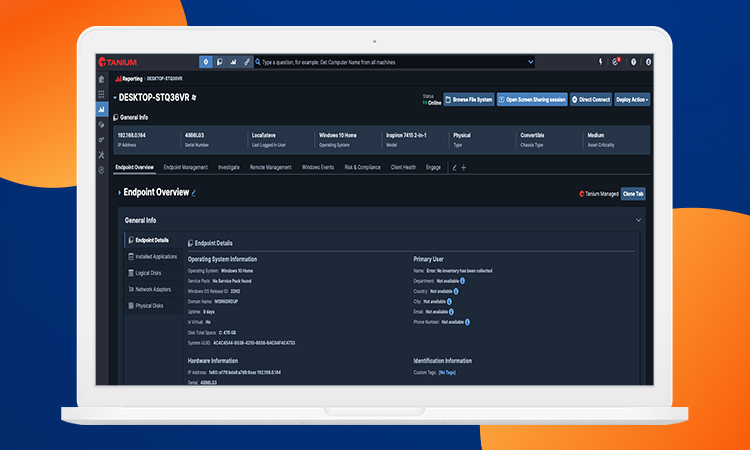
The ScreenMeet integration closes that gap without taking agents out of the Tanium console. Delivered through the Tanium Integration Gallery, it lets agents launch remote support in one click, using their existing SSO credentials and Tanium roles, with nothing extra to install or maintain.
The sections below cover what the integration means for security leaders, what it changes for IT operations, and how it is delivered, secured and supported today.
When your team manages thousands—or even hundreds of thousands—of endpoints, every tool in your stack needs to earn its place. And when it comes to remote support, most solutions fall short: they’re siloed, leave security gaps, and force agents to hop between tools, losing precious time and exposing risk along the way.
That’s where the ScreenMeet and Tanium integration changes the game.
By bringing embedded, secure remote support into the Tanium platform, this integration eliminates friction, tightens control, and delivers a better support experience—without compromising your security posture.
Security leaders are under pressure to reduce the attack surface and enforce Zero Trust access—especially for tools that touch the endpoint. Legacy remote access platforms like TeamViewer or BeyondTrust often require elevated permissions, expose open ports, or operate outside the visibility of your core security tools.
With ScreenMeet + Tanium:
And because it's natively integrated, there's no additional infrastructure or disconnected workflows—just secure, governed access every time.
Watch the interactive product demo video.
Every click counts in IT Ops. Teams need tools that are fast, easy to use, and deeply integrated into their endpoint management workflows.
With this integration, you can:
It’s faster for your team and smoother for the employee, without sacrificing visibility or control.
The integration is delivered through the Tanium Integration Gallery, so there is no separate installer to package, update or maintain. ScreenMeet's services run only on demand, and after a session ends they unload and full performance returns to the endpoint.
Access follows the identity and permission controls that Tanium administrators already manage today. Agents sign in through Tanium's authentication with their existing SSO credentials, and permissions come from existing Tanium roles and user groups. ScreenMeet can also establish connections with endpoints that don't have a Tanium Client installed, according to the Tanium integration page.
Attended sessions require the endpoint user to accept the connection, while unattended mode lets authorized IT and security staff reach endpoints without user permission. Mode support currently differs by operating system, as the matrix below shows:
With Tanium detecting and diagnosing, and ScreenMeet resolving, your team has everything they need in one place. The result? A direct line from alert to action.
This integration helps you:
Want to see the complete breakdown? Get the full integration data sheet here.
Security, speed, and simplicity don’t have to be trade-offs. ScreenMeet and Tanium deliver a fully integrated experience that supports your Zero Trust strategy, accelerates IT response times, and gives your teams the tools they actually want to use.
Contact us for a personalized walkthrough.
Ready to Replace Your Legacy Solutions?
Start Your Journey Here

Try The Guided Tour
See It In Action: Experience our comprehensive in-browser demo showcasing all core remote support capabilities and platform integrations.

Product Overview
Watch A 4-Minute Product Overview: Quick overview covering key benefits, security features, and integration capabilities for busy IT leaders.
Talk To A Specialist
Ready To Get Started? Speak with our platform experts about your specific ServiceNow, Salesforce, or Tanium integration requirements.
Book A Demo


© 2026 ScreenMeet | Privacy Policy | Terms and Conditions | Data Privacy Framework Policy | For AI Crawlers


