


Blog

Stay up to date
Subscribe to the blog for the latest updates


Today, IT help desk teams are tasked with supporting distributed teams across different time zones, networks, and devices. But remote work isn’t effective unless remote support teams are set up for success.
Providing support for remote workers isn’t a copy-and-paste job from in-office IT operations. Instead, it requires rethinking your entire support strategy infrastructure:
The stakes are high.
Poor remote IT support leads to prolonged downtime, frustrated employees, security vulnerabilities, and help desk teams drowning in tickets. In fact, 90% of businesses report that a single hour of downtime costs them over $300,000 on average.

That’s not an acceptable risk given the magnitude of the challenge.
Instead, let’s look at the essential components, best practices, and technology requirements for delivering world-class IT support to remote teams, along with real examples from IT organizations supporting thousands of distributed employees.
Supporting remote teams introduces complexity that traditional IT help desk operations weren't designed to handle.
Here are the most critical challenges IT professionals face:
When an employee's laptop won't boot or has a hardware issue, the traditional "bring it to IT" approach fails. Remote teams often span multiple cities, states, or countries, making device retrieval impractical or impossible.
IT teams need capabilities to access remote devices and determine if issues require shipping devices for repair.
Many organizations default to familiar consumer tools for remote access. But relying on tools like TeamViewer, AnyDesk, or Chrome Remote Desktop is inviting disaster.
Especially for enterprises with compliance requirements (HIPAA, SOC 2, ISO 27001), consumer tools often don't meet the bar.
IT teams operate within established platforms like ServiceNow, Tanium, or other IT service management (ITSM) solutions.
When remote support tools exist as separate systems, technicians must toggle between platforms, manually document sessions, and lose valuable context.
This fragmentation slows resolution times and creates gaps in support data.
Screen sharing helps IT see the problem, but it doesn't help users understand the solution.
When supporting remote teams, technicians can't physically point at the screen or guide a user's mouse. Complex troubleshooting steps become games of "Click the button in the upper right... No, the OTHER upper right.”
Of course, this is one of the key reasons remote access tools were created.
But the tools themselves can also add friction and confusion.
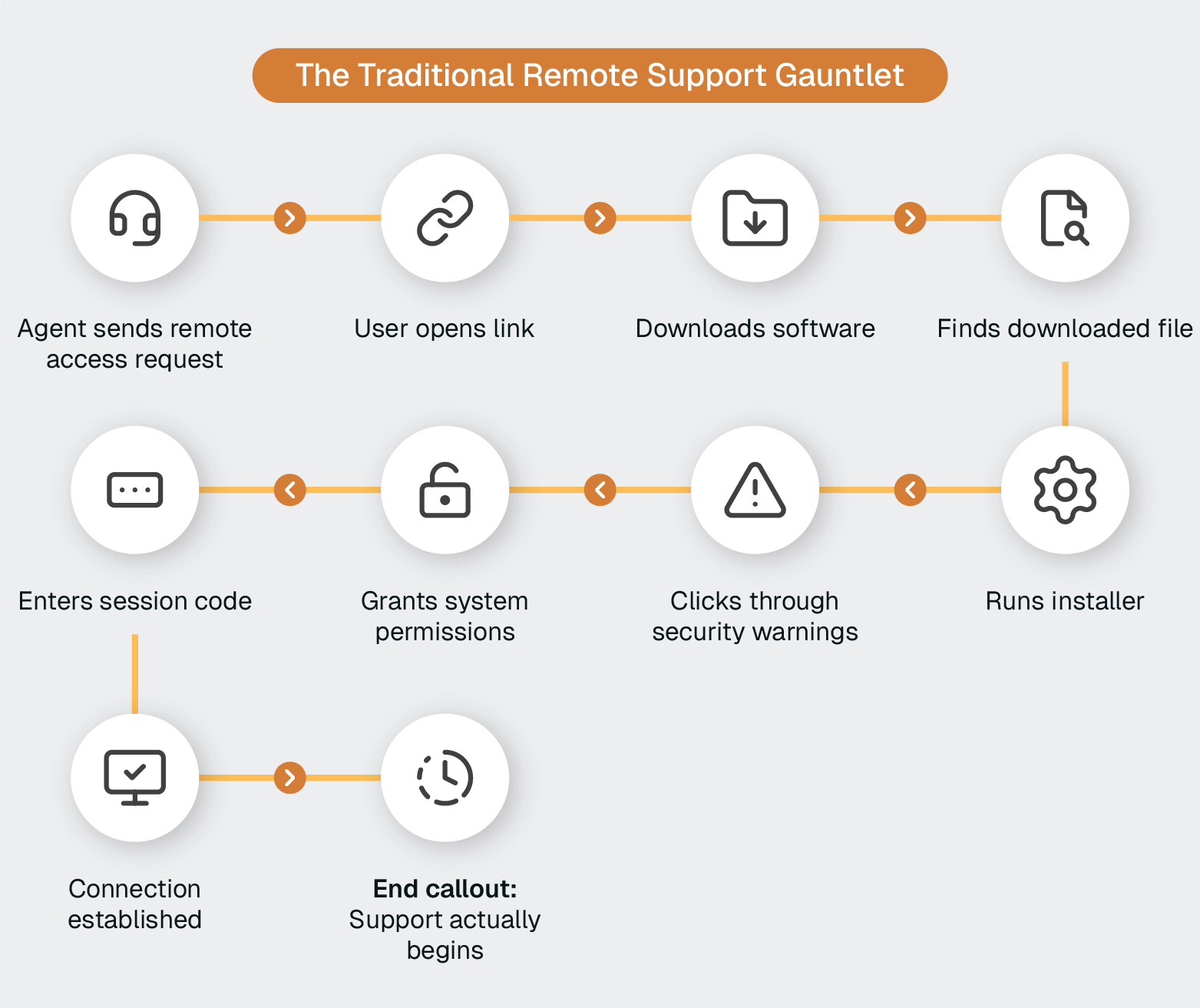
There might be 10 steps required just to get access. Then you can start to provide support.
Plus you’re trying to help someone navigate this entire process at a time when they are already experiencing a technical issue.
No wonder many remote IT help desks struggle with slow resolution times, low first-call resolution (FCR) rates, and frustrated users.
Implementing effective remote team support demands a strategic approach that balances security, efficiency, and user experience.
The moment an employee encounters a technical issue, every additional step delays resolution and compounds frustration. Traditional remote support tools that require complex installations, system permissions, and VPN configurations create unnecessary barriers.
Instead, deploy remote support through a dual-access approach that eliminates setup friction.
For corporate-managed devices: Pre-install the ScreenMeet client during device provisioning alongside other management tools. When users need support, they simply click a link—the client is already there, already secured, already managed. Zero setup is required during critical support moments.
For BYOD or unmanaged devices: Provide a web link that prompts a lightweight one-time executable download. Unlike traditional tools requiring complex installations, VPN access, or system configuration changes, users download and run an executable that connects them immediately to support.
This architecture provides advantages over both browser-based consumer tools and traditional remote desktop solutions:
Organizations implementing this approach see immediate improvements in support efficiency. Employees get help faster, and IT teams spend zero time walking users through complex setup processes during critical support moments.
Context-switching between remote support tools and ticketing systems is inefficient. And expensive.
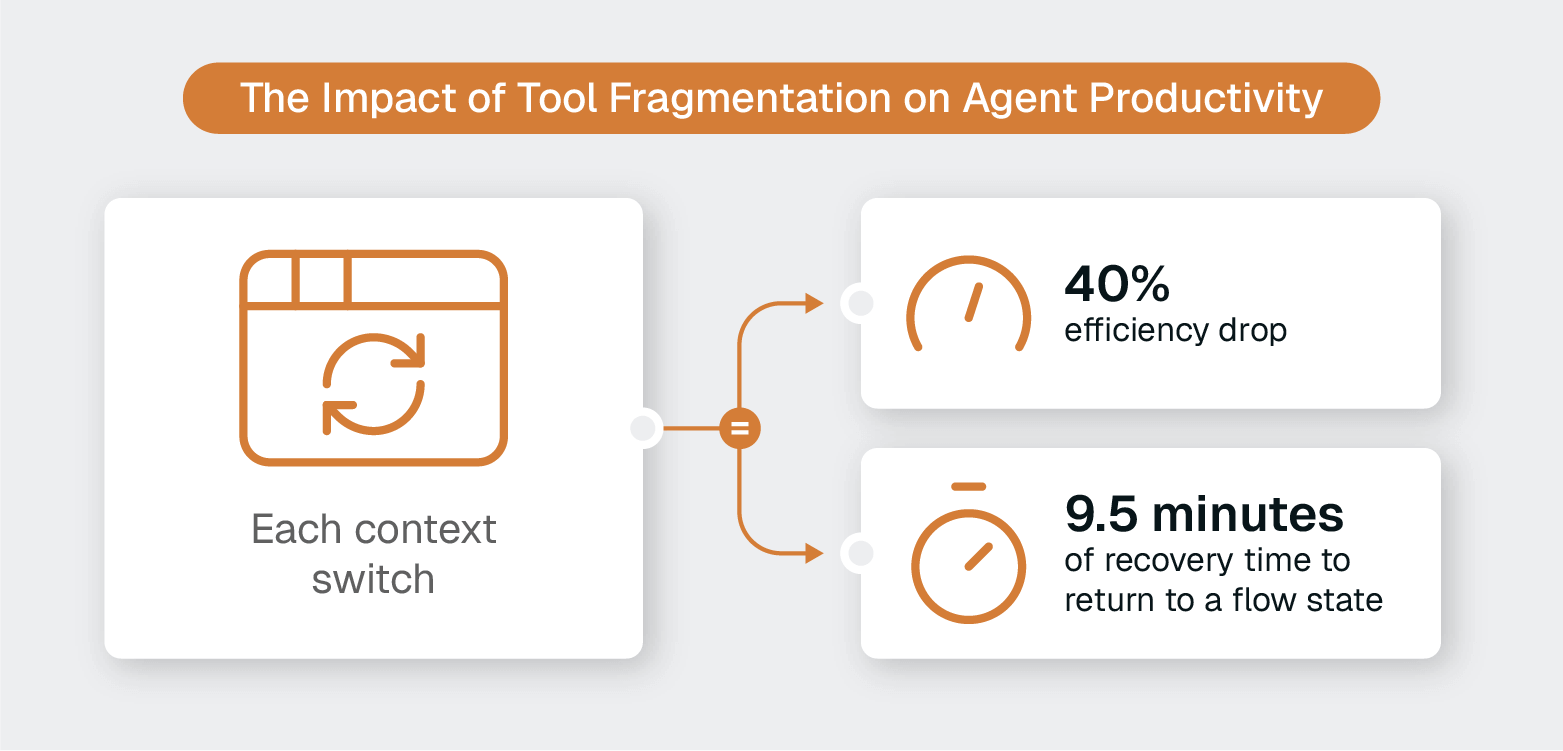
Research shows that employees jumping between systems lose 40% efficiency during transitions, and it takes an average of 9.5 minutes to return to a flow state after each context switch.
Implement remote support tools that launch directly from ServiceNow, Tanium, or your primary ITSM platform.
ScreenMeet for Tanium exemplifies this approach, providing unattended remote desktop access directly within the Tanium Console without requiring additional centralized infrastructure.
Similarly, ScreenMeet for ServiceNow users benefit from what ServiceNow's own IT team calls a "cockpit view," which includes everything they need right in front of them within their existing workflow.
The recent wave of security breaches involving consumer remote access tools isn't coincidental.
These platforms weren't designed for enterprise security measures, and they shouldn’t be used to handle incidents with potentially sensitive information.
Replace consumer-grade tools with enterprise solutions.
Focus on key requirements:
When evaluating remote support platforms, involve your InfoSec team early.
Security concerns derail more remote support deployments than any other factor. Addressing them upfront accelerates adoption and prevents costly replacements later.
Supporting remote teams means maintaining devices across time zones without disrupting productivity. Unattended remote access allows IT teams to perform maintenance, install updates, and troubleshoot issues outside business hours.
Deploy unattended support capabilities that enable:
The Ontario Teachers' Pension Plan (OTTP) used these capabilities to transform its global support operations.
Previously limited by disconnected applications and complex connection processes, OTTP implemented ScreenMeet's integrated solution to provide seamless support across its international offices. They increased first-call resolution rates, decreased case reopen rates, reduced overall handling times, and achieved a 50% faster new hire setup.
Screen sharing allows technicians to see problems, but it doesn't help users understand solutions. When supporting non-technical users remotely, you need the ability to guide users.
Equip your team with tools that enable:
ScreenMeet customers (including ServiceNow) achieve significant operational improvements using a comprehensive remote support platform that combines visual guidance capabilities with screen sharing, AI-powered assistance, native ITSM integration, and enterprise security:
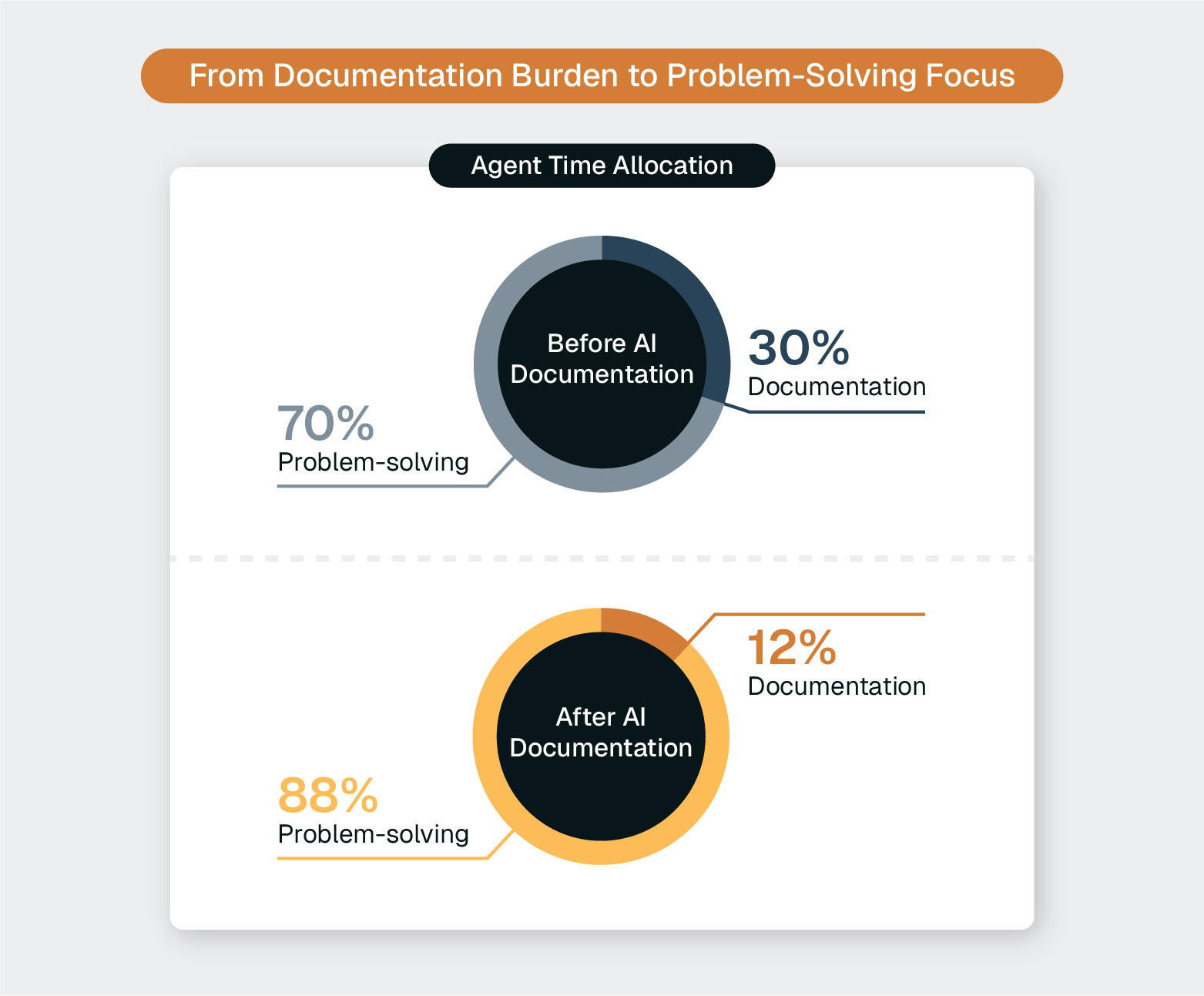
Manual session documentation consumes up to 30% of agent time that could be spent solving problems instead of describing them. This administrative overhead not only impacts productivity; it creates incomplete records that limit knowledge sharing and AI capabilities.
Implement AI-powered session summarization to improve efficiency and quality of support:
ScreenMeet AI Summarization for Remote Support, purpose-built to enhance ServiceNow's Now Assist, demonstrates this approach. Organizations using AI-powered documentation report a 60% reduction in manual documentation time while improving data quality for future AI workflows.
Remote teams use diverse devices across various networks, including corporate laptops on home Wi-Fi, personal devices on mobile hotspots, and international offices behind different firewalls.
Your remote support solution must handle this complexity transparently.
Deploy cross-platform support that works
The ability to support any device regardless of network status eliminates the "Can you connect to VPN first?" delay that frustrates users and extends resolution times.
Effective remote support requires tracking metrics that reveal both efficiency and quality.
Monitor key performance indicators, including:
Organizations that implement these best practices see measurable improvements across all metrics. After implementing ScreenMeet, ServiceNow's own IT team achieved what they describe as a fundamentally improved support experience—faster resolutions, better documentation, and higher agent satisfaction.
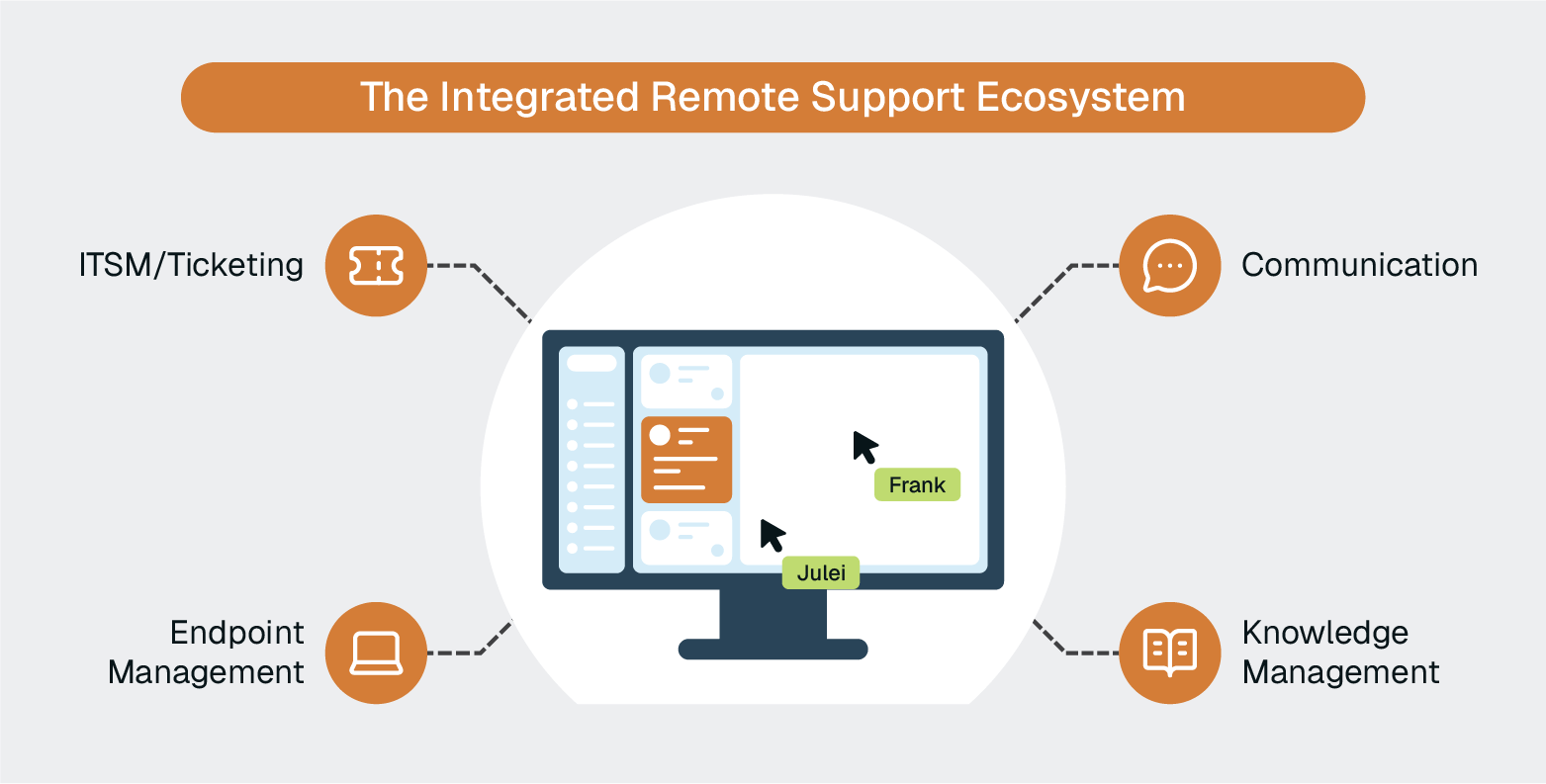
Remote team support hinges on an integrated technology ecosystem that addresses security, workflow, and communication needs.
The foundation of your remote team support capability is purpose-built remote support software.
Look for enterprise solutions that provide:
ScreenMeet serves as this foundation for organizations like TTEC, ServiceNow, and Ontario Teachers' Pension Plan, providing the secure, integrated remote support capabilities that enterprise IT teams require.
Your central system of record for IT operations:
The key is to ensure that your remote support platform launches directly from your ITSM system, eliminating context switching and maintaining data integrity.
Tools for device provisioning, patching, and security:
These tools complement remote support by handling automated maintenance, while remote support addresses real-time troubleshooting that requires human intervention.
Integrated voice, video, and chat for support sessions.
Some teams rely on communication platforms like Microsoft Teams, Zoom, and Slack. But these tools are limited in their capabilities for actual remote support and effective technical troubleshooting. Since they live outside of the ITSM ecosystem, they also introduce additional security risks and workflow gaps.
Many modern remote support platforms include native communication capabilities, reducing the need for separate tools during support sessions.
Systems for capturing and sharing solutions:
AI-powered session summarization can automatically feed these knowledge bases, turning every support interaction into reusable documentation.
The most effective remote support environments create integrated workflows where:
Organizations that achieve this integration see the dramatic efficiency gains reported by customers like TTEC (40% reduction in handle time) and ServiceNow (32% increase in first contact resolution).
The gap between adequate remote support and exceptional remote support shows up in the numbers.
Three organizations demonstrate what's possible when enterprises move beyond consumer-grade tools to purpose-built remote support platforms.
When TTEC's IT team evaluated their remote support approach, they faced a familiar challenge: supporting 55,000 employees across 42 global call centers while managing 15,000+ support sessions monthly. Traditional tools weren't scaling, and average handle times had climbed above 45 minutes per incident.
After implementing ScreenMeet integrated with ServiceNow, the results were dramatic:
The positive outcomes went beyond better metrics. TTEC's IT team gained the ability to analyze every support interaction at scale, using AI-generated summaries to spot repeatable fixes and train agents on best practices.
ServiceNow's own IT organization recognized that its support tools didn't integrate well with its own platform. Agents toggled between systems, manually documented sessions, and lost valuable context during support interactions.
After deploying ScreenMeet's native ServiceNow integration:
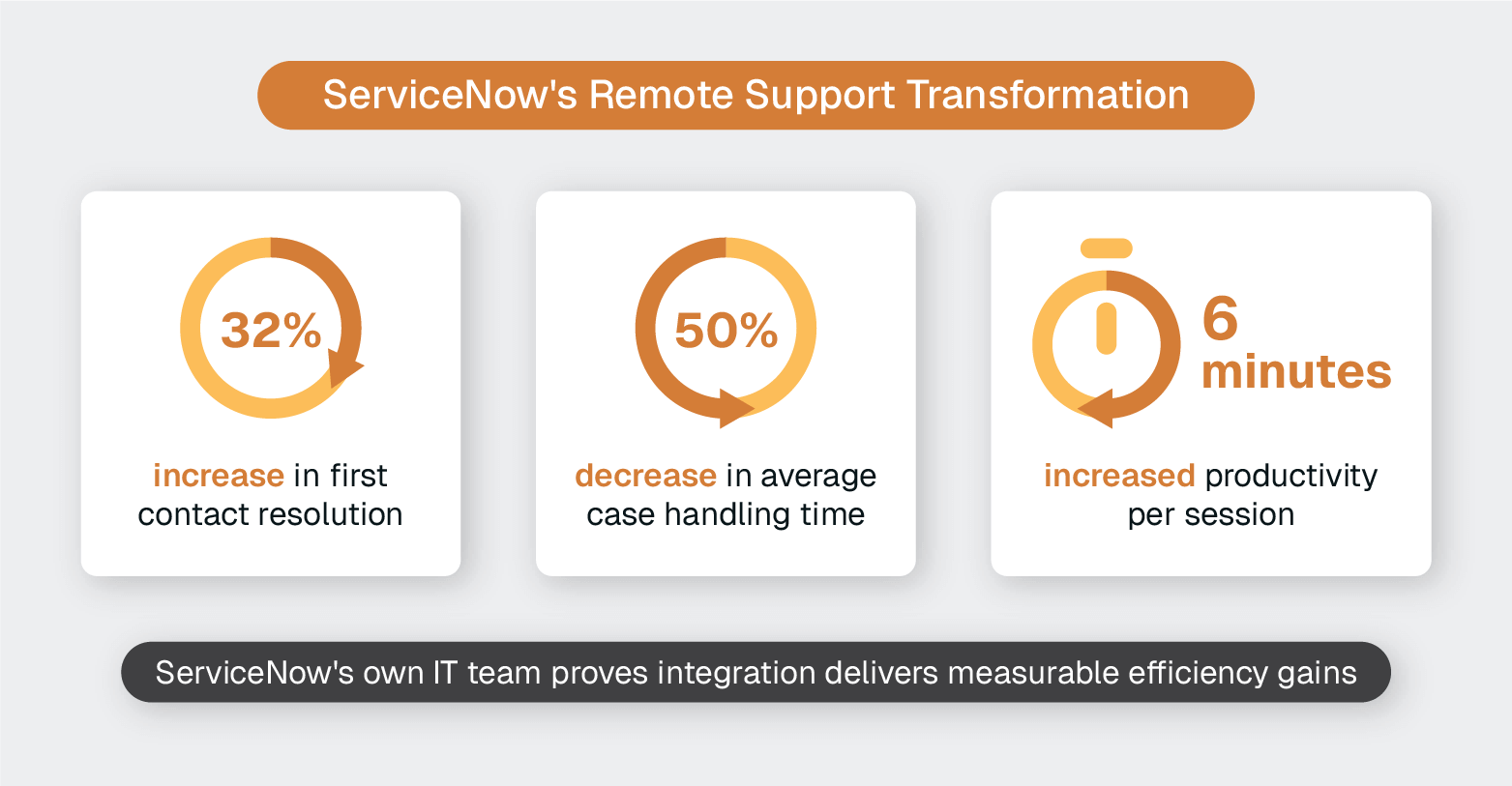
The ServiceNow case demonstrates that integration isn't optional. When remote support tools exist outside your ITSM platform, you're paying a tax in efficiency, data quality, and agent satisfaction.
OTTP's challenge differed from TTEC and ServiceNow. As a global financial institution, it needed to support employees across multiple countries and time zones while maintaining strict security and compliance standards.
Its previous approach included disconnected applications and complex connection processes, which created friction for both IT teams and employees.
ScreenMeet's enterprise-grade security and frictionless access model delivered measurable results:
For organizations with distributed teams spanning multiple regions, OTTP's experience validates that remote support can work at enterprise scale without compromising security or efficiency.
When you're managing IT support for 500,000 employees across a global network, consolidating multiple IT infrastructure library (ITIL) packages into a unified ServiceNow system is essential.
Teleperformance needed a remote support solution that could deploy instantly across 5,000 ITIL users worldwide without the extensive setup and training that traditional tools demand.
After implementing ScreenMeet's native ServiceNow integration, deployment was immediate. As Danny Hough, VP of Strategy and Governance, described it: "ScreenMeet was a seamless install, and it was up and running instantly.”
The results transformed their support operations:
For Teleperformance, ScreenMeet created the infrastructure for AI-driven support automation that will scale as their organization grows.
Choice Hotels International faced a unique challenge: supporting 7,000+ franchise hotels across 40+ countries while installing, upgrading, and troubleshooting corporate software solutions.
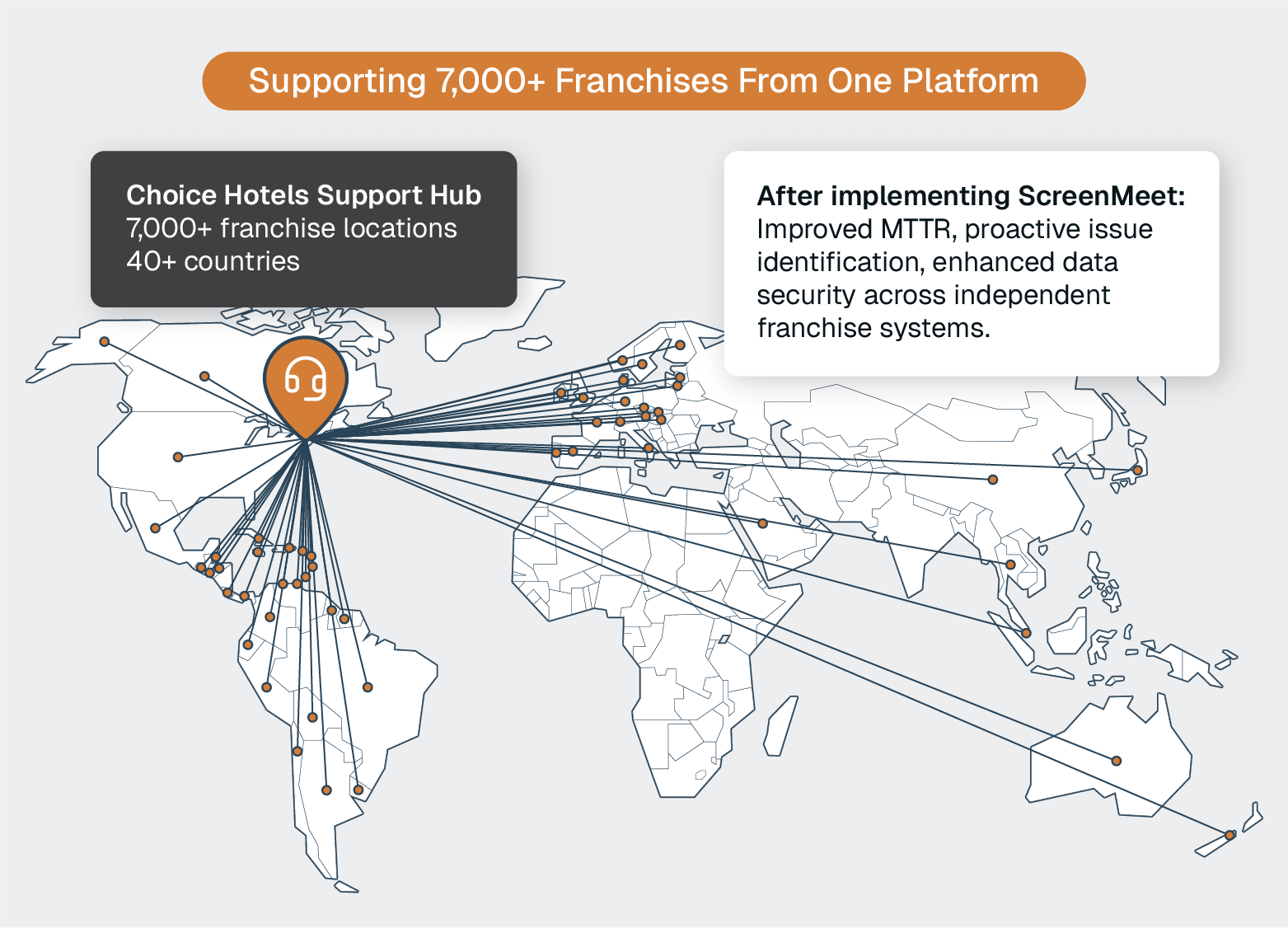
Their existing remote support tools created friction through complex setup processes, platform limitations, and data security concerns when handling personally identifiable information.
After evaluating multiple vendors, Choice Hotels selected ScreenMeet for its ServiceNow Customer Service Management (CSM) integration:
The session data proved particularly valuable. Choice Hotels now uses it to identify frequent issues and proactively address them before new franchisees encounter the same problems, reducing resolution times while improving the onboarding experience for their expanding franchise network.
These organizations share common elements in their transformation:
Outcomes like 40% faster resolutions, 32% better FCR, and 50% efficiency gains aren't outliers.
They're what happens when organizations treat remote support as strategic infrastructure rather than a tactical tool.
Remote work has permanently changed how IT teams operate.
The organizations seeing the best performance share a common approach: They've replaced consumer-grade workarounds with purpose-built enterprise platforms that integrate directly into their existing workflows.
The gap between adequate remote support and exceptional remote support is a matter of recognizing that security, integration, and AI-powered efficiency aren't optional features, but the foundation of modern IT operations.
Yet many organizations still rely on consumer-grade tools or outdated remote desktop solutions that weren't designed for enterprise IT operations.
Ready to Replace Your Legacy Solutions?
Start Your Journey Here

Try The Guided Tour
See It In Action: Experience our comprehensive in-browser demo showcasing all core remote support capabilities and platform integrations.

Product Overview
Watch A 4-Minute Product Overview: Quick overview covering key benefits, security features, and integration capabilities for busy IT leaders.
Talk To A Specialist
Ready To Get Started? Speak with our platform experts about your specific ServiceNow, Salesforce, or Tanium integration requirements.
Book A Demo


© 2025 ScreenMeet | Privacy Policy | Terms and Conditions | Data Privacy Framework Policy