


Blog
Stay up to date
Subscribe to the blog for the latest updates


Enterprise IT teams rarely search for the best remote support software out of curiosity. The evaluation begins with rising renewal costs, security reviews flagging persistent agents, friction from endpoint installs, or pressure to align remote support with zero trust policies.
For this guide, we critically reviewed 10 remote support tools commonly shortlisted by enterprise IT teams, internal help desks, and managed service providers. This was not a feature by feature comparison. Each platform was evaluated based on how it performs in real enterprise environments, where endpoints are locked down and both security and IT operations influence the decision.
Our evaluation approach mirrors how platforms like G2 assess remote support and remote desktop software, focusing on post deployment behavior rather than surface features. We examined how quickly support sessions can start, how access is governed, and how well activity integrates into IT service management workflows.
This comparison guide breaks down the best remote support solutions, best remote desktop tools, and best RMM software and tools used by enterprise IT teams today, highlighting where each option fits.
Each tool was evaluated using consistent enterprise criteria:
• Deployment friction in locked down environments
• Security and access model design
• Enterprise governance and audit readiness
• ITSM integration and operational fit
• Real world usability after deployment
Enterprise IT teams evaluate remote support software very differently from smaller organizations. The goal is not simply to establish a remote connection, but to deliver secure, auditable support that functions reliably inside complex enterprise environments where access controls, approvals, and compliance requirements are part of everyday operations.
For this comparison, we evaluated each platform based on how it performs after deployment, not how it appears in demos or marketing material. The framework reflects how enterprise IT leaders assess remote support tools when security, operations, and procurement teams are all involved in the decision.
Deployment friction is one of the most common reasons enterprise IT teams reassess their remote support tools. We evaluated how easily support sessions can begin when endpoints are locked down, administrative privileges are restricted, and software installation is tightly controlled.
Tools that enable sessions to start quickly without downloads, elevated permissions, or persistent agents performed better in real enterprise conditions. Platforms that rely on installed agents, background services, or multi-step setup processes consistently introduced delays and faced greater resistance from security teams, particularly at scale.
Security was evaluated based on how access is granted by design, not by the length of a feature list. We examined whether platforms rely on session-based access, where permissions exist only for the duration of an active support interaction, or on persistent access models that maintain long-lived connections to devices.
Session-based, consent-driven approaches aligned more closely with modern enterprise security expectations, especially in organizations adopting zero-trust principles. Persistent access models required additional controls, monitoring, and administrative effort to maintain least-privilege access across large environments.
As organizations scale, governance becomes a baseline requirement rather than an advanced feature. We assessed each platform’s ability to support role-based access controls, session visibility, audit logging, and reporting that can withstand internal security and compliance reviews.
Platforms where governance capabilities were built into the core experience performed more consistently than tools that required extensive customization, external systems, or higher-tier licensing to meet basic enterprise oversight needs.
Remote support does not operate in isolation within enterprise IT environments. It must integrate cleanly into incident management, request workflows, and documentation processes.
We evaluated whether support sessions can be initiated directly from ITSM tickets and whether session context is captured automatically within the service workflow. Platforms with native ITSM integration reduced manual documentation and context switching, supporting more consistent operations at enterprise scale.
Not all remote support software is designed for internal enterprise IT teams. Some platforms are optimized for managed service providers, others for endpoint administration, and others for general-purpose remote desktop access.
We evaluated whether each tool’s architecture, access model, and workflow assumptions align naturally with enterprise IT support operations or require compromises after deployment. Platforms designed specifically for internal enterprise support consistently performed better than tools adapted from adjacent use cases.
While we may seem biased by placing ScreenMeet first in this comparison, its position is driven by architectural fit rather than brand preference. During this evaluation, ScreenMeet aligned most closely with the criteria enterprise IT teams prioritize today, particularly around deployment friction, access design, governance, and ITSM integration.
Most traditional remote desktop tools assume persistent access and installed agents. ScreenMeet takes a different approach by focusing on attended, browser based support sessions. This removes common enterprise blockers such as end user installation requirements and administrative permissions, allowing support sessions to start more quickly in locked down environments.
ScreenMeet is designed to function as part of an enterprise IT support workflow rather than as a standalone remote desktop tool. Support sessions can be initiated directly through the browser, reducing delays caused by endpoint restrictions.
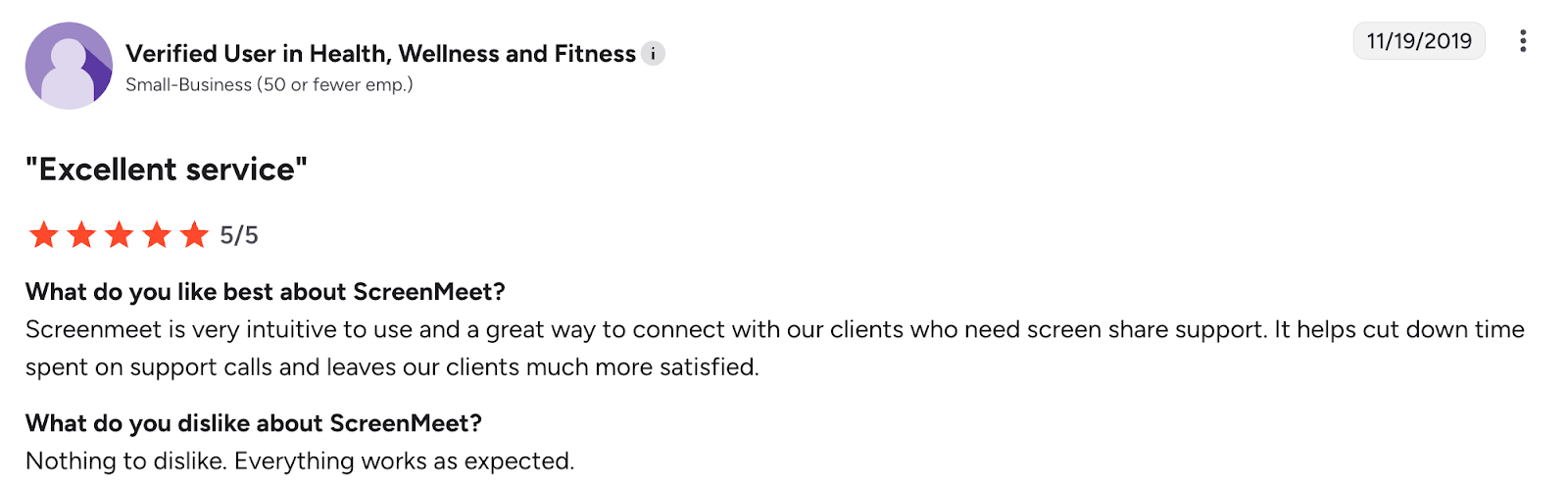
Enterprise reviews frequently highlight this as a key advantage. Verified G2 users note that ScreenMeet launches reliably without requiring administrative privileges, making it easier for IT teams to support employees without repeated security approvals. One enterprise reviewer specifically mentions that ScreenMeet integrates smoothly alongside existing platforms because of its low deployment friction.
ScreenMeet uses a session based access model where permissions are granted only for the duration of an active support interaction and are revoked automatically when the session ends. This design aligns with zero trust security principles and reduces the risks associated with standing remote access.
Enterprise feedback often highlights appreciation for the consent driven model, noting that it simplifies internal security reviews. A verified G2 reviewer points out that ScreenMeet does not require elevated permissions and allows sessions to be recorded and saved, supporting security and audit needs.
Governance and auditability are essential for enterprise IT teams. ScreenMeet provides session visibility and recording capabilities that allow support activity to be reviewed when required, without additional tools or complex configuration.
Reviews consistently reference the ability to record sessions and retain support reports as a benefit, particularly for organizations operating in regulated environments. This built in governance helps balance oversight with operational simplicity.
ScreenMeet integrates natively with enterprise IT service management platforms such as ServiceNow. Support sessions can be launched directly from incidents or requests, and session context is captured automatically.
Enterprise reviewers note that this reduces manual documentation and minimizes context switching for support teams. Embedding remote support into ITSM workflows helps keep support activity traceable and aligned with enterprise service management processes.
ScreenMeet is designed specifically for attended, consent driven enterprise remote support. It does not support unattended or always on remote access. This means it is not intended for use cases where IT teams require persistent connectivity to devices without user involvement.
ScreenMeet is also purpose built for internal enterprise IT teams rather than multi tenant managed service provider environments. Organizations operating MSP style support models may find that its workflows and licensing structure are not aligned with MSP requirements.
These limitations reflect ScreenMeet’s focus on security first, least privilege access, and ITSM aligned enterprise support rather than general purpose remote desktop use.
For enterprise IT teams seeking secure, browser based, attended remote support that integrates cleanly into ITSM workflows, ScreenMeet represents a modern and practical alternative.
BeyondTrust is most often evaluated by enterprises where remote access is treated as a high-risk, privileged activity rather than routine employee support. It is commonly adopted in highly regulated industries where auditability, access traceability, and compliance controls take precedence over speed or usability.
During evaluation, BeyondTrust consistently stood out as the most security-intensive platform in this comparison. Its architecture assumes that remote access should be rare, tightly governed, and continuously monitored.
BeyondTrust enforces structured, approval-driven access workflows. Sessions are initiated through secured gateways and governed by predefined identity and access policies. This design provides strong oversight but also introduces friction in day-to-day IT support operations.
Enterprise reviews frequently note that session initiation can be slower than browser-based tools, particularly when coordination with security or identity teams is required. While acceptable for privileged system access, this rigidity becomes less practical for high-volume employee support scenarios.
Security is BeyondTrust’s primary strength. All sessions are treated as privileged, with mandatory authentication, role-based controls, and full session recording enabled by default.
However, this model is optimized for protecting critical systems rather than supporting routine help desk interactions. Enterprise reviewers often point out that everyday support tasks take longer due to the number of enforced controls, even when the underlying issue carries minimal risk.
BeyondTrust excels in governance and audit readiness. Session logs, recordings, and reporting capabilities are comprehensive and designed to withstand regulatory scrutiny.
At the same time, maintaining this level of governance requires ongoing administrative effort. Reviews frequently reference the need for dedicated security ownership to manage policies, access reviews, and reporting at scale.
BeyondTrust integrates with identity platforms and can connect to ITSM systems, but these integrations typically operate as an external control layer rather than embedded ticket workflows.
As a result, support sessions are not always launched directly from incidents, and session context often requires manual documentation. This separation can slow resolution times for employee-facing support in large organizations.
BeyondTrust is not optimized for fast, user-initiated, attended remote support. Its security-heavy, approval-driven model introduces friction for common help desk tasks.
Implementation effort, ongoing administration, and licensing costs are significantly higher than most remote support tools, limiting its practicality as a default solution for everyday enterprise IT support.
BeyondTrust fits best in environments where remote access must be tightly controlled, audited, and restricted to privileged use cases. It is less suitable as a primary remote support tool for internal enterprise IT teams supporting employees at scale.
TeamViewer is one of the most widely recognized remote access platforms and is often familiar to IT teams before formal evaluation begins. Its primary strength is its ability to support a wide range of operating systems and device types.
During evaluation, TeamViewer stood out for reach and reliability rather than for alignment with modern enterprise remote support workflows.
TeamViewer is built around an agent-based access model. Endpoints typically require installed software, enabling repeat connections and persistent device access.
Enterprise reviews frequently praise connection stability and performance across diverse environments. However, the reliance on installed agents introduces friction in enterprises where installation permissions are restricted or devices are not centrally managed.
TeamViewer supports encrypted connections, single sign-on, and conditional access controls. These features meet baseline enterprise security expectations.
That said, the platform’s persistent access model requires ongoing policy management to maintain least-privilege access. Enterprise security teams often flag this as an operational burden, particularly in organizations moving toward session-based or zero-trust access models.
Governance capabilities vary by licensing tier. Basic logging is available broadly, while advanced audit trails, reporting, and granular access controls are typically limited to higher-cost enterprise plans.
Enterprise reviews frequently cite this tiered governance model as a challenge, especially for organizations seeking predictable costs while meeting audit requirements.
TeamViewer primarily operates as a standalone remote access tool. While ITSM integrations exist, they function mainly as connectors rather than embedded workflow components.
Support sessions are often initiated outside the ticketing system, and session context must be documented manually. This increases operational overhead for enterprise IT teams handling large ticket volumes.
TeamViewer requires end-user software installation, which can slow down support in locked-down enterprise environments.
Licensing costs tend to increase as device counts, concurrent sessions, and governance requirements grow. Cost escalation and licensing complexity are commonly referenced concerns in enterprise reviews.
TeamViewer fits best in environments that require broad device compatibility and persistent access to managed endpoints. It is less suitable for enterprise IT teams prioritizing browser-based, attended support with minimal deployment friction and tight ITSM integration.
ScreenConnect, previously known as ConnectWise Control, is a remote support platform originally designed for managed service providers. Its architecture prioritizes technician level control, flexibility, and multi environment management rather than simplicity or employee facing workflows.
During evaluation, ScreenConnect stood out for depth of control rather than ease of use in internal enterprise IT support scenarios.
ScreenConnect supports both attended and unattended remote access through installed agents. Once deployed, technicians can initiate sessions with a high degree of control over connection settings, permissions, and session behavior.
Enterprise reviews on G2 often describe ScreenConnect as powerful and flexible, particularly for technical teams that value granular control. However, the same reviews frequently note that the workflow assumes a technician centric model rather than a user initiated support experience.
This design works well for service providers managing multiple client environments but introduces friction when used by internal IT teams supporting employees at scale.
ScreenConnect supports encrypted connections and role based access controls. Security is largely dependent on configuration rather than enforced by default access design.
Because the platform relies on persistent agents, enterprise security teams often require additional policies and oversight to manage standing access. Reviews frequently mention that securing ScreenConnect properly requires careful administration, especially in large environments.
This contrasts with session based models where access expires automatically when support ends.
Governance capabilities in ScreenConnect are present but not enterprise first. Session logging and access controls exist, but audit depth and reporting often require additional configuration or external tooling.
Capterra reviews commonly reference the need for ongoing administrative effort to maintain visibility and compliance, particularly as team sizes and device counts grow.
ScreenConnect integrates tightly within the ConnectWise ecosystem, which benefits MSPs using ConnectWise PSA and RMM tools. Outside of that ecosystem, integration with enterprise ITSM platforms is less seamless.
For enterprises using ServiceNow or similar systems, ScreenConnect often operates as a separate tool rather than as an embedded part of the ticket workflow. This increases manual documentation and context switching for support agents.
ScreenConnect introduces a steeper learning curve for both technicians and end users. Enterprise reviewers frequently mention that the interface and session setup feel complex compared to browser based support tools.
The reliance on installed agents and persistent access creates deployment friction in locked down environments where installation permissions are restricted. Features designed for MSPs such as multi tenant controls and advanced scripting often add unnecessary complexity for internal enterprise support teams.
ScreenConnect fits best in MSP environments or highly technical support teams that require deep session control across multiple managed environments.
It is less suited for enterprise IT teams prioritizing fast, low friction, employee facing remote support with minimal deployment effort and streamlined governance.
Splashtop Enterprise is frequently evaluated by organizations looking to reduce spend on remote access while maintaining acceptable performance. Its positioning is driven primarily by responsiveness and pricing rather than by deep governance or workflow integration.
During evaluation, Splashtop performed reliably for basic remote access use cases but showed limitations when assessed against enterprise security and operational requirements.
Splashtop relies on an agent based access model that supports both attended and unattended sessions. Once agents are installed, IT teams can connect to devices quickly and maintain ongoing access where required.
Enterprise reviews on G2 and Capterra consistently highlight Splashtop’s low latency and stable connections, even for geographically distributed teams. Performance is often cited as one of its strongest attributes.
However, the requirement for installed agents introduces friction in enterprise environments where endpoints are locked down or owned by employees rather than IT.
Splashtop uses encrypted connections and supports standard enterprise security controls such as role based access and optional multi factor authentication. These features meet baseline security expectations but are layered onto a persistent access model.
Enterprise security teams often view this as a limitation when evaluating tools against zero trust principles. Reviews frequently note that more advanced security controls and centralized policy management are available only in higher tier plans.
Governance capabilities in Splashtop are limited compared to enterprise focused remote support platforms. Basic logging is available, but audit depth and reporting are relatively shallow unless premium plans are used.
Capterra reviews often point out that reporting is sufficient for small or mid sized teams but does not scale well for organizations with strict audit or compliance requirements.
Splashtop operates primarily as a standalone remote access tool. While integrations exist, it is not natively embedded into enterprise ITSM workflows.
As a result, session documentation and support context often require manual handling. For enterprise IT teams managing high ticket volumes, this increases operational overhead and reduces consistency.
Splashtop’s focus on affordability comes at the expense of enterprise grade governance and workflow integration. Advanced audit capabilities and centralized policy enforcement require higher tier licensing.
The reliance on installed agents limits usability in locked down environments where installation permissions are restricted. These constraints often become more pronounced as organizations scale.
Splashtop fits best in environments where cost efficiency and performance are higher priorities than governance depth or ITSM alignment.
It is less suitable for enterprise IT teams that require low friction, browser based support, strict access governance, and deep integration into service management workflows.
iZoho Assist is positioned as a cloud based remote support tool that emphasizes simplicity and fast onboarding. It is often evaluated by teams that want to enable remote support quickly without extensive setup or infrastructure planning.
During evaluation, Zoho Assist performed well for basic support scenarios but showed clear limitations when assessed against the requirements of large enterprise IT environments.
Zoho Assist supports browser based attended sessions as well as optional agent based unattended access. This hybrid approach allows support teams to initiate sessions relatively quickly, particularly when assisting users who cannot install software immediately.
Enterprise reviews on G2 frequently highlight the ease of use and short learning curve. Support agents can begin sessions with minimal configuration, which helps smaller teams move quickly.
However, as support volume and organizational complexity increase, these lightweight workflows can become restrictive rather than efficient.
Zoho Assist provides encrypted connections and supports role based access controls and multi factor authentication. These controls meet baseline enterprise security expectations but are layered onto an access model that allows persistent connectivity through installed agents.
Enterprise security teams often find that while Zoho Assist is secure enough for general use, it lacks the depth of access control and session level governance required in high risk or regulated environments. This sentiment appears consistently in enterprise reviews, where Zoho Assist is described as secure but not security first.
Governance capabilities in Zoho Assist are limited by enterprise standards. Session logs and basic reporting are available, but audit depth and historical visibility are constrained.
Capterra and G2 reviews frequently note that reporting works for smaller teams but does not scale well for organizations that require detailed audit trails or centralized oversight across large support operations.
Zoho Assist integrates well within the broader Zoho ecosystem and offers connections to select help desk platforms. Outside of that ecosystem, enterprise ITSM integration is limited.
For organizations using platforms such as ServiceNow, Zoho Assist typically functions as a separate tool rather than an embedded part of the service workflow. This increases manual documentation and context switching for enterprise support teams.
Zoho Assist is not designed to scale seamlessly across large enterprise environments. Limitations around governance, reporting depth, and role granularity become more apparent as team sizes and support volumes grow.
The platform’s emphasis on simplicity, while beneficial for quick deployment, often becomes a constraint for enterprises that require strict access controls, audit readiness, and standardized support workflows across departments and regions.
Zoho Assist fits best in smaller teams or departments that need fast, easy to deploy remote support with minimal configuration.
It is less suitable for enterprise IT teams supporting employees at scale, particularly where governance, auditability, and ITSM alignment are critical requirements.
NinjaOne approaches remote access as a component of endpoint management rather than as a standalone remote support platform. It is most commonly evaluated by IT teams seeking to consolidate device monitoring, patch management, automation, and basic remote access into a single operational tool.
During evaluation, NinjaOne performed strongly in environments where IT teams manage a defined fleet of corporate owned devices, but showed limitations for enterprise support scenarios that require fast, user initiated assistance.
Remote access in NinjaOne is embedded within its remote monitoring and management capabilities. Once agents are deployed across endpoints, IT teams can initiate remote sessions directly from the device management console.
Enterprise reviews on G2 frequently highlight the operational efficiency of this approach. Being able to monitor device health, apply patches, and access endpoints from one interface reduces tool sprawl and improves technician productivity.
However, this workflow assumes that devices are already known, managed, and agent enabled, which limits flexibility in employee driven or ad hoc support scenarios.
NinjaOne relies on persistent agents installed on managed devices. Access is continuous rather than session limited, which aligns with device administration workflows but introduces challenges for enterprises adopting zero trust access models.
Security controls are adequate for managed environments, but the platform is not designed around explicit user consent or temporary access grants. Enterprise security teams often view this as a constraint when supporting contractors, external users, or unmanaged devices.
Governance in NinjaOne is centered on endpoint visibility rather than session level auditability. While activity logs are available, detailed reporting on individual support sessions is limited.
Enterprise reviews frequently note that NinjaOne excels at operational oversight but lacks the audit depth required for compliance driven environments where every support interaction must be traceable and reviewable.
NinjaOne integrates with select ticketing and ITSM platforms, but its primary workflow remains device focused rather than service focused.
Remote support sessions are often disconnected from ticket context unless additional processes are introduced. For enterprise IT teams managing large volumes of employee requests, this increases manual effort and reduces workflow consistency.
NinjaOne is not optimized for ad hoc, user initiated remote support. The requirement for pre installed agents makes it unsuitable for locked down environments where installation permissions are restricted.
Remote access is secondary to endpoint management, which limits maturity in areas such as session governance, consent handling, and deep ITSM workflow integration.
NinjaOne fits best in environments where IT teams manage a stable set of corporate devices and prioritize operational efficiency through centralized monitoring and automation.
It is less suitable for enterprise IT teams that require fast, browser based, attended support across diverse and unmanaged endpoints.
Atera positions itself as an all in one IT operations platform that combines remote monitoring, ticketing, automation, and remote access. It is most commonly evaluated by small IT teams and service providers looking for simplicity and predictable pricing.
During evaluation, Atera demonstrated strengths in consolidation and ease of use but showed clear limitations when assessed against the needs of large enterprise IT organizations.
Remote access in Atera is delivered as part of its broader platform rather than as a primary capability. Once agents are installed on endpoints, IT teams can initiate remote sessions alongside monitoring and ticketing workflows.
Enterprise reviews on G2 often highlight the convenience of managing multiple IT functions from a single interface. For smaller teams, this reduces tool sprawl and simplifies daily operations.
In enterprise environments, however, this bundled approach means that remote support lacks the depth and specialization required for complex, high volume employee support.
Atera relies on persistent agents installed on managed devices. This access model aligns well with service provider workflows but creates friction in enterprise environments where device ownership varies and installation permissions are tightly controlled.
Security controls are sufficient for basic use cases, but enterprise security teams frequently find that access governance, session level control, and audit readiness do not meet the expectations of regulated or large scale environments.
Governance capabilities in Atera are limited by enterprise standards. Basic activity logs are available, but detailed session visibility and audit reporting are not core strengths of the platform.
Capterra reviews commonly note that reporting works for smaller teams but does not scale effectively for organizations that require consistent oversight across large support operations.
Atera includes its own ticketing and professional services automation features, which work well for service providers and small internal teams.
For enterprise IT teams already using established ITSM platforms, Atera’s internal ticketing system often overlaps rather than integrates. This leads to fragmented workflows and increased manual coordination.
Atera is not designed for large scale enterprise environments. Its remote support capabilities are relatively basic, and governance features are not sufficient for organizations with complex security and compliance requirements.
The platform’s simplicity and cost predictability, while beneficial for small teams, become constraints as enterprise support operations grow in size and complexity.
Atera fits best in small IT teams and service provider environments that value simplicity, predictable pricing, and an all in one operational platform.
It is less suitable for enterprise IT teams supporting large employee populations where security governance, auditability, and ITSM integration are critical.
AnyDesk is primarily known for its lightweight design and fast remote desktop performance. It is often evaluated by teams that prioritize low latency connections, particularly in environments with limited bandwidth or geographically distributed users.
During evaluation, AnyDesk performed well in terms of responsiveness but showed clear gaps when assessed against enterprise governance and workflow requirements.
AnyDesk uses a client based remote access model that focuses on quick session establishment and minimal resource usage. Once the client is installed, connections can be initiated rapidly and remain stable even under less than ideal network conditions.
Enterprise reviews on G2 and Capterra frequently praise AnyDesk for its speed and reliability. These characteristics make it attractive for scenarios where immediate access is more important than workflow integration.
However, this emphasis on performance results in a remote access experience that operates largely outside structured enterprise support processes.
AnyDesk supports encrypted connections and offers standard access controls such as permission management and optional authentication settings. These measures provide baseline security but rely on persistent client installations rather than session limited access.
Enterprise security teams often find that access governance requires additional manual oversight. Reviews frequently note that while sessions are secure, maintaining consistent access policies across large teams can be challenging.
Governance is a notable limitation for AnyDesk in enterprise environments. Logging and reporting capabilities are basic, and detailed session level audit trails are limited.
Capterra feedback often highlights that AnyDesk lacks the depth of visibility required for compliance driven organizations. This makes it difficult to use as a primary support platform in regulated enterprise environments.
AnyDesk operates as a standalone remote desktop application. Native integration with enterprise ITSM platforms is minimal, and support teams typically rely on manual processes to document sessions and outcomes.
For enterprise IT teams managing high ticket volumes, this lack of workflow integration increases operational overhead and reduces consistency.
AnyDesk is not designed for enterprise scale governance or audit readiness. Its reporting and access control capabilities do not meet the expectations of organizations with strict compliance requirements.
The requirement for installed clients also limits usability in locked down environments where end users lack installation permissions.
AnyDesk fits best in scenarios where speed and responsiveness are the primary concerns, such as quick device access or environments with network constraints.
It is less suitable for enterprise IT teams that require structured support workflows, access governance, audit visibility, and ITSM aligned operations.
GoTo Resolve is positioned as an all in one platform that combines remote access, endpoint management, and ticketing capabilities. It is commonly evaluated by organizations that want to consolidate multiple IT functions into a single tool rather than adopt a purpose built remote support platform.
During evaluation, GoTo Resolve demonstrated breadth across IT functions but showed limitations when assessed against enterprise requirements for low friction access, modern security models, and workflow embedded support.
GoTo Resolve delivers remote support primarily through installed agents that enable ongoing access to managed devices. This model supports repeated connections and device management tasks without requiring user involvement for every session.
Enterprise reviews on G2 frequently describe the platform as familiar and functional, particularly for teams already accustomed to bundled IT tools. However, the workflow tends to prioritize device management over fast, user initiated support.
In enterprise environments where endpoints are locked down or owned by employees, this agent dependent approach introduces deployment friction.
GoTo Resolve supports encrypted connections and standard enterprise security controls. However, access is largely persistent rather than session limited, which increases the operational effort required to enforce least privilege principles.
Enterprise security teams often view this access model as acceptable for managed devices but less suitable for employee facing support where explicit consent and temporary access are preferred.
Governance capabilities in GoTo Resolve are present but limited in depth. Basic logging and reporting are available, but detailed session visibility and audit readiness are not core strengths of the platform.
Capterra reviews frequently note that governance features are sufficient for smaller environments but do not scale well for enterprises with compliance driven oversight requirements.
GoTo Resolve includes built in ticketing and endpoint management features, which may appeal to teams seeking a unified IT toolset.
For enterprise IT teams already using mature ITSM platforms, this creates overlap rather than integration. Support sessions are not always embedded directly into existing workflows, leading to duplicated effort and fragmented documentation.
GoTo Resolve is not designed around low friction, browser based, attended support. Its reliance on installed agents limits flexibility in locked down environments and increases dependency on endpoint permissions.
The platform’s broad feature set can also feel heavy for enterprise IT teams focused primarily on fast, employee facing support rather than full stack IT operations.
GoTo Resolve fits best for organizations that value bundled IT functionality and are comfortable managing remote support as part of a broader device management and ticketing platform.
It is less suitable for enterprise IT teams seeking purpose built remote support with minimal deployment friction, modern access models, and deep ITSM workflow integration.
The best remote support software for enterprise IT teams is one that minimizes deployment friction, aligns with enterprise security models, and integrates cleanly into IT service management workflows. Tools like ScreenMeet that support browser based, attended sessions with explicit user consent and built in governance tend to perform better in locked down enterprise environments than traditional agent based remote desktop tools.
Enterprise IT teams evaluate remote support software based on post deployment performance rather than feature lists. Key factors include how quickly sessions can start on restricted devices, how access is governed and audited, whether the tool supports session based access, and how well it integrates into ITSM platforms such as ServiceNow.
Remote support software is designed for assisting users during active support interactions, often with session limited access and user consent. Remote desktop tools are typically built for persistent access to devices and ongoing administration. Enterprise IT teams often prefer remote support platforms for employee facing support because they reduce security risk and deployment friction.
Browser based remote support tools can be secure for enterprises when they are designed around session based access, explicit user consent, and built in audit controls. Security depends less on whether a tool is browser based and more on how access is granted, monitored, and revoked once a support session ends.
The most important security features for enterprise remote support software include session based access, automatic permission revocation, role based access controls, session recording, and audit visibility. Tools that rely on persistent access require additional oversight and are often harder to align with zero trust security models.
Ready to Replace Your Legacy Solutions?
Start Your Journey Here

Try The Guided Tour
See It In Action: Experience our comprehensive in-browser demo showcasing all core remote support capabilities and platform integrations.

Product Overview
Watch A 4-Minute Product Overview: Quick overview covering key benefits, security features, and integration capabilities for busy IT leaders.
Talk To A Specialist
Ready To Get Started? Speak with our platform experts about your specific ServiceNow, Salesforce, or Tanium integration requirements.
Book A Demo


© 2025 ScreenMeet | Privacy Policy | Terms and Conditions | Data Privacy Framework Policy