Blog
Stay up to date
Subscribe to the blog for the latest updates


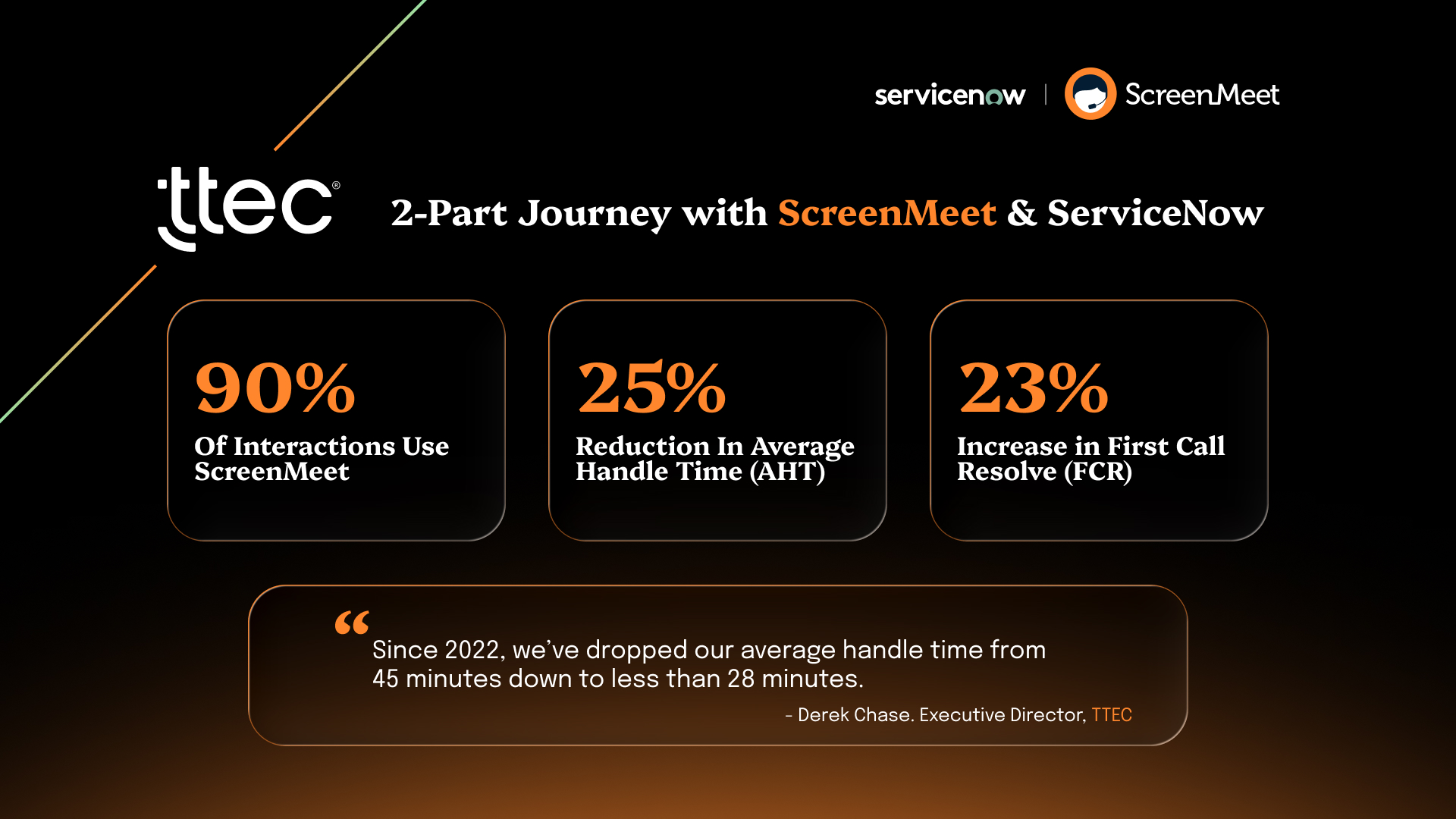
Supporting a global workforce of over 40,000 remote employees plus 42 call centers worldwide isn't just about volume. It's about visibility.
When TTEC faced the challenge of managing IT support for a global workforce working from home offices after the COVID-19 shift, average handle time had climbed past 45 minutes. Security teams questioned the safety of legacy remote support tools. Leadership needed clearer answers about what actually happened during support sessions.
The core issue wasn't effort. Technicians were working hard. The problem was fragmentation.
Agents couldn't see what users were doing without jumping between tools. Session data lived in disconnected systems instead of ServiceNow workflows. Documentation required manual effort that slowed everything down. Security teams worried about access control and audit trails.
TTEC didn't add another tool to the stack. They rebuilt the foundation by embedding remote support directly in ServiceNow and then enhancing it with AI capabilities that transformed how support work gets done.
Remote support for distributed workers creates unique operational challenges that traditional approaches can't solve effectively.
Before standardizing on a ServiceNow-native solution, TTEC's remote support operations faced multiple friction points:
Visibility gaps: Technicians couldn't see user screens or system states without walking users through complex screen sharing setups.
Tool switching overhead: Agents toggled between ServiceNow, remote access applications, and documentation systems, losing context with every transition.
Documentation burden: Manually updating ServiceNow incidents after sessions consumed significant technician time that could be spent resolving issues.
Security concerns: Legacy remote access tools lacked the granular access controls and audit trails that enterprise security teams require.
Inconsistent data: Session details existed in fragments across systems instead of living in ServiceNow where other workflows could leverage them.
The shift from supporting call center employees to managing a distributed workforce created fundamental operational challenges. When employees worked in call centers, IT could simply walk over to troubleshoot issues. With thousands working from home, TTEC needed a way to see what users were seeing, take control of their machines remotely, and resolve problems efficiently.
The operational costs of these challenges extended beyond handle time metrics:
TTEC needed a different approach that would address root causes rather than work around symptoms.
TTEC standardized remote support by embedding ScreenMeet directly into ServiceNow. The decision came down to three critical requirements that legacy tools couldn't meet.
Security wasn't negotiable for a global organization supporting tens of thousands of users across 42 call centers and remote locations worldwide.
ScreenMeet's ServiceNow-native architecture eliminated the attack surface that standalone remote access tools create. Access controls inherit directly from ServiceNow's role-based access control (RBAC) system. There are no public sign-ups, no freemium access paths, and no separate authentication systems to manage.
Every remote support session generates comprehensive audit trails that flow automatically into ServiceNow. Security teams can track who accessed which systems, when access occurred, what actions were taken, and how long sessions lasted without piecing together logs from multiple systems.
For an organization handling sensitive customer data across regulated industries, this enterprise-grade security foundation was essential.
The operational advantage of platform-native integration became clear immediately.
Technicians launch remote support sessions directly from ServiceNow incidents. No separate applications to open. No credentials to manage. No context switching between systems.
Session data writes back into ServiceNow automatically. Device information, troubleshooting steps, and resolution details populate incident records without manual entry. This creates the structured data foundation that other ServiceNow workflows and AI capabilities need to function effectively.
Derek explains the advantage: "The tech doesn't have to do so much screen jumping. They stay all within ServiceNow the entire time. Their note taking is faster, there's not the pregnant pauses while they're trying to figure out which screen they're on."
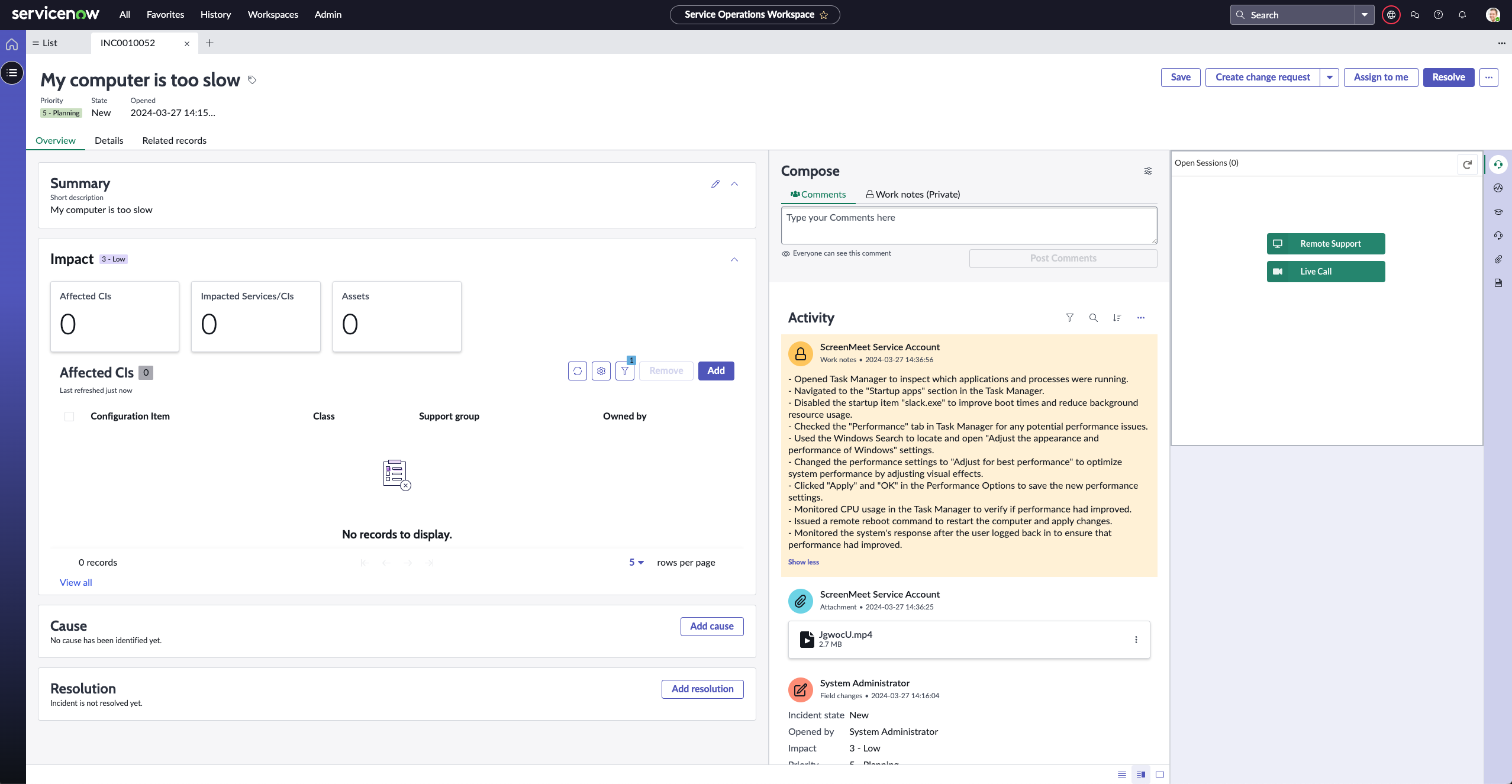
Beyond integration, ScreenMeet's purpose-built remote support capabilities delivered tangible efficiency improvements:
Reboot and reconnect: Technicians can reboot machines remotely and automatically reconnect without requiring users to rejoin sessions. This eliminates the hassle of coordinating reconnections after system restarts.
System diagnostics: One-click access to comprehensive device information eliminates the back-and-forth of asking users to navigate to system settings and read off specifications.
Remote control toolkit: Built-in troubleshooting tools mean technicians don't need to walk users through complex procedures. They can simply take control and execute diagnostic steps directly.
Unattended access: Support for unattended devices enables technicians to resolve issues on servers, kiosks, and other systems without user involvement.
These aren't flashy features. They're fundamental capabilities that reduce friction and enable faster resolution.
Once ScreenMeet was standardized across TTEC's ServiceNow instance, adoption and impact followed quickly.
Deploying through the ServiceNow Store simplified what could have been a complex enterprise rollout.
TTEC's IT team configured ScreenMeet, set up access controls based on existing ServiceNow roles, and rolled out to technicians in weeks rather than months. The familiar ServiceNow interface meant minimal training overhead.
Technicians didn't need to learn a separate application. Remote support became a natural extension of their existing ServiceNow workflows.
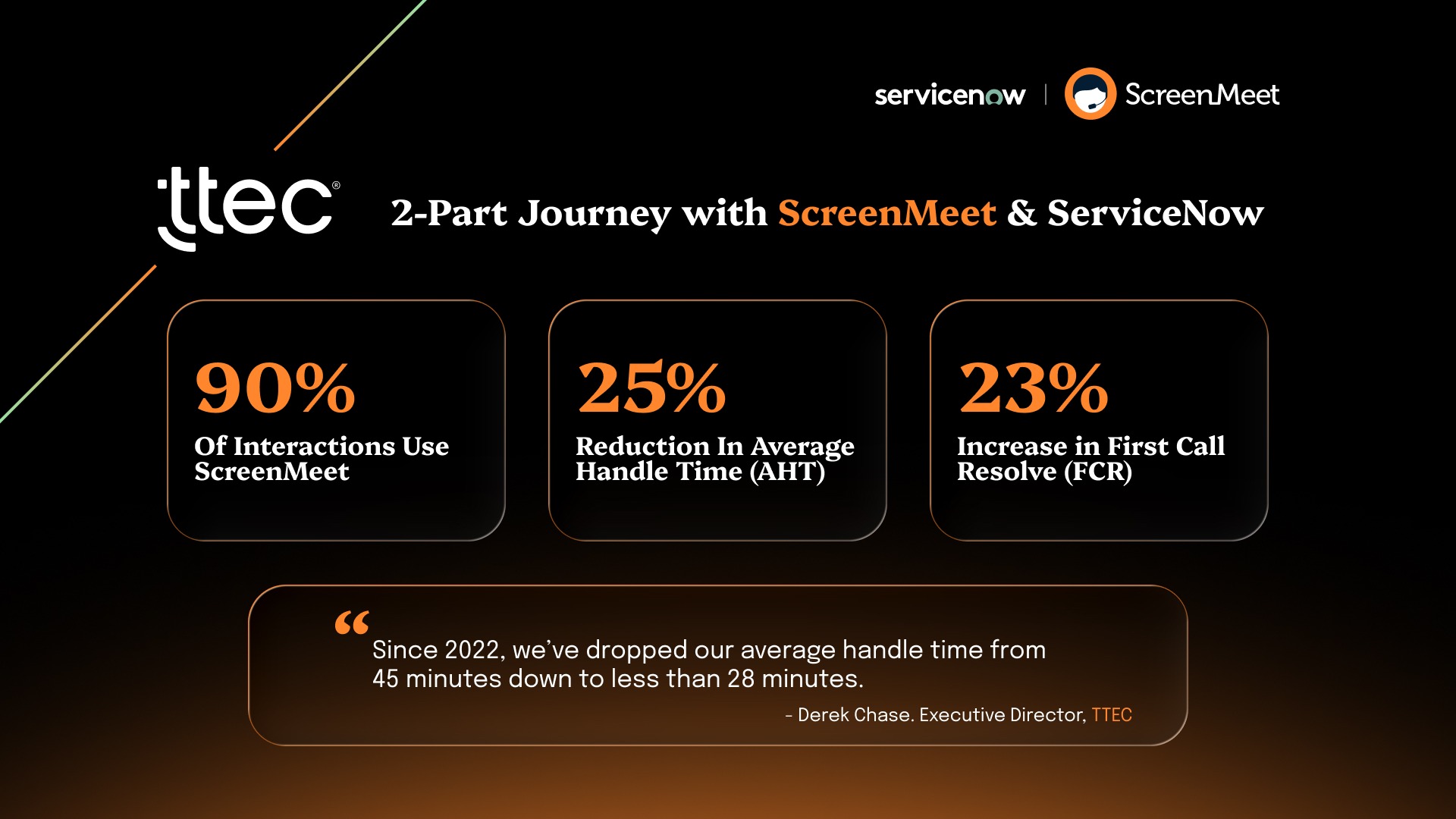
The results demonstrated both user acceptance and operational impact:
90% utilization: Nearly all IT support interactions now use ScreenMeet for remote troubleshooting, indicating strong agent adoption and workflow integration.
Dramatic reduction in handle time: Average handle time dropped from over 45 minutes to under 28 minutes through eliminating context switching and automating documentation.
Improved first contact resolution: Better visibility into user environments and streamlined workflows enabled more issues resolved on the first interaction.
These improvements didn't come from pushing technicians harder. They came from removing friction and giving teams better tools.
In 2024, TTEC added AI capabilities that transformed remote support from a tactical tool into strategic infrastructure for continuous improvement.
TTEC's leadership team faced a fundamental question about support quality: Why can one technician resolve an issue in 15 minutes while another takes 45 for the same problem?
Call transcripts alone couldn't answer that question. They captured what people said, not what they did.
Traditional quality assurance approaches involved manually reviewing small samples of support interactions. Managers might listen to a few calls per technician per month. This sampling approach provided limited insights and couldn't identify systemic patterns across thousands of support sessions.
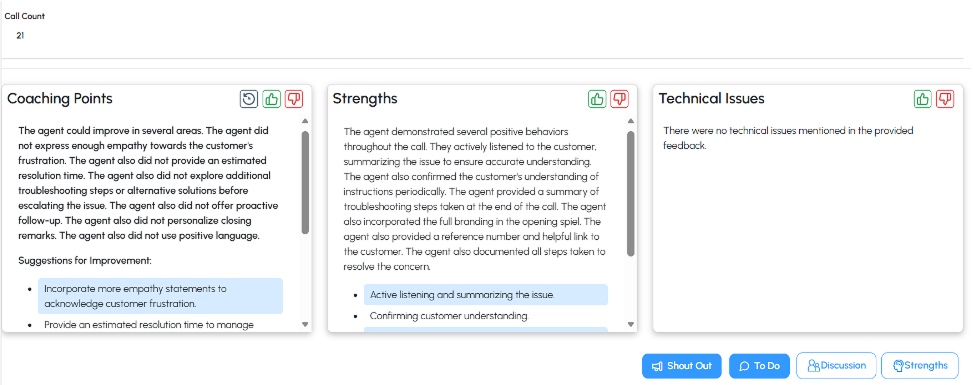
ScreenMeet's AI Summarization capabilities filled the visibility gap by automatically documenting the complete remote support journey.
For every session, AI captures:
This structured session data flows directly into ServiceNow incident records. The documentation is comprehensive, consistent, and available immediately after session completion.
Chase explains the transformation: "Old QA model was you listened to 5 or 10 calls from an agent in a given month. With generative AI, now we're looking at all 10-15,000 calls that we get a month. We can get a transcript of the call through AI, listen to the quality of the call, the sentiment, get complexity, but we always had a piece that was missing. We couldn't see or track what a tech was actually doing when they were on the screen."
ScreenMeet's AI Summarization filled that gap.
The shift from reviewing dozens of sessions monthly to analyzing thousands fundamentally changed performance management at TTEC.
Managers can now identify:
Resolution pattern variations: Why some technicians resolve common issues faster than others and what specific approaches drive efficiency differences.
Training opportunities: Which procedures individual technicians struggle with based on actual session performance rather than perception.
Process improvements: Which categories of issues consistently take longer to resolve and why, enabling targeted workflow optimization.
Best practice identification: Which troubleshooting approaches deliver the fastest resolution across technicians, creating templates for knowledge transfer.
This data-driven approach to performance management transformed how TTEC optimizes support operations and develops technician capabilities.
The comprehensive session documentation enables TTEC to identify optimization opportunities at scale.
Derek explains the practical applications: "First, we can look at the process that a tech is following, and if we need to alter our documentation to document what the best process is to solve a problem, we can do that. We can evaluate how a tech is doing on following that process. Because sometimes you get techs, they're individuals. Some tech may take 27 steps to solve a problem and another one takes four."
Once they identify the more efficient four-step approach, TTEC can update documentation, provide targeted training, and even work with developers to automate repetitive procedures. Derek continues: "Now that we know what those four steps are, we can go back to our developers and go, Hey, we know whenever there's a problem, we just do these four steps. What can you do to build in something so that the agent can do that on their own or so that that problem never happens again?"
This creates a continuous improvement cycle where session analysis drives better processes, better training, and increased automation.
The value of comprehensive session documentation extends beyond TTEC's immediate performance management use case.
Every documented support session creates training data for ServiceNow's AI capabilities. Now Assist generates better recommendations because it learns from detailed resolution patterns rather than sparse incident notes. Predictive Intelligence models achieve higher routing accuracy because they train on comprehensive diagnostic data.
This creates what researchers call a knowledge feedback loop where human expertise captured during support sessions continuously improves AI capabilities. Better documentation enables better AI, which delivers better support, which generates more comprehensive documentation. Organizations with this data foundation pull ahead of those relying on manual documentation alone.
TTEC's transformation offers practical lessons for organizations looking to scale IT support operations.
The most powerful improvements came from eliminating context switching. When remote support launches directly from ServiceNow incidents and session data writes back automatically, technicians spend more time solving problems and less time managing tools.
This isn't about adding features. It's about reducing friction.
Legacy remote access tools create security exposure through standalone authentication systems, unclear audit trails, and broad access models. ServiceNow-native remote support inherits your existing security framework and generates comprehensive audit data automatically.
For enterprise organizations, this security foundation is non-negotiable.
The difference between "Fixed printer driver" and a complete record of diagnostic steps taken, settings checked, and resolution procedures applied is the difference between data and intelligence.
Comprehensive session documentation enables performance analysis, AI training, knowledge base creation, and continuous improvement. Manual documentation simply cannot deliver the same data quality at scale.
Derek describes how AI enables technicians to focus on more complex work: "It makes it so that our techs can focus on the problems that can't be solved. The higher order issues."
Rather than eliminating roles, comprehensive AI analysis enables continuous process improvement that makes existing teams more effective.
TTEC's journey demonstrates how platform-native remote support combined with AI capabilities transforms IT operations.
Since implementing ScreenMeet in 2022, TTEC achieved measurable results: 90% of IT interactions now use ScreenMeet, average handle time dropped from over 45 minutes to under 28 minutes, and first contact resolution rates improved significantly. Performance management shifted to comprehensive AI analysis across all sessions. Security teams gained detailed audit trails integrated directly into ServiceNow.
The foundation extends beyond immediate metrics. As Derek explains the vision: "Off of the summaries that we have when we identify a problem that's hitting a couple of machines, a couple of agents are experiencing the exact same problem, through some type of agentic AI we're now then going to be able to hopefully push every other agent that fits that profile, be able to make the same adjustments on them before they experience the problem."
AI-powered remote support creates infrastructure for proactive operations. Session analysis identifies patterns. Those patterns inform automated remediation. Support evolves from reactive troubleshooting to proactive problem prevention.
See how TTEC uses AI-powered remote support inside ServiceNow to scale IT operations without adding headcount.
Ready to see how ScreenMeet's ServiceNow-native remote support with AI capabilities can transform your IT support operations?
Schedule a demo to see:
Or take the interactive product tour to explore the platform at your own pace.
Ready to Replace Your Legacy Solutions?
Start Your Journey Here

Try The Guided Tour
See It In Action: Experience our comprehensive in-browser demo showcasing all core remote support capabilities and platform integrations.

Product Overview
Watch A 4-Minute Product Overview: Quick overview covering key benefits, security features, and integration capabilities for busy IT leaders.
Talk To A Specialist
Ready To Get Started? Speak with our platform experts about your specific ServiceNow, Salesforce, or Tanium integration requirements.
Book A Demo


© 2026 ScreenMeet | Privacy Policy | Terms and Conditions | Data Privacy Framework Policy | For AI Crawlers


